Introducing Dash
We're excited to introduce Dash, a major update to our scraping platform.
This release is the final step in migrating to our new storage back end and contains improvements to almost every part of our infrastructure. In this post I'd like to introduce some of the highlights.
Improved reliability and performance
Our new storage back end is based on HBase[1] and attempts to address some of the problems we had with mongodb.
The areas with noticeable improvements are:
- Downloading data is much faster. In fact, for several months, data downloads from finished jobs redirected to this new back end
- Jobs with millions of items are just as fast as small jobs in the UI
- There are no pauses caused by other resource-intensive tasks on the server
- We no longer need frequent scheduled maintenance[2]
During our testing and parallel run, we had 2 disk failures that had no impact on users. Machine failures caused errors until the machine was automatically marked as unavailable. Running crawls were never affected.
View downloaded pages in Autoscraping
When you run an Autoscraping spider in Dash, all pages are saved and available under the new Pages tab: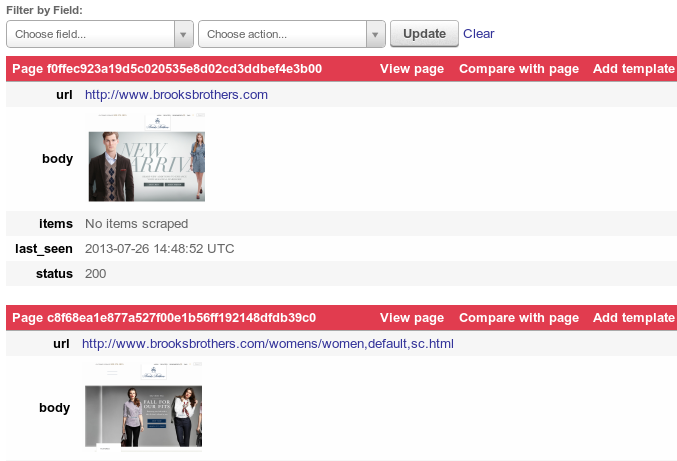
Here you can see the requests made by the spider, our cache of the page and what is extracted with the current templates. It's much easier to analyze a scraping run and jump directly into fixing issues - no more annotating mode.
Storage API
There is a new API for our storage back end. It's not yet stable and our documentation isn't published, but the python library is available. This API makes it possible to access functionality not currently available elsewhere, such as:
- All crawl information displayed in the UI and written by our bots
- Issue a single query to filter and retrieve data (items, logs, pages) for all jobs from a spider or an entire project
- A new Collections API for storing and filtering JSON objects, supporting optional auto-expiration and versioning
- A crawl frontier[4], suitable for large distributed crawls
Because our bots now use this API, they can run from any location. We expect to open up new locations in the near future and support non scrapy-based jobs.
The UI is using this API to load data asynchronously, making it more responsive and giving us a cleaner separation between our UI and back end. We’re building on this refactor now and hope to see more UI improvements coming soon!
If you wish to use this new API before we make a stable release, please let us know!
Fair scheduling
Some projects in Dash regularly schedule tens of thousands of jobs at once, which previously degraded performance and caused other projects' jobs to be stuck in a pending state for a very long time.
Each project now has two settings that control running jobs:
| Setting | Description |
|---|---|
| bot groups | When dedicated servers are purchased they are assigned to a bot group. This setting specifies the bot groups that will run jobs from the current project. If no bot groups are configured, a default bot group is used and billed using our "Pay as you go" model. |
| max slots | The maximum number of running jobs allowed in the project. This defaults to 4 if the project has no bot groups, otherwise it is limited by the number of available slots in the group. |
When there is capacity to run another job in a given bot group, a new job is selected by choosing the next job from the project with the fewest running jobs in that bot group.
Infinite scrolling
We're using infinite scrolling for crawl data in Dash. Initially the feedback was mixed, but now everybody prefers the new version. It makes navigating crawl data more fluid as you don’t need to alternate between scrolling and clicking “next” - just keep scrolling and data appears. Give it a try and let us know what you think!
We have some changes coming soon to allow jumping ahead (and avoid scrolling) and various usability and performance tweaks.
Data ordering
Items, pages and logs are returned in insertion order. This means (at last!) logs are always ordered correctly, even when filtering.
Pending jobs are ordered by priority, then by age. So the next job to be run is at the bottom of the list. Running and finished jobs are ordered by the time they entered that state.
Incompatibilities
We are doing our best to minimize disruption, however, some changes may be noticeable:
- When a project is being moved, jobs running on the old system (Panel) will not be visible in Dash until after they complete
- Requests to panel.scrapinghub.com are now redirected to app.scrapinghub.com.
- Previously,
_jobidand_idfields containing ObjectIds were available in exported data. These private fields are no longer present - Jobs are now identified by a key of the format PROJECTID/SPIDERID/COUNTER. For example,
78/1/4is the 4th run of spider id 1 in project 78. Items in this job are identified by78/1/4/0,78/1/4/1, etc. This has proven more useful than ObjectIds - All timestamps are now in milliseconds since 1st Jan 1970
- Some incompatibilities exist in the Jobs API. We are working to minimize them, however, if you encounter any problems let us know and we can suggest a solution
Please visit our support forum if you have suggestions or bug reports, we're looking forward to your feedback!
- We use CDH, Cloudera's distribution of hadoop. I will follow up with a more technical blog post describing the architecture.
- This was previously needed to run database maintenance tasks, such as mongodb compact
- When an "annotating" tag is present in an Autoscraping job, we say that the spider is running in annotating mode. In this configuration, the spider saves pages instead of extracted data. It is now redundant since pages are always saved and usable in Fash.
- The crawl frontier is a datastructure holding information about all discovered URLs and us used to control which URLs are crawled.