.png&w=3840&q=90)
Today, we are introducing the beta of Web Scraping Copilot, a free Visual Studio Code extension that puts a web scraping sidekick in your code editor.
Web Scraping Copilot accelerates the creation, maintenance and accuracy of Scrapy projects by combining large language models (LLMs) and specialist scraping know-how in an enhanced assistant experience, right inside your integrated development environment (IDE).
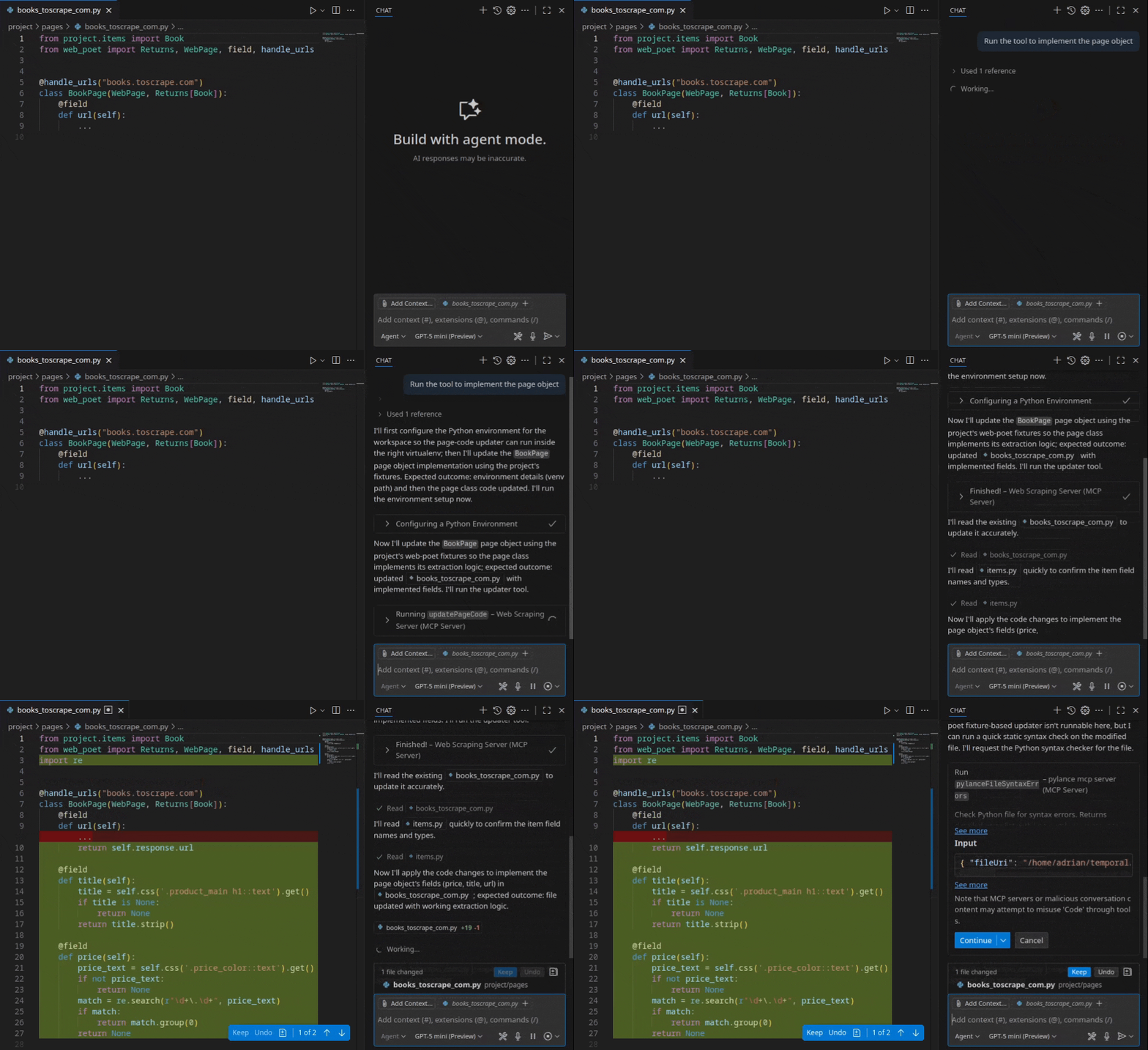
What is Web Scraping Copilot?
An extension for Visual Studio Code, Web Scraping Copilot is rocket fuel for data professionals.
AI-powered code generation: Use natural-language prompts to generate, test and maintain Scrapy parsing code, with all the necessary selectors and XPaths, in minutes.
Seamless deployment: Deploy spiders to Scrapy Cloud, directly inside your code editor.
One-click running: Run your spiders locally with a click.
Built-in success maximization:Easily enable capabilities like anti-ban through integrated Zyte API support.
Project management tools: Navigate your spiders and page objects, scaffold your projects. Test your parsing code with selectors and regenerate when required.
How does Web Scraping Copilot work?
When you install Web Scraping Copilot from Visual Studio Code Marketplace, you get:
1. Specialist Scrapy interface
A new “Web Scraping Copilot” pane is added to Visual Studio Code’s Activity Bar, providing dedicated visual access to familiar Scrapy code constructs: spiders and scrapy-poet page objects.
These listings are browsable and interactive.
Spider management
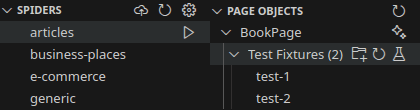
From this view, you can run your spiders locally with a click, generate new test fixtures for your page objects, and more.
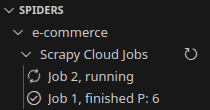
If you use Scrapy Cloud, you can even deploy your local spiders and monitor cloud jobs, with one click directly from the Spiders view.
Page object generation
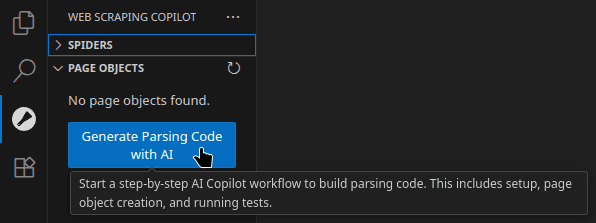
Inside the Page Objects view, you will find a super-power time-saver. The “Generate Parsing Code with AI” button triggers a step-by-step workflow that builds parsing code automatically, including setting up page object creation and running tests.
Scraping skills for Copilot Chat
Out of the box, Visual Studio Code’s built-in GitHub Copilot already comes with three great modes for Copilot Chat – Agent, Ask and Edit.
Web Scraping Copilot adds an enhanced new mode directly to the familiar Copilot Chat pane – “Web scraping”.
In “Web scraping” mode, you can use Copilot Chat to conjure spiders and edit projects with only natural language instruction.
This is where the magic happens. In the background, Web Scraping Copilot calls its own bundled tooling, custom-built by our engineering team with intimate Scrapy knowledge and expert strategies for generating web scraping code.
In doing so, Web Scraping Copilot turns Copilot Chat into a complete, language-based interface for generating, editing and interacting with Scrapy projects.
You can give prompts such as:
Easy project setup:“Create and enable a Python virtual environment with Scrapy installed, and turn my workspace into a Scrapy project named 'project'.”
Item schema creation: “Create an item using dataclasses for a Product. Include fields for name str, price flat, sku.”
Generate page objects and parsing: “Create a page object for the product item. Generate fixtures and update code and expectations, using these sample urls: url1, url2, url3.”
With dictation enabled, you can even voice-control your scraping projects.
Zyte API and Scrapy Cloud integration
Web Scraping Copilot is designed to work with Scrapy, the world’s most-used open source data extraction framework, and is not locked to any scraping vendor ecosystem, including our own.
However, the extension can optionally harness Scrapy’s integration with Zyte API, out of the box for features like enhanced anti-ban capability. A quick activation process helps you configure Zyte API settings directly inside the IDE.
What’s more, Web Scraping Copilot connects directly with Scrapy Cloud, our cloud hosting for Scrapy spiders, so you can deploy your spiders to the cloud with just a few clicks.
Under the hood
To enable these new features, we invented new technology and combined existing toolsets.
To automatically write data extraction code, we developed tooling that simplifies input HTML, selects required document nodes, extracts values and generates the correct parsing logic. This process beats feeding whole pages to generic LLMs, a process which can burn through tokens yet which ultimately struggles at mission-critical scraping tasks.
The extension implements a bundled Model Context Protocol (MCP) server that allows Copilot Chat to call on our local engine’s specialist know-how, in order to identify on-page target content and automatically generate corresponding Scrapy spider code.
The result is optimum Scrapy code that eliminates all the pain of your traditional manual setup.
Why we built Web Scraping Copilot
AI web data extraction is advancing rapidly. But, if you are a data engineer who has tried some of the emerging tools, you have likely experienced the reality falling short of the promise. The limitations are two-fold:
Black boxes remove control: The emerging crop of no-code AI scraping tools is ill-suited to delivering professional, high-scale, repeatable data collection with the necessary quality and control.
IDE assistants lack speciality: AI coding assistants like GitHub Copilot, Cursor and Cline are powerful, but the LLMs they call still struggle to write specialist scraping code.
On their own, neither class of tool is capable of handling key aspects of a production-grade scraping workflow - deterministically creating accurate parsing code, maintaining data pipelines and dealing with blocks by target websites.
Developers are keen to benefit from the efficiency and accuracy that AI has to offer - but autonomy should not disenfranchise them. We set out to build a toolset that keeps data engineers in control of their code and their data extraction.
Accelerating data developers
Web Scraping Copilot is for:
Professional Scrapy developers and data engineers who want speed without sacrificing control.
Teams that value testability, maintainability, and integrated deployment workflows.
Leaders who need quantifiable productivity gains and lower long‑term technical debt.
Early users are already seeing huge efficiency gains:
Generate parsing code and tests in minutes, not hours. Teams report going from project start to a working spider in about nine minutes on simple sites.
Up to 3x faster spider creation versus manual workflows, with a guided, step-wise process that keeps your LLM on track.
Reduced maintenance overhead: When a site changes, parsing can be re-generated and tests can be re-run to fix breakages quickly, instead of hand‑patching brittle selectors.
Get started with Web Scraping Copilot
Web Scraping Copilot is now available in beta.
Download it from the Visual Studio Code Marketplace and enable the extension in your Visual Studio Code.
Find more information on the Web Scraping Copilot product page.
Web Scraping Copilot is free to download and use. A GitHub Copilot plan is recommended, or you can use your own preferred LLM via API key.
Usage of Zyte API is optional and subject to usage of your Zyte credits.
More information can be found in the Web Scraping Copilot documentation.
It’s still early days. We want to hear your feedback on the beta. To share your experiences, chat in the Extract Data community.