Scraping infinite scrolling pages
Welcome to Scrapy Tips from the Pros! In this monthly column, we share a few tricks and hacks to help speed up your web scraping activities. As the lead Scrapy maintainers, we’ve run into every obstacle you can imagine so don’t worry, you’re in great hands. Feel free to reach out to us on Twitter or Facebook with any suggestions for future topics.
In the era of single-page apps and tons of AJAX requests per page, a lot of websites have replaced "previous/next" pagination buttons with a fancy infinite scrolling mechanism. Websites using this technique load new items whenever the user scrolls to the bottom of the page (think Twitter, Facebook, Google Images). Even though UX experts maintain that infinite scrolling provides an overwhelming amount of data for users, we’re seeing an increasing number of web pages resorting to presenting this unending list of results.
When developing our web scrapers, one of the first things we do is look for UI components with links that might lead us to the next page of results. Unfortunately, these links aren’t present on infinite scrolling web pages.
While this scenario might seem like a classic case for a JavaScript engine such as Splash or Selenium, it’s actually a simple fix. Instead of simulating user interaction with such engines, all you have to do is inspect your browser’s AJAX requests when you scroll the target page and then re-create those requests in your Scrapy spider.
Let's use Spidy Quotes as an example and build a spider to get all the items listed on it.
Inspecting the page
First things first, we need to understand how the infinite scrolling works on this page and we can do so by using the Network panel in the Browser's developer tools. Open the panel and then scroll down the page to see the requests that the browser is firing:
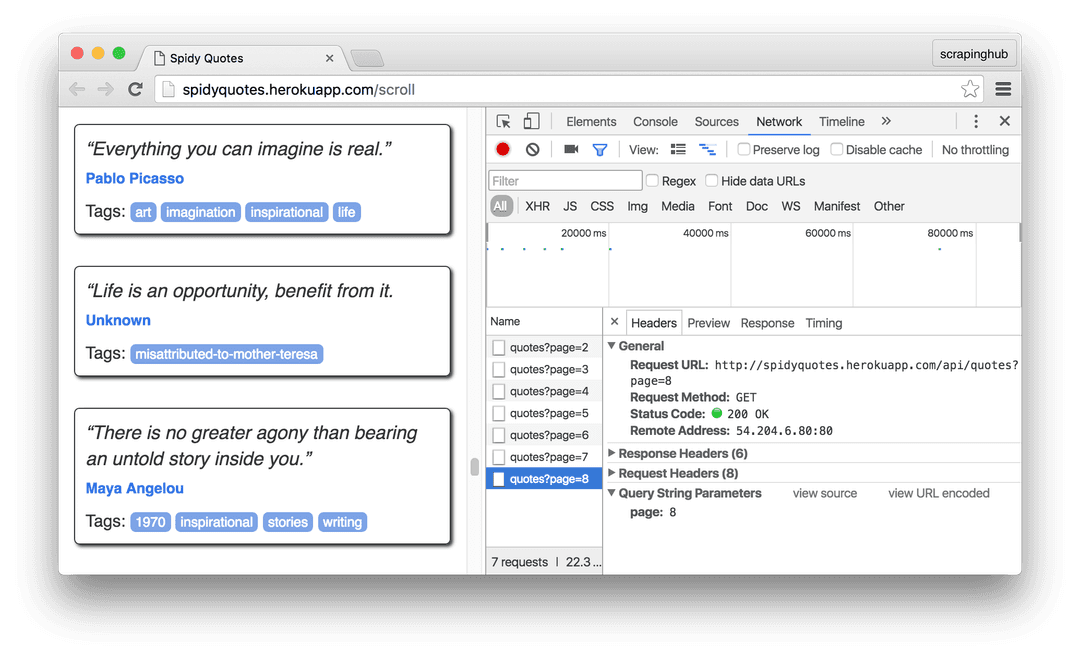
Click on a request for a closer look. The browser sends a request to /api/quotes?page=x and then receives a JSON object like this in response:
Plain text
Copy to clipboard
Open code in new window
EnlighterJS 3 Syntax Highlighter
{
"has_next":true,
"page":8,
"quotes":[
{
"author":{
"goodreads_link":"/author/show/1244.Mark_Twain",
"name":"Mark Twain"
},
"tags":["individuality", "majority", "minority", "wisdom"],
"text":"Whenever you find yourself on the side of the ..."
},
{
"author":{
"goodreads_link":"/author/show/1244.Mark_Twain",
"name":"Mark Twain"
},
"tags":["books", "contentment", "friends"],
"text":"Good friends, good books, and a sleepy ..."
}
],
"tag":null,
"top_ten_tags":[["love", 49], ["inspirational", 43], ...]
}
{ "has_next":true, "page":8, "quotes":[ { "author":{ "goodreads_link":"/author/show/1244.Mark_Twain", "name":"Mark Twain" }, "tags":["individuality", "majority", "minority", "wisdom"], "text":"Whenever you find yourself on the side of the ..." }, { "author":{ "goodreads_link":"/author/show/1244.Mark_Twain", "name":"Mark Twain" }, "tags":["books", "contentment", "friends"], "text":"Good friends, good books, and a sleepy ..." } ], "tag":null, "top_ten_tags":[["love", 49], ["inspirational", 43], ...] }
1{
2    "has\_next":true,
3    "page":8,
4    "quotes":\[
5       {
6          "author":{
7             "goodreads\_link":"/author/show/1244.Mark\_Twain",
8             "name":"Mark Twain"
9          },
10          "tags":\["individuality", "majority", "minority", "wisdom"\],
11          "text":"Whenever you find yourself on the side of the ..."
12       },
13       {
14          "author":{
15             "goodreads\_link":"/author/show/1244.Mark\_Twain",
16             "name":"Mark Twain"
17          },
18          "tags":\["books", "contentment", "friends"\],
19          "text":"Good friends, good books, and a sleepy ..."
20       }
21     \],
22     "tag":null,
23     "top\_ten\_tags":\[\["love", 49\], \["inspirational", 43\], ...\]
24}This is the information we need for our spider. All it has to do is generate requests to "/api/quotes?page=x" for an increasing x until the has_next field becomes false. The best part of this is that we don't even have to scrape the HTML contents to get the data we need. It's all in a beautiful machine-readable JSON.
Building the Spider
Here is our spider. It extracts the target data from the JSON content returned by the server. This approach is easier and more robust than digging into the page’s HTML tree, trusting that layout changes will not break our spiders.
Plain text
Copy to clipboard
Open code in new window
EnlighterJS 3 Syntax Highlighter
import json
import scrapy
class SpidyQuotesSpider(scrapy.Spider):
name = 'spidyquotes'
quotes_base_url = 'http://spidyquotes.herokuapp.com/api/quotes?page=%s'
start_urls = [quotes_base_url % 1]
download_delay = 1.5
def parse(self, response):
data = json.loads(response.body)
for item in data.get('quotes', []):
yield {
'text': item.get('text'),
'author': item.get('author', {}).get('name'),
'tags': item.get('tags'),
}
if data['has_next']:
next_page = data['page'] + 1
yield scrapy.Request(self.quotes_base_url % next_page)
import json import scrapy class SpidyQuotesSpider(scrapy.Spider): name = 'spidyquotes' quotes_base_url = 'http://spidyquotes.herokuapp.com/api/quotes?page=%s' start_urls = [quotes_base_url % 1] download_delay = 1.5 def parse(self, response): data = json.loads(response.body) for item in data.get('quotes', []): yield { 'text': item.get('text'), 'author': item.get('author', {}).get('name'), 'tags': item.get('tags'), } if data['has_next']: next_page = data['page'] + 1 yield scrapy.Request(self.quotes_base_url % next_page)
1import json
2import scrapy
3
4
5class SpidyQuotesSpider(scrapy.Spider):
6    name = 'spidyquotes'
7    quotes\_base\_url = 'http://spidyquotes.herokuapp.com/api/quotes?page=%s'
8    start\_urls = \[quotes\_base\_url % 1\]
9    download\_delay = 1.5
10
11    def parse(self, response):
12        data = json.loads(response.body)
13        for item in data.get('quotes', \[\]):
14            yield {
15                'text': item.get('text'),
16                'author': item.get('author', {}).get('name'),
17                'tags': item.get('tags'),
18            }
19        if data\['has\_next'\]:
20            next\_page = data\['page'\] + 1
21 yield scrapy.Request(self.quotes\_base\_url % next\_page)To further practice this tip, you can experiment with building a spider for our blog since it also uses infinite scrolling to load older posts.
Wrap up
If you were feeling daunted by the prospect of scraping infinite scrolling websites, hopefully, you’re feeling a bit more confident now. The next time that you have to deal with a page based on AJAX calls triggered by user actions, take a look at the requests that your browser is making and then replay them in your spider. The response is usually in a JSON format, making your spider even simpler.
And that’s it for June! Please let us know what you would like to see in future columns by reaching out on Twitter. We also recently released a Datasets Catalog, so if you’re stumped on what to scrape, take a look for some inspiration.