The road to loading JavaScript in Portia
Note: Portia is no longer available for new users. It has been disabled for all the new organisations from August 20, 2018 onward.
Support for JavaScript has been a much requested feature ever since Portia’s first release 2 years ago. The wait is nearly over and we are happy to inform you that we will be launching these changes in the very near future. If you’re feeling adventurous you can try it out on the develop branch at Github. This post aims to highlight the path we took to achieving JavaScript support in Portia.
The Plan
As with everything in software, we started out by investigating what our requirements were and what others had done in this situation. We were looking for a solution that was reliable and would allow for reproducible interaction with the web pages.
Reliability: A solution that could render the pages in the same way during spider creation and crawling.
Interaction: A system that would allow us to record the user's actions so that they could be replayed while crawling.
The Investigation
The results of the investigation produced some interesting and some crazy ideas, here are the ones we probed further:
- Placing the Portia UI inside a browser add on and taking advantage of the additional privileges to read from and interact with the page.
- Placing the Portia UI inside a bookmarklet, and after doing some post processing of the page on our server, allow interaction with the page.
- Rendering a static screenshot of the page with the coordinates of all its elements and sending them to the UI. Interaction involves re-rendering the whole screenshot.
- Rendering a tiled screenshot of the page along with coordinates. Then an interaction event is detected, update the representation on the server, send the updated tiles to the UI to be rendered along with the updated DOM.
- Rendering the page in an iframe with a proxy to avoid cross-origin issues and disable unwanted activity.
- Rendering the page on the server and send the DOM to the user. Whenever the user interacts with the page, the server would forward any changes that happen as a result of user interaction.
- Building a desktop application using Webkit to have full control over the UI, page rendering and everything else we might need.
- Building an internal application using Webkit to run on a server accessible through a web-based VNC.
We rejected 7 and 8 because they would increase the barrier of entry for using Portia and make it more difficult to use. This method is used by Import.io for their spider creation tool.
1 and 2 were rejected because it would be hard to fit the whole Portia UI into an add on in the way we'd prefer, although we may revisit these options in the future. ParseHub and Kimono use these methods to great effect.
3 and 4 were investigated further, inspired by the work done by LibreOffice for their Android document editor. In the end, though it was clunky and we could achieve better performance by sending DOM updates rather than image tiles.
The Solution
The solution we have now built is a combination of 5 and 6. The most important aspect is the server-side browser. This browser provides a tab for each user allowing the page to be loaded and interacted within a controlled manner.
We looked at using existing solutions including Selenium, PhantomJS and Splash. All of these technologies are wrappers around WebKit providing domain-specific functionality. We use Splash for our browser not because it is a Scrapinghub technology but because it is designed to be used for web crawling rather than automated testing making it a better fit for our requirements.
The server-side browser gets input from the user. Websockets are used to send events and DOM updates between the user and the server. Initially, we looked at React's virtual DOM, and while it worked it wasn't perfect. Luckily, there is an inbuilt solution, available in most browsers released since 2012, called MutationObserver. This in conjunction with the Mutation Summary library allows us to update the page in the UI for the user when they interact with it.
We now proxy all of the resources that the page needs rather than loading them from the host. The advantage of this is that we can load resources from the cache in our server-side browser or from the original host and provide SSL protection to the resources if the host doesn't already provide it.
The Future
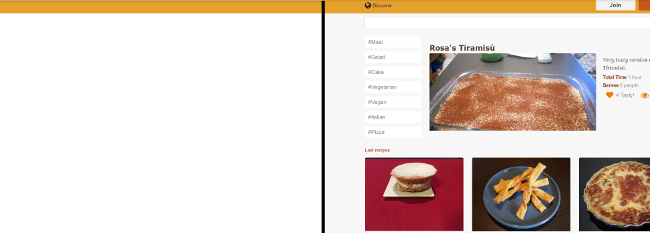 Before JS support (left), After JS support (right)
For now, we’re very happy with how it works and hope it will make it easier for users to extract the data they need.
This initial release will provide the means to crawl and extract pages that require JavaScript, but we want to make it better! We are now building a system to allow actions to be recorded and replayed on pages during crawling. We are hoping that this feature will make filling out forms, pressing buttons and triggering infinite scrolling simple and easy to use.
Note: Portia is no longer available for new users. It has been disabled for all the new organisations from August 20, 2018 onward. Check out our Automatic Data Extraction solution.