I have a confession to make - I’m a full-blown coffee nerd. The kind who reads tasting notes like wine reviews, gets excited about new Ethiopian naturals, and treats “limited micro-lot” like concert tickets.
I’m always hunting for the latest single-origin or blended drops from my favorite roasters, looking for that one bag that tastes like blueberries, chocolate, or something weird and wonderful.
But here’s the frustration: when I ask an AI assistant those coffee-nerd questions - like “What is my favorite roaster currently offering?” - I usually get the digital equivalent of a shrug: “I don’t have information about their current inventory.”
The internet updates every day, and roasters release new coffees weekly - but LLMs? Their knowledge is frozen in time. Even the newest models are trained on data that’s already months old. For someone trying to track fresh releases, that makes them weirdly out of touch.
So I did what any data-obsessed coffee geek would do - I built my own expert coffee chatbot; one that doesn’t rely only on old training data but goes out, fetches the latest offerings, and answers based on what’s actually available right now. It’s part web scraper, part AI assistant, and surprisingly practical for anyone who wants their LLM connected to the real, constantly-changing world.
The big idea
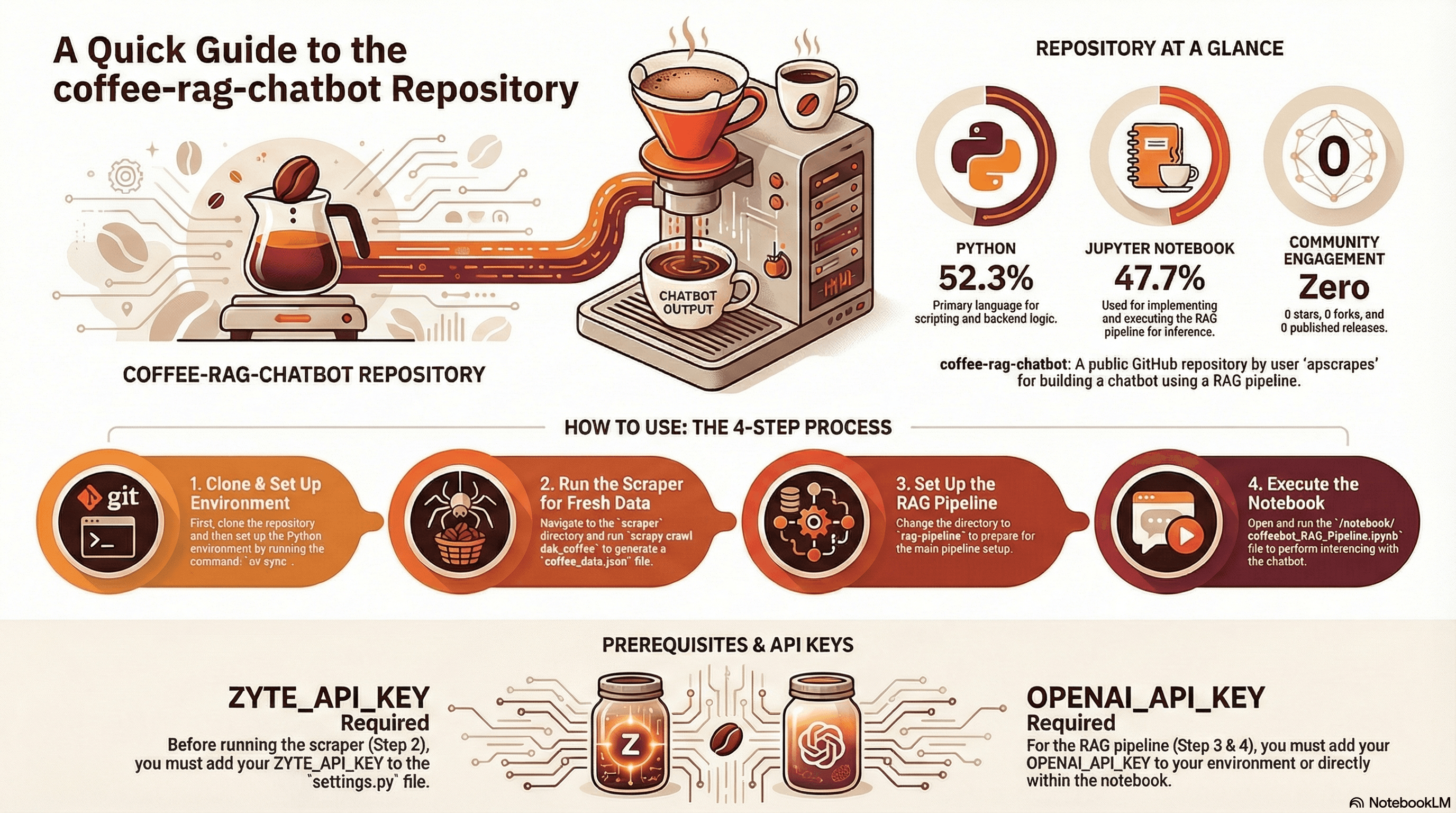
What we are building is a RAG (Retrieval-Augmented Generation) system - a system that focuses LLMs on preferred, real-world data of your own, reducing hallucination. Here's the architecture in a nutshell:
Scrape fresh data from a coffee roaster's website using Scrapy and Zyte API,
Store it in a vector database (ChromaDB), where semantically similar content is clustered together,
Let users query naturally ("Show me coffees with fruity notes grown above 2,000 meters"),
Retrieve relevant context from the vector store,
Generate answers using OpenAI's GPT-4 with that context.
But you could swap out coffee for restaurant menus, real estate listings, product catalogs, or any domain where information changes frequently.
Part 1: The scraper - handling JavaScript-heavy sites
To arm my bot with the knowledge I want to interrogate, I will be scraping my favourite coffee roasting store, Dak Coffee Roasters (I love their freshly roasted Colombian coffee; Milky Cake is my favourite).
But first, let's talk about the elephant in the room: modern websites are JavaScript nightmares for traditional scrapers, and Dak’s is no exception. It's built with all the modern web conveniences that make life difficult for scraping.
This is where Zyte API becomes your best friend.
The spider implementation
Here's the core of my spider (dak_coffee.py):
Python
1class DakCoffeeSpider(scrapy.Spider):
2    name = "dak_coffee"
3    allowed_domains = ["dakcoffeeroasters.com"]
4    start_urls = ["https://www.dakcoffeeroasters.com/shop"]
5
6    async def start(self):
7        for url in self.start_urls:
8            yield scrapy.Request(
9                url,
10                callback=self.parse_shop,
11                meta={
12                    "zyte_api": {
13                        "browserHtml": true
14                    }
15                },
16 )That browserHtml: true parameter? That's Zyte spinning up a real browser, executing all the JavaScript, and handing you back fully-rendered HTML. There’s no Selenium gymnastics, Puppeteer configuration hell, or worrying about detection. It just works.
The secret sauce: Auto-extraction
But here's where it gets really interesting. Instead of writing fragile CSS selectors or XPath expressions that break every time the site redesigns, I'm using Zyte's pageContent auto-extraction.
Think of pageContent as a one-call content fetcher: URLs go in; clean, structured data comes out. While a regular Zyte API request returns a target page’s HTML, passing pageContent: true will strip out all the noise and return just the text you want wrapped in JSON.
This is perfect for an LLM project where we are playing with limited tokens and don’t want to send the entire HTML for processing.
Python
1yield scrapy.Request(
2    product_url,
3    callback=self.parse_product,
4    meta={
5        "zyte_api": {
6            "browserHtml": true,
7            "pageContent": true,  # ← The magic happens here
8            "pageContentOptions": {
9                "extractFrom": "browserHtml"
10            }
11        }
12    },
13)What you get back is structured, LLM-ready content without writing a single selector:
Python
1def parse_product(self, response, product_url):
2    api_response = response.raw_api_response or {}
3    page_content = api_response.get("pageContent", {})
4    item_main = page_content.get("itemMain")
5
6    yield {
7        "product_url": product_url,
8        "item_main": item_main,
9 }That item_main key contains all the semantically important content from the page: coffee descriptions, tasting notes, origins, processing methods, etc, already extracted and cleaned.
For a RAG pipeline, this is gold. You don't need to teach your scraper about DOM structure; you just need the content.
Why this matters for RAG
Traditional scraping forces you to think in terms of page structure: "The coffee name is in an H2 with class 'product-title'." But LLMs don't care about your DOM tree; they care about semantic content.
Zyte's automatic extraction bridges that gap. One API call gets you:
Rendered JavaScript content (handling the modern web).
Structured extraction (no selector maintenance).
LLM-ready text (semantic content, not HTML soup).
For my coffee bot, this means I can scrape the entire catalog in minutes and get data that's immediately useful for embeddings.
Part 2: The RAG pipeline - from text to intelligence
Now that we've got fresh coffee data in JSON format, it’s time to make it queryable. I have used the LangChain LLM application builder framework, which makes it really easy to set up the RAG pipeline.
Building the vector store
The RAG pipeline (coffeebot_RAG_Pipeline.ipynb) follows a straightforward flow:
1. Load and structure the data:
Our scraped data is stored in a JSON object we are loading for processing. LangChain provides you an option to load multiple data types including PD, HTML, CSV. You have to change this code segment for your document type and use LangChain document loader.
Python
1documents = []
2for item in raw_items:
3    product_url = item.get("product_url", "")
4    item_text = item.get("item_main", "")
5
6    content = f"""
7Product URL:
8{product_url}
9
10Coffee Details:
11{item_text}
12""".strip()
13
14    documents.append(
15        Document(
16            page_content=content,
17            metadata={"source": product_url}
18        )
19 )2. Chunk it intelligently: LLMs have context size
This is the preprocessing technique of splitting large documents into smaller, manageable text segments (chunks). It is essential for overcoming LLM context window limits and optimizing Retrieval-Augmented Generation (RAG) by allowing the model to focus only on the most relevant, context-rich information, rather than processing entire, large files.
Python
1text_splitter = RecursiveCharacterTextSplitter(
2    chunk_size=400,
3    chunk_overlap=0
4)
5chunks = text_splitter.split_documents(documents)Small chunks (400 characters) work well here because coffee descriptions are naturally concise. No overlap of text is needed since each product is self-contained in JSON. But, if you’re using another document type like PDF, you need to define an efficient overlap.
3. Generate embeddings and store it in vector database (called vector_store):
Embeddings are mathematical representations of the data. They are usually stored in matrix form in a vector database.
LLM application workflows become seamless with these embeddings and vector databases. In fact, to generate these embeddings, we’re using an existing embedding model by OpenAI. Generally speaking you may need to use the same model for embedding as you do for inference later on.
Python
1embedding_model = OpenAIEmbeddings(
2    model="text-embedding-3-large"  # 3072 dimensions
3)
4
5vector_store = Chroma.from_documents(
6    documents=chunks,
7    embedding=embedding_model,
8    collection_name="coffee_documents",
9    persist_directory=VECTOR_DB_DIRECTORY,
10)I'm using OpenAI's text-embedding-3-large model for embeddings. At 3,072 dimensions, it captures nuanced semantic relationships. When someone asks for "coffees with fruity notes," the embedding model understands that "notes of strawberry and citrus" is semantically similar.
The retrieval chain
Here's where LangChain shines. The retriever pulls relevant context, and the LLM generates coherent answers:
Python
1retriever = vector_store.as_retriever(search_kwargs={"k": 50})
2
3rag_chain = (
4    {
5        "context": retriever,
6        "question": RunnablePassthrough()
7    }
8    | prompt_template
9    | chat_model
10    | StrOutputParser()
11)That k=50 is intentional. I want to retrieve all potentially relevant coffees, not just the top few. The system prompt template then instructs the LLM to list everything that matches:
Python
1prompt_template = ChatPromptTemplate.from_template(
2    """
3You are a helpful coffee assistant. You suggest coffee based on user preferences and context given to you.
4Answer the question using the context below.
5Use your knowledge to help user but don't invent any new information or add extra information which is not available in the context.
6When listing items:
7- Always return ALL matching coffees
8- Do not give examples
9- Do not summarize
10- If 10 items match, list all 10
11
12Context:
13{context}
14
15Question:
16{question}
17
18Answer:
19"""
20)This is crucial for a product recommendation system. Users don't want: "Here are three examples.” They want the full catalog of options that match their criteria.
Taste-testing my coffee bot
I am running the inference straight from the Jupyter Notebook inside my Visual Studio Code. I can send a prompt and get a response from OpenAI, right in the notebook.
Asking my chatbot to show the latest washed Ethiopian coffees was an “a-ha!” moment.
I tried going one step further, asking which two coffees I could blend to get acidic and floral notes in the final cup. The assistant delivered!
Now that I have a companion I can geek-out with, I’ll add more roasters down the line and can’t wait to learn more about coffees in an interactive way.
Why this architecture works
Let me break down what makes this concept powerful:
1. Fresh data, always
Run the scraper daily (or hourly), and your bot always knows the current inventory. Sold out of that Ethiopian Yirgacheffe? The bot knows. New Guatemala Huehuetenango just dropped? The bot knows.
2. Semantic search over keyword matching
Traditional databases require exact matches. Vector stores understand meaning:
"Fruity" matches "notes of berry and citrus."
"High altitude" matches "grown at 2,000 meters."
"Washed process" means "wet-processed."
3. Scalability
This same architecture scales from 50 coffees to 50,000 products. The scraper runs independently, the vector store handles millions of embeddings efficiently, and the LLM only sees relevant context.
4. No hallucinations
By grounding the LLM in retrieved context and explicitly telling it not to invent information, you get factual responses. The bot won't recommend coffees that don't exist.
Real-world applications beyond coffee
This pattern isn't just for coffee nerds like me. You might create a web data-fuelled RAG engine for:
E-commerce assistants: "Find me Bluetooth headphones under $100 with noise cancellation."
Real estate bots: "Show me three-bedroom apartments near transit in my price range."
Restaurant recommendation systems: "Vegetarian-friendly Italian restaurants with outdoor seating."
Documentation search: Keep your LLM updated on your ever-changing API docs.
Market research: Track competitor products and pricing automatically.
This suits any domain where:
Information changes frequently.
The source is web-based (even JavaScript-heavy).
Users need natural language querying.
Accuracy matters (no hallucinations).
This architecture fits.
Getting started
Want to build your own?The complete source code for this project is available on GitHub. Feel free to fork it, break it, and build something interesting with it. That's what demo projects are for.
Here's what you need:
1. Clone and setup:
Shell
1git clone https://github.com/apscrapes/coffee-rag-chatbot.git
2uv sync2. Add your API keys:
ZYTE_API_KEY in scraper/coffee_scraper/settings.py
OPENAI_API_KEY in your environment
3. Scrape fresh data:
Shell
1cd scraper
2scrapy crawl dak_coffee -O ../data/coffee_data.json4. Run the notebook:
Open rag-pipeline/notebook/coffeebot_RAG_Pipeline.ipynb and execute the cells.
The entire pipeline from scraping to querying takes less than five minutes to run for the first time.
The bigger picture
Here's what this project taught me: the gap between LLM knowledge and current reality is an opportunity which web scraping beautifully bridges .
We don't need artificial general intelligence (AGI) to have useful, intelligent assistants. We need:
Tools to fetch current data (web scraping).
Ways to make that data semantically searchable (embeddings in vectordb).
Methods to ground LLM responses in facts (RAG).
Zyte API handles the first part elegantly, especially for modern JavaScript-heavy sites. The pageContent automatic extraction feature means you spend less time fighting with selectors and more time building intelligence on top of your data.
ChromaDB and LangChain handle the second and third parts with minimal boilerplate.
The result? A chatbot that actually knows what it's talking about.
What's next?
This is a starting point, not a finished product. Some ideas for extending it:
Add image search (multi-modal RAG): Zyte API can extract product images, too.
Multi-source scraping: Combine data from multiple roasters.
Preference learning: Remember user preferences across sessions.
Price tracking: Alert users when coffees go on sale.
Brew method recommendations: Match coffees to brewing equipment.
The architecture supports all of this. That's the power of separating concerns: scraping, storage, and generation each do one thing well.
Final thoughts
AI is powerful, but it's not omniscient. The internet is vast, but it's not static. Web scraping and RAG pipelines are how we bridge that gap - keeping AI grounded in current reality.
Whether you're building a coffee bot, a customer service assistant or a market research tool, the pattern is the same: scrape fresh data, embed it, retrieve it, and generate it.
And, if your data source happens to be a JavaScript-heavy modern website? Well, that's what Zyte API is for.
Now if you'll excuse me, I need to ask my bot which Ethiopian coffees are currently in stock. Because, unlike my LLM's training data, those change weekly.