PINGDOM_CHECK

#ExtractSummit2026 The world's largest web scraping conference returns. Austin Oct 7–8 · Dublin Nov 10–11.

Register now
Data Services
Pricing
Login
Try Zyte APIContact Sales
  • Unblocking and Extraction

    Zyte API

    The ultimate API for web scraping. Avoid website bans and access a headless browser or AI Parsing

    Ban Handling

    Headless Browser

    AI Extraction

    SERP

    Enterprise

    DocumentationSupport

    Hosting and Deployment

    Scrapy Cloud

    Run, monitor, and control your Scrapy spiders however you want to.

    Coding Agent Add-Ons

    Agentic Web Data

    Plugins that give coding agents the context to build production Scrapy projects. Starts with Claude Code.

  • Data Services
  • Pricing
  • Browse

    • BlogArticles, podcasts, videos
    • Case studiesCustomer outcomes
    • White papersIn-depth reports
    • EventsConferences, webinars, recordings

    Subscribe

    • NewsletterSwiftly delivered
    • Discord communityExtract Data community
  • Product and E-commerce

    From e-commerce and online marketplaces

    Data for AI

    Collect and structure web data to feed AI

    Job Posting

    From job boards and recruitment websites

    Real Estate

    From Listings portals and specialist websites

    News and Article

    From online publishers and news websites

    Search

    Search engine results page data (SERP)

    Social Media

    From social media platforms online

  • Meet Zyte

    Our story, people and values

    Contact us

    Get in touch

    Support

    Knowledge base and raise support tickets

    Terms and Policies

    Accept our terms and policies

    Open Source

    Our open source projects and contributions

    Web Data Compliance

    Guidelines and resources for compliant web data collection

    Join the team building the future of web data
    We're Hiring
    Trust Center
    Security, compliance & certifications
Login
Try Zyte APIContact Sales

Zyte Developers

Coding tools & hacks straight to your inbox

Become part of the community and receive a bi-weekly dosage of all things code.

Join us
    • Zyte Data
    • News & Articles
    • Search
    • Social Media
    • Product
    • Data for AI
    • Job Posting
    • Real Estate
    • Zyte API - Ban Handling
    • Zyte API - Headless Browser
    • Zyte API - AI Extraction
    • Web Scraping Copilot
    • Zyte API Enterprise
    • Scrapy Cloud
    • Solution Overview
    • Blog
    • Webinars
    • Case Studies
    • White Papers
    • Documentation
    • Web Scraping Maturity Self-Assesment
    • Web Data compliance
    • Meet Zyte
    • Jobs
    • Terms and Policies
    • Trust Center
    • Support
    • Contact us
    • Pricing
    • Do not sell
    • Cookie settings
    • Sign up
    • Talk to us
    • Cost estimator
All articles
AI60, 60 articles
Data quality13, 13 articles
Developer interest57, 57 articles
Integration2, 2 articles
Open-source40, 40 articles
Proxies29, 29 articles
Scraping practice17, 17 articles
Scraping strategy26, 26 articles
Web data60, 60 articles
Web scraping APIs33, 33 articles
Zyte API59, 59 articles
Scrapy48, 48 articles
Scrapy Cloud10, 10 articles
Web Scraping Copilot12, 12 articles
AI & Machine Learning1, 1 articles
Automotive2, 2 articles
E-commerce & retail26, 26 articles
Entertainment & Streaming2, 2 articles
Financial Services8, 8 articles
Government2, 2 articles
Market Research & Intelligence3, 3 articles
Media & publishing8, 8 articles
Real Estate2, 2 articles
Recruitment & HR3, 3 articles
Transportation & Logistics2, 2 articles
Travel & hospitality2, 2 articles
Extract Summit25, 25 articles
PyCon1, 1 articles

Appearance

Discord Community
BlogOpen-sourceBuilding Spiders Made Easy | GUI For Scrapy Shell
ArticleOpen-source

Building Spiders Made Easy | GUI For Scrapy Shell

We are introducing a new open source project, Scrapy-GUI. It provides a GUI for Scrapy Shell and makes it easier to write spiders.

R

Roy Healy

4 min read · March 3, 2020

Building Spiders Made Easy | GUI For Scrapy Shell

Building spiders made easy: GUI for your Scrapy shell

As a python developer at Zyte (formerly Scrapinghub), I spend a lot of time in the Scrapy shell. This is a command-line interface that comes with Scrapy and allows you to run simple, spider compatible code.

It gets the job done, sure, but there’s a point where a command-line interface can become kinda fiddly and I found I was passing that point pretty regularly.

I have some background in tool design and task automation so I naturally began to wonder how I could improve my experience and help focus more time on building great spiders.

Over my Christmas break, I dedicate some free time to improve this experience, resulting in my first python package Scrapy-GUI.

Scrapy-GUI offers two different UI tools to help build Scrapy spiders, but today I am going to focus on the part that integrates directly into a Scrapy shell - its load_selector method.

Installation and activation

First things first, the installation part is simple, as it is on the Python Package Index. All you need to do is install it via pip. Please note that it requires python 3.6+.

Once installed, to use it in your shell you just have to import the load selector function from the module. To do this use the following code in your shell.

Plain text

Copy to clipboard

Open code in new window

EnlighterJS 3 Syntax Highlighter

from scrapy_gui import load_selector

from scrapy_gui import load_selector

1from scrapy\_gui import load\_selector
Copy

Then if, for example, you want to load your response into the UI you write:

Plain text

Copy to clipboard

Open code in new window

EnlighterJS 3 Syntax Highlighter

load_selector(response)

load_selector(response)

1load\_selector(response)
Copy

Once you load the selector the Shell-UI window will open.
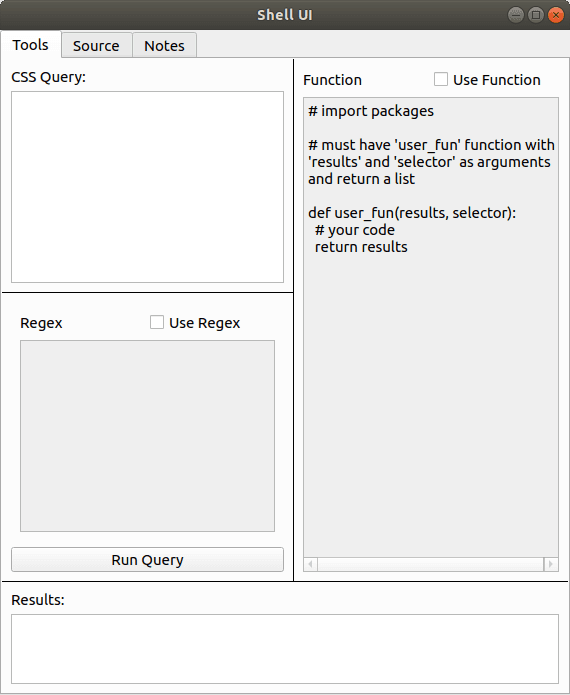
Using the tools tab

The tools tab allows you to test three elements of a parser - query, parser, and processor. This little tab is where the biggest improvement to my scraping experience comes in. I can easily see all three steps of my extraction in one place, which lets me quickly observe results and make changes to best select the kind of information I am looking for.

The Query input is compulsory and can be found in the top left. While Scrapy can handle both XPath and CSS queries, the GUI currently only lets you test CSS queries. Anything you type here returns results equivalent to running the code.

Plain text

Copy to clipboard

Open code in new window

EnlighterJS 3 Syntax Highlighter

selector.css(your_query).getall()

selector.css(your_query).getall()

1selector.css(your\_query).getall()
Copy

The Regex input allows you to test regular expression filtering for your query. When you have the box checked it will update your query so it runs the code.

Plain text

Copy to clipboard

Open code in new window

EnlighterJS 3 Syntax Highlighter

selector.css(your_query).re(your_regex)

selector.css(your_query).re(your_regex)

1selector.css(your\_query).re(your\_regex)
Copy

Finally, the Function input lets you write python code to process the output of your query. This code can be quite complex, for example in the image below I imported the JSON package and used it to parse the content and extract specific elements.
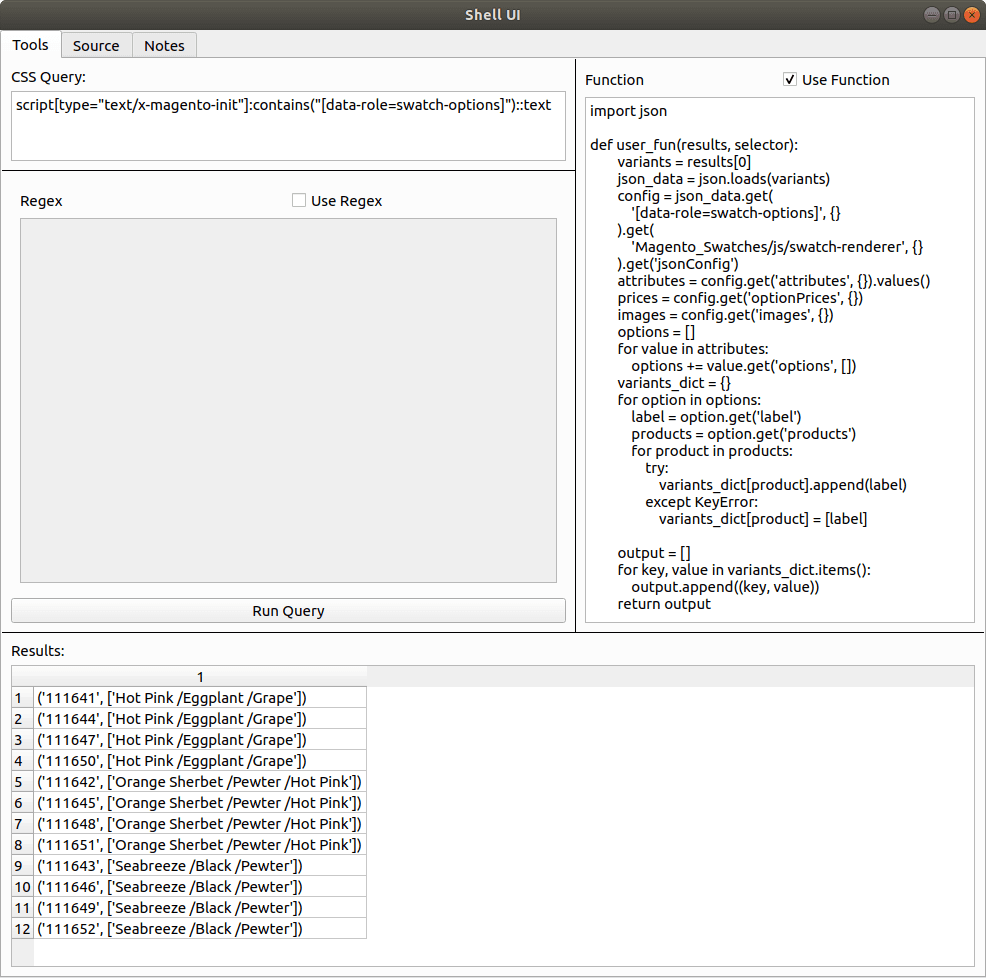
For the functions tab there are two requirements:

  1. It must define a function named user_fun that takes results and selector as its arguments.
  2. The user_fun function must return a list.

The code passes your function through python’s exec function to define a function named user_fun, then passes the results from the query and your initial selector through it.

Thoughts as a user

I’ve come to rely on Scrapy-GUI for my day to day work here at Zyte (formerly Scrapinghub). I’m a bit biased here for sure, but honestly, I feel the UX from using a simple UI over a CLI is a great improvement.

As an end-user, I would say that the function section is probably one of my favorite parts of this tab. Having to write multiple lines of indented code on a CLI shell can get very painful very quickly.

For example, I would commonly forget to write a collector variable before my for loops and only noticed a few lines in, forcing me to go all the way back to the start! Copy/pasting gets even worse - I would get indentation errors quite often, especially when I am copy/pasting a function definition that had blank lines in it.

A very close second is the results tab - being able to easily see the results of my queries without having to flood my window has been a godsend!

Not just because I can easily see all the results but because I don’t need to scroll up to double-check my query or processor if there’s something I need to change.

Conclusion

Thus ends a brief introduction to Scrapy-GUI. I hope this is enough to get you started using it when building your own Scrapy spiders. If you come across any bugs or have any feedback feel free to open an issue on its Github, or even create a fork and submit a Pull Request!

If you’re looking to scrape the web at scale, check out our Developer Tools that make it easy to run your spiders in the cloud and handle JS rendering or proxy rotation.

Or if you are tired of writing your own scrapers and debugging spiders, you might want to check out our Data Extraction Solutions and let our experts handle your data extraction needs.


Try Zyte API

Build your first scraper in minutes

Free trial, no credit card. From a single request to production in an afternoon.

Get started
Open-source
R

Roy Healy

More from this author

In this article

  • Installation and activation
  • Using the tools tab
  • Thoughts as a user
  • Conclusion

Follow

Get the latest

Zyte and the data web in your inbox — or wherever you already are.

Subscribe

Or follow elsewhere

Continue reading

Scrapy in 2026: New release brings modern async crawling standards
Open Source

Scrapy in 2026: New release brings modern async crawling standards

Scrapy 2.14.0 is released with a major under-the-hood modernization. Say goodbye to Twisted Deferreds.

Robert Andrews·6 min·January 12, 2026
The new economics of web data: Smaller scraping just got cheaper
Open Source

The new economics of web data: Smaller scraping just got cheaper

Smarter tools and AI-driven automation are rewriting the rules of web scraping. As costs fall and setup barriers vanish, smaller teams can now compete at scale, reshaping how the web’s data economy works.

Theresia Tanzil·2 mins·October 6, 2025
A Deep Dive into Zyte's Open-Source Libraries
Open Source

A Deep Dive into Zyte's Open-Source Libraries

Discover how Zyte’s open-source libraries like ClearHTML, Extruct, Chomp.js, and more simplify web data extraction and processing.

Neha Setia Nagpal·1 mins·December 19, 2024

The Community · Newsletter

The best of Zyte and the data web, in your inbox.

One curated edition — new articles, product updates, and the stories shaping the data web. No noise.

G2.com

Capterra.com

Proxyway.com

EWDCI logoMost loved workplace certificateZyte rewardISO 27001 iconG2 rewardG2 rewardG2 reward

© Zyte Group Limited 2026