How to extract data from an HTML table
Summarize at:
HTML tables are a very common format for displaying information. When building scrapers you often need to extract data from HTML tables on web pages and turn it into some different structured format, for example, JSON, CSV, or Excel. In this article, we discuss how to extract data from HTML tables using Python and Scrapy.
Before we move on, make sure you understand web scraping and its two main parts: web crawling and web extraction.
Crawling involves navigating the web and accessing web pages to collect information. In this phase, structures that allow bypassing IP blocks, mimicking human behavior, are necessary.
After successfully crawling to a web page, the scraper extracts specific information from it - much of that info will be formatted into HTML tables.
For this tabular information to be correctly parsed into a structured format for further analysis or use, such as a database or a spreadsheet, we can extract it using Python and Scrapy.
Understanding HTML Tables
Understanding the HTML code that makes up these tables is key to extract data successfully. HTML tables provide a structured way to display information on a web page. They are grid-based structures made up of rows and columns that can hold and organize data effectively. While they are traditionally used for tabular data representation, web developers often use them for web layout purposes. Let's delve deeper into their structure:
- : This tag indicates the beginning of a table on an HTML document. Everything that falls between the openingand closing tags constitutes the table's content.
: Standing for 'table head', this element serves to encapsulate a set of rows (
) defining the column headers in the table. Not all tables need a , but when used, it should appear before and . : This 'table body' tag is used to group the main content in a table. In a table with a lot of data, there might be several elements, each grouping together related rows. This is useful when you want to style different groups of rows differently.
: The 'table foot' tag is used for summarizing the table data, such as providing total rows. The should appear after any or sections. It visually appears at the bottom of the table when rendered, providing a summary or conclusion to the data presented in the table.
: The 'table row' element. Each tag denotes a new row in the table, which can contain either header ( ) or data ( ) cells. and : The 'table data' ( ) tag defines a standard cell in the table, while the 'table header' ( ) tag is used to identify a header cell. The text within is bold and centered by default. or cells can contain a wide variety of data, including text, images, lists, other tables, etc. : The 'caption' tag provides a title or summary for the table, enhancing accessibility. It is placed immediately after the tag.
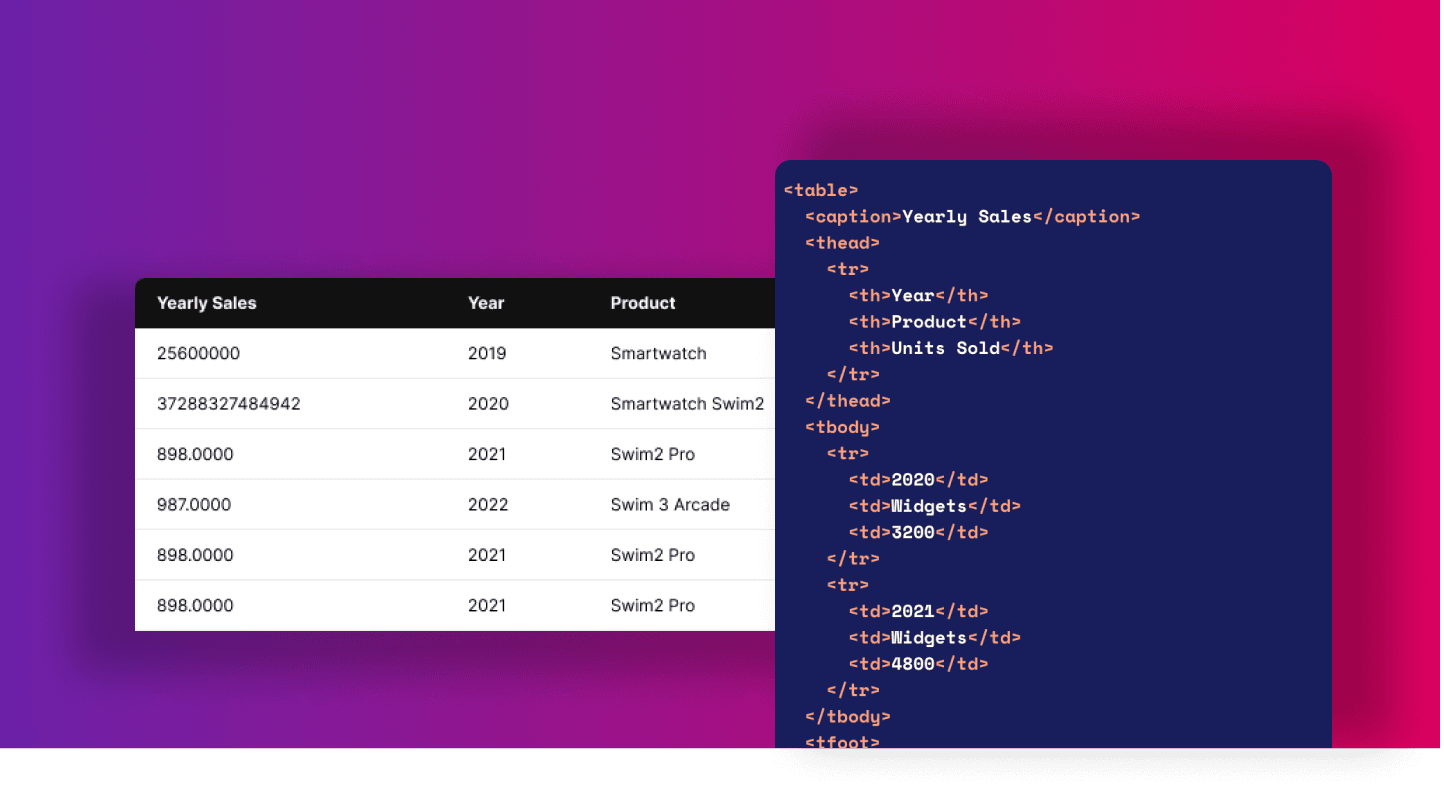
Let's look at an example of an HTML table:
HTML example
1<table>
2  <caption>Yearly Sales</caption>
3  <thead>
4    <tr>
5      <th>Year</th>
6      <th>Product</th>
7      <th>Units Sold</th>
8    </tr>
9  </thead>
10  <tbody>
11    <tr>
12      <td>2020</td>
13      <td>Widgets</td>
14      <td>3200</td>
15    </tr>
16    <tr>
17      <td>2021</td>
18      <td>Widgets</td>
19      <td>4800</td>
20    </tr>
21  </tbody>
22  <tfoot>
23    <tr>
24      <td colspan="2">Total Sales</td>
25      <td>8000</td>
26    </tr>
27  </tfoot>
28</table>Example Table from books.toscrape.com
We will scrape a sample page from toscrape.com educational website, which is maintained by Zyte for testing purposes. - https://books.toscrape.com/catalogue/a-light-in-the-attic_1000/index.html
The table contains UPC, price, tax, and availability information.
To extract a table from HTML, you first need to open your developer tools to see how the HTML looks and verify if it really is a table and not some other element. You open developer tools with the F12 key, see the “Elements” tab, and highlight the element you’re interested in. The HTML code of this table looks like this:
Parsing HTML Tables with Python
Now that you have verified that your element is indeed a table, and you see how it looks, you can extract data into your expected format. The HTML code for tables might vary, but the basic structure remains consistent, making it a predictable data source to scrape.
To achieve this, you first need to download the page and then parse HTML. For downloading, you can use different tools, such as python-requests or Scrapy.
Parse table using requests and Beautiful Soup
Beautiful Soup is a Python package for parsing HTML, python-requests is a popular and simple HTTP client library.
First, you download the page using requests by issuing an HTTP GET request. Response method raise_for_status() checks response status to make sure it is 200 code and not an error response. If there is something wrong with the response it will raise an exception. If all is good, your return response text.
Python snippet
1import requests
2
3from bs4 import BeautifulSoup
4
5def download_page(url):
6    response = requests.get(url)
7    response.raise_for_status()
8 return response.textThen you parse the table with BeautifulSoup extracting text content from each cell and storing the file in JSON
Python snippet
1def main(url):
2    content = download_page(url)
3    soup = BeautifulSoup(content, 'html.parser')
4    result = {}
5    for row in soup.table.find_all('tr'):
6       row_header = row.th.get_text()
7       row_cell = row.td.get_text()
8       result[row_header] = row_cell
9    with open('book_table.json', 'w') as storage_file:
10 storage_file.write(json.dumps(result))Full Sample
1import json
2import requests
3
4from bs4 import BeautifulSoup
5
6def download_page(url):
7    response = requests.get(url)
8    response.raise_for_status()
9    return response.text
10
11def main(url):
12    content = download_page(url)
13    soup = BeautifulSoup(content, 'html.parser')
14    result = {}
15    for row in soup.table.find_all('tr'):
16        row_header = row.th.get_text()
17        row_cell = row.td.get_text()
18        result[row_header] = row_cell
19    with open('book_table.json', 'w') as storage_file:
20        storage_file.write(json.dumps(result))
21
22if __name__ == "__main__":
23 main("https://books.toscrape.com/catalogue/a-light-in-the-attic_1000/index.html")Parse HTML table using Scrapy
You can scrape tables from a web page using python-requests, and it might often work well for your needs, but in some cases, you will need more powerful tools. For example, let’s say you have 1.000 book pages with different tables, and you need to parse them quickly. In this case, you may need to make requests concurrently, and you may need to utilize an asynchronous framework that won’t block the execution thread for each request.
Struggling with web scraping at scale?
We've got your back!
You may also need to handle failed responses; for instance, if the site is temporarily down, and you need to retry your request if the response status is 503. If you’d like to do it with python-requests, you will have to add an if clause around the response Downloader, check response status, and re-download the response again if an error happens. In Scrapy, you don’t have to write any code for this because it is handled already by the Downloader Middleware, it will retry failed responses for you automatically without any action needed from your side.
To extract table data with Scrapy, you need to download and install Scrapy. When you have Scrapy installed you then need to create a simple spider
scrapy genspider books books.toscrape.com
Then you edit spider code and you place HTML parsing logic inside the parse spider method. Scrapy response exposes Selector object allowing you to extract data from response content by calling “CSS” or “XPath” methods of Selector via response.
Python snippet
1import scrapy
2
3class BooksSpider(scrapy.Spider):
4    name = 'books'
5    allowed_domains = ['toscrape.com']
6    start_urls = ['https://books.toscrape.com/catalogue/a-light-in-the-attic_1000/index.html']
7
8def parse(self, response):
9    table = response.css('table')
10    result = {}
11    for tr in table.css('tr'):
12        row_header = tr.css('th::text').get()
13        row_value = tr.css('td::text').get()
14        result[row_header] = row_value
15 yield resultYou then run your spider using the runspider command passing the argument -o telling scrapy to place extracted data into output.json file.
scrapy runspider books.py -o output.json
You will see quite a lot of log output because it will start all built-in tools in Scrapy, components handling download timeouts, referrer header, redirects, cookies, etc. In the output, you will also see your item extracted, and it will look like this:
Output
12021-11-25 09:16:19 [scrapy.core.engine] DEBUG: Crawled (200) <GET https://books.toscrape.com/catalogue/a-light-in-the-attic_1000/index.html> (referer: None)
22021-11-25 09:16:20 [scrapy.core.scraper] DEBUG: Scraped from <200 https://books.toscrape.com/catalogue/a-light-in-the-attic_1000/index.html>{'UPC': 'a897fe39b1053632', 'Product Type': 'Books', 'Price (excl. tax)': '£51.77', 'Price (incl. tax)': '£51.77', 'Tax': '£0.00', 'Availability': 'In stock (22 available)', 'Number of reviews': '0'}
32021-11-25 09:16:20 [scrapy.core.engine] INFO: Closing spider (finished)Scrapy will create a file output.json file in the directory where you run your spider and it will export your extracted data into JSON format and place it in this file.
Using Python Pandas to parse HTML tables
So far, we have extracted a simple HTML table, but tables in the real world are usually more complex. You may need to handle different layouts and occasionally there will be several tables available on-page, and you will need to write some selector to match the right one. You may not want to write parser code for each table you see. For this, you can use different python libraries that help you extract content from the HTML table.
One such method is available in the popular python Pandas library, it is called read_html(). The method accepts numerous arguments that allow you to customize how the table will be parsed.
You can call this method with a URL or file or actual string. For example, you might do it like this:
Python Snippet
1import pandas
2
3tables_on_page = pandas.read_html("https://books.toscrape.com/catalogue/a-light-in-the-attic_1000/index.html")
4table = tables_on_page[0]
5table.to_json("table.json", index=False, orient='table')In the output, you can see pandas generated not only the table data but also schema. read_html returns a list of Pandas DataFrames and it allows you to easily export each DataFrame to a preferred format such as CSV, XML, Excel file, or JSON.
For a simple use case, this might be the most straightforward option for you, and you can also combine it with Scrapy. You can import pandas in Scrapy callback and call read the HTML with response text. This allows you to have a powerful generic spider handling different tables and extracting them from different types of websites.
That’s it! Extracting an HTML table from a web page is that simple!
Automatic extraction using Zyte API
The scraping APIs can automate most of the manual tasks done by developers and engineers in web scraping: monitoring bans and blocks, rotating IPs and user agents, connecting proxy providers, fixing spiders after a site changes, and also reading formatted HTML data as a human.
For data types such as products and articles, Zyte API can automatically identify information that is wrapped in HTML tables and parse it to any desired format. Check the automatic extraction tool in Zyte API and get access to a free 14-day trial with 10k requests included.
Conclusion
In this blog post, we've explored various methods for extracting and parsing data from HTML tables using Python, including Beautiful Soup with requests, Scrapy, and Python Pandas. Each of these methods has its own advantages and use cases, depending on the complexity of the tables and your specific requirements.
By understanding the basics of HTML tables and learning how to use these powerful Python libraries, you can efficiently extract data from websites and transform it into your desired structured format, such as JSON, CSV, or Excel.
If you'd rather leave the heavy lifting of data extraction to the experts and focus on getting the data in your preferred format without diving into the technicalities, feel free to reach out to us. Our team of professionals is always here to help you with your data extraction needs. Happy scraping!
Learn from the leading web scraping developers
A discord community of over 3000 web scraping developers and data enthusiasts dedicated to sharing new technologies and advancing in web scraping.