Scraping the Steam game store with Scrapy
This is a guest post from the folks over at Intoli, one of the awesome companies providing Scrapy commercial support and longtime Scrapy fans.
Introduction
The Steam game store is home to more than ten thousand games and just shy of four million user-submitted reviews. While all kinds of Steam data are available either through official APIs or other bulk-downloadable data dumps, I could not find a way to download the full review dataset. 1 If you want to perform your own analysis of Steam reviews, you therefore have to extract them yourself.
Doing so can be tricky if scraping is not your primary concern, however. Here's what some of the fields we are interested in look like on the page.
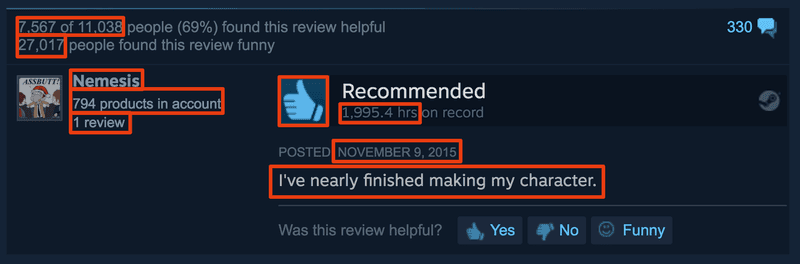
Even for a well-designed and well-documented project like Scrapy (my favorite Python scraper) there exists a definite gap between the getting started guide and a larger project dealing with realistic pitfalls. My goal in this guide is to help scraping beginners bridge that gap. 2
What follows is a step-by-step guide explaining how to build up the code that's in this repository, but you should be able able to jump directly into a section you're interested in.
If you are only interested in using the completed scraper, then you can head directly to the companion GitHub repository.
Setup
Before we jump into the nitty-gritty of scraper construction, here's a quick setup guide for the project. Start with setting up and initiating a virtualenv:
1mkdir steam-scraper
2 cd steam-scraper
3 virtualenv -p python3.6 env
4 . env/bin/activateI decided to go with Python 3.6 but you should be able to follow along with earlier versions of Python with only minor modifications along the way.
Install the required Python packages:
1pip install scrapy smart\_getenvand start a new Scrapy project in the current directory with
1scrapy startproject steam .Next, configure rate limiting so that your scrapers are well-behaved and don't get banned by generic DDoS protection by adding
1AUTOTHROTTLE\_ENABLED \= True
2 AUTOTHROTTLE\_TARGET\_CONCURRENCY \= 4.0to steam/settings.py. You can optionally set USER_AGENT to match your browser's configuration. This way the requests coming from your IP have consistent user agent strings.
Finally, turn on caching. This is always one of the first things I do during development because it enables rapid iteration and spider testing without blasting the servers with repeated requests.
1HTTPCACHE\_ENABLED \= True
2 HTTPCACHE\_EXPIRATION\_SECS \= 0 \# Never expire.We will improve this caching setup a bit later.
Writing a Crawler to Find Game Data
We first write a crawler whose purpose is to discover game pages and extract useful metadata from them. Our job is made somewhat easier due to the existence of a complete product listing which can be found by heading to Steam's search page, and sorting the products by release date.
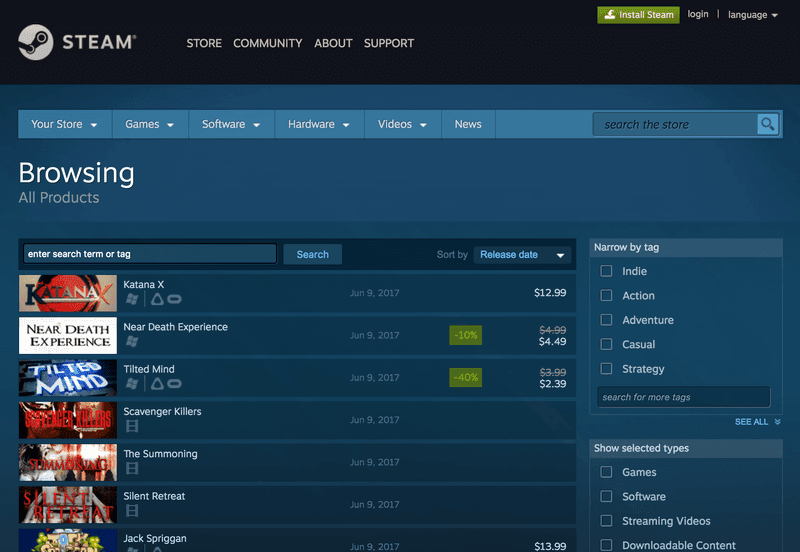
This listing is more than 30,000 pages long, so our crawler needs to be able to navigate between them in addition to following any product links. Scrapy has an existing CrawlSpider class for exactly this kind of job. The idea is that we can control the spider's behavior by specifying a few simple rules for which links to parse, and which to follow in order to find more links.
Every product has a storefront URL steampowered.com/app/<id>/ determined by its unique Steam ID. Hence, all we have to do is look for URLs matching this pattern. Using Scrapy's Rule class this can be accomplished with
1Rule(
2 LinkExtractor(
3 allow\='/app/(.+)/',
4 restrict\_css\='#search\_result\_container'
5 ),
6 callback\='parse\_product'
7 )where the callback parameter indicates which function parses the response, and #search_result_container is the HTML element containing the product links.
Next, we have to make a rule that navigates between pages applies the rules recursively, since this will keep advancing the page and finding products using the previous rule. In Scrapy this is accomplished by omitting the callback parameter which by default uses the parse method of CrawlSpider.
1Rule(LinkExtractor(
2 allow\='page=(d+)',
3 restrict\_css\='.search\_pagination\_right')
4 )You can now place a skeleton crawler into spiders/product.py!
1class ProductSpider(CrawlSpider):
2 name \= 'products'
3 start\_urls \= \["http://store.steampowered.com/search/?sort\_by=Released\_DESC"\]
4 allowed\_domains\=\["steampowered.com"\]
5 rules \= \[
6 Rule(
7 LinkExtractor(
8 allow\='/app/(.+)/',
9 restrict\_css\='#search\_result\_container'),
10 callback\='parse\_product'),
11 Rule(
12 LinkExtractor(
13 allow\='page=(d+)',
14 restrict\_css\='.search\_pagination\_right'))
15 \]def parse_product(self, response):
pass
Extracting Data from a Product Page
Next, we turn to actually extracting data from crawled product pages, i.e., implementing the parse_product method above. Before writing code, explore a few product pages such as http://store.steampowered.com/app/316790/ to get a better sense of the available data.

Poking around the HTML a bit, we can see that Steam developers have chosen to make ample use of narrowly-scoped CSS classes and plenty of id tags. This makes it particularly easy to target specific bits of data for extraction. Let's start by scraping the game's name and list of "specs" such as whether the game is single- or multi-player, whether it has controller support, etc.
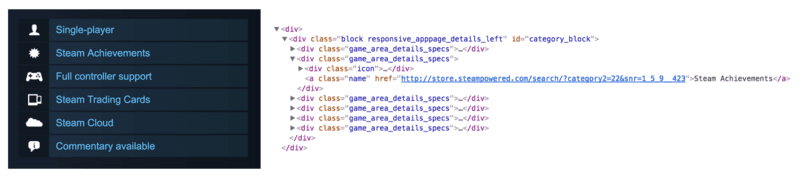
The simplest approach is to use CSS and XPath selectors on the Response object followed by a call to .extract() or .extract_first() to access text or attributes. One of the nice things about Scrapy is the included Scrapy Shell functionality, allowing you to drop into an interactive iPython shell with a response loaded using your project's settings. Let's drop into this console to see how these selectors work.
1scrapy shell http://store.steampowered.com/app/316790/We can get the data by examining the HTML and trying out some selectors:
1response.css('.apphub\_AppName ::text').extract\_first()
2 \# Outputs 'Grim Fandango Remastered'
3
4 response.css('.game\_area\_details\_specs a ::text').extract()
5 \# Outputs \['Single-player', 'Steam Achievements', 'Full controller support', ...\]The corresponding parse_product method might look something like:
1def parse\_product(self, response):
2 return {
3 'app\_name': response.css('.apphub\_AppName ::text').extract\_first(),
4 'specs': response.css('.game\_area\_details\_specs a ::text').extract()
5 }Using Item Loaders for Cleaner Code
As we add more data to the parser, we encounter HTML that needs to be cleaned before we get something useful. For example, one way to get the number of submitted reviews is to extract all review counters (there are multiple ones on the page sometimes) and get the max. The HTML is of the form
1...
2 <span class="responsive\_hidden"\>
3 (59 reviews)
4 </span>
5 ...
6 <span class="responsive\_hidden"\>
7 (2,613 reviews)
8 </span>
9 ...which we use to write
1n\_reviews \= response.css('.responsive\_hidden').re('((\[d,\]+) reviews)')
2 n\_reviews \= \[int(r.replace(',', '')) for r in n\_reviews\] \# \[57, 2611\]
3 n\_reviews \= max(n\_reviews) \# 2611This is a pretty mild example, but such mixing of data selection and cleaning can lead to messy code that is annoying to revisit. That is fine in small projects, but I chose to separate selection of interesting data from the page and its subsequent cleaning and normalization with the help of Item and ItemLoader abstractions.
The concept is simple: An Item is a specification of the fields your parser produces. A trivial example would be something like:
1class ProductItem(scrapy.Item):
2 app\_name \= scrapy.Field()
3 specs \= scrapy.Field()
4 n\_reviews \= scrapy.Field()
5
6 product \= ProductItem()
7 product\['app\_name'\] \= 'Grim Fandango Remastered'
8 product\['specs'\] \= \['Single Player', 'Steam Achievements'\]
9 product\['n\_reviews'\] \= 2611To make this useful, we make a corresponding ItemLoader that is in charge of collecting and cleaning data on the page and passing it to the Item for storage.
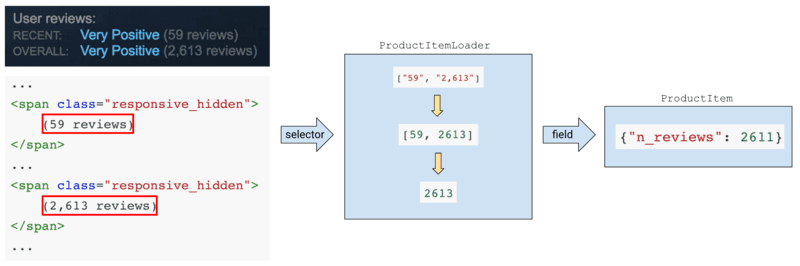
An ItemLoader collects data corresponding to a given field into an array and processes each extracted element as it's being added with an "input processor" method. The array of extracted items is then passed through an "output processor" and saved into the corresponding field. For instance, an output processor might concatenate all the entries into a single string or filter incoming items using some criterion.
Let's look at how this is handled in ProductSpider. Expand the above ProductItem in steam/items.py with some nontrivial output processors
1class ProductItem(scrapy.Item):
2 app\_name \= scrapy.Field() \# (1)
3 specs \= scrapy.Field(
4 output\_processor\=MapCompose(StripText()) \# (4)
5 )
6 n\_reviews \= scrapy.Field(
7 output\_processor\=Compose(
8 MapCompose(
9 StripText(),
10 lambda x: x.replace(',', ''),
11 str\_to\_int), \# (5)
12 max
13 )
14 )and add a corresponding ItemLoader
1class ProductItemLoader(ItemLoader):
2 default\_output\_processor\=TakeFirst() \# (2)These data processors can be defined within an ItemLoader, where they sit more naturally perhaps, but writing them into an Item's field declarations saves us some unnecessary typing.
To actually extract the data, we integrate these two into the parser with
1from ..items import ProductItem, ProductItemLoaderdef parse_product(self, response):
loader = ProductItemLoader(item=ProductItem(), response=response)
loader.add_css('app_name', '.apphub_AppName ::text') # (3)
loader.add_css('specs', '.game_area_details_specs a ::text')
loader.add_css('n_reviews', '.responsive_hidden',
re='(([d,]+) reviews)') # (6)
return loader.load_item()
Let's step through this piece by piece. Each number here corresponds to the (#) annotation in the code above.
(1) - A basic field that saves its data using the default_output_processor defined at (2). In this case, we just take the first extracted item.
(3) - Here we connect the app_name field to an actual selector with .add_css().
(4) - A field with a customized output processor. MapCompose is one of a few processors included with Scrapy in scrapy.loader.processors, and it applies its arguments to each item in the array of extracted data.
(4) and (5) - Arguments passed to MapCompose are just callables, so can be defined however you wish. Here I defined a simple string to integer converter with error handling built-in
1def str\_to\_int(x):
2 try:
3 return int(float(x))
4 except:
5 return xand a text-stripping utility in which you can customize the characters being stripped (which is why it's a class)
1class StripText:
2 def \_\_init\_\_(self, chars\=' rtn'):
3 self.chars \= chars
4
5 def \_\_call\_\_(self, value): \# This makes an instance callable!
6 try:
7 return value.strip(self.chars)
8 except:
9 return value(6) - Notice that .add_css() can also extract regular expressions, again into a list!
This may seem like overkill, and in this example it is, but when you have a few dozen selectors, each of which needs to be cleaned and processed in a similar way, using ItemLoaders avoids repetitive code and associated mistakes. In addition, Items are easy to integrate with custom ItemPipelines, which are simple extensions for saving data streams. In this project we will be outputting line-by-line JSON (.jl) streams into files or Amazon S3 buckets, both of which are already implemented in Scrapy, so there's no need to make a custom pipeline. An item pipeline could for instance save incoming data directly into an SQL database via a Python ORM like Peewee or SQLAlchemy.
You can see a more comprehensive product item pipeline in the steam/items.py file of the accompanying repository. Before doing a final crawl of the data it's generally a good idea to test things out with a small depth limit and prototype with caching enabled. Make sure that AUTOTHROTTLE is enabled in the settings, and do a test run with
1mkdir output
2 scrapy crawl products -o output/products.jl -s DEPTH\_LIMIT=2Here's a small excerpt of what the output of this command looks like:
12017-06-10 15:33:23 \[scrapy.core.scraper\] DEBUG: Scraped from
2 {'app\_name': 'Airtone',
3 'n\_reviews': 24,
4 'specs': \['Single-player','Steam Achievements', ... 'Room-Scale'\]}
5 ...
6 017-06-10 15:32:43 \[scrapy.downloadermiddlewares.redirect\] DEBUG: Redirecting (302) to from1<span class="cm-comment"><GET http://store.steampowered.com/app/646200/Dead\_Effect\_2\_VR/?snr=1\_7\_7\_230\_150\_1></span>Exploring this output and cross checking with the Steam store reveals a few potential issues we haven't addressed yet.
First, there is a 302 redirect that forwards us to a mature content checkpoint that needs to be addressed before Steam will allow us to see the corresponding product listing.
Second, URLs include a mysterious snr query string parameter that doesn't have a meaningful effect on page content.
Although the parameter doesn't seem to be varying too much within a short time span, it could lead to duplicated entries.
Not the end of the world, but it would be nice to take care of this before proceeding with the crawl.
Custom Request Dropping and Caching Rules
In order to avoid scraping the same URL multiple times Scrapy uses a duplication filter middleware. It works by standardizing the request and comparing it to an in-memory cache of standardized requests to see if it's already been processed.
Since URLs which differ only by the value of the snr parameter point to the same resource we want to ignore it when determining which URL to follow.
So, how is this done?
The solution is representative of the way I like to deal with custom behavior in Scrapy: read its source code, then overload a class or two with the minimal amount of code necessary to get the job done. Scrapy's source code is pretty readable, so it's easy to learn how a core component functions as long as you are familiar with the general architectural layout.
For our purposes we look through SteamDupeFilter in scrapy.dupefilters and conclude that all we have to do is overload its request_fingerprint method
1from w3lib.url import url\_query\_cleaner
2 from scrapy.dupefilters import RFPDupeFilter
3
4 class SteamDupeFilter(RFPDupeFilter):
5 def request\_fingerprint(self, request):
6 url \= url\_query\_cleaner(request.url, \['snr'\], remove\=True)
7 request \= request.replace(url\=url)
8 return super().request\_fingerprint(request)and point the change out to Scrapy in our project's settings.py
1DUPEFILTER\_CLASS \= 'steam.middlewares.SteamDupeFilter'In the repository, I also update the default caching policy by overloading the _redirect method of RedirectMiddleware from scrapy.downloadermiddlewares.redirect, but you should be fine without doing so.
Next, we figure out how to deal with mature content redirects.
Getting through Access Checkpoints
Steam actually has two types of checkpoint redirects, both for the purposes of verifying the user's age before allowing access to a product page with some kind of mature content. There is another redirect, appending the product's name to the end of the URL, but it's immaterial for our purposes.
The first is a simple age input form, asking the user to explicitly input their age. For example, trying to access http://store.steampowered.com/app/9200/ redirects the user to http://store.steampowered.com/agecheck/app/9200/.

Submitting the form with a birthday sufficiently far back allows the user to access the desired resource, so all we have to do is instruct Scrapy to submit the form when this happens.
Checking out the age form's HTML reveals all the input fields whose values are submitted through the form, so we simply replicate them every time we detect the right pattern in our response URL:
1def parse\_product(self, response):
2 \# Circumvent age selection form.
3 if '/agecheck/app' in response.url:
4 logger.debug(f"Form-type age check triggered for {response.url}.")
5
6 form \= response.css('#agegate\_box form')
7
8 action \= form.xpath('@action').extract\_first()
9 name \= form.xpath('input/@name').extract\_first()
10 value \= form.xpath('input/@value').extract\_first()
11
12 formdata \= {
13 name: value,
14 'ageDay': '1',
15 'ageMonth': '1',
16 'ageYear': '1955'
17 }
18
19 yield FormRequest(
20 url\=action,
21 method\='POST',
22 formdata\=formdata,
23 callback\=self.parse\_product
24 )
25
26 else:
27 \# I moved all parsing code into its own function for clarity.
28 yield load\_product(response)The other type of redirect is a mature content checkpoint that requires the user to press a "Continue" button before showing the actual product page. Here's one example: http://store.steampowered.com/app/414700/.
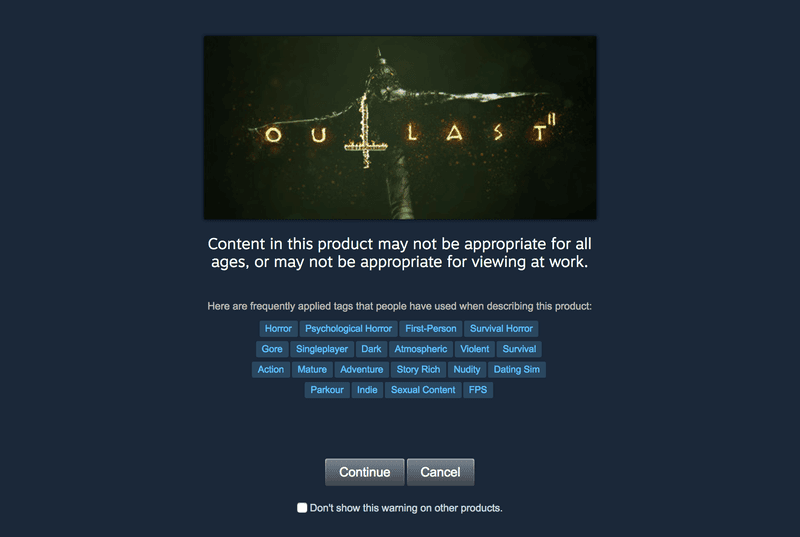
Note that this checkpoint's URL is different than in the previous case, letting us easily distinguish between them from a spider.
By looking at the HTML, you can see that the mechanism by which access is granted to the product page is also different than last time.
Hitting "Continue" triggers a HideAgeGate JavaScript function that sets a mature_content cookie and updates the address, inducing a page reload with the new cookie present.
The routine is hard-coded on the page and the parts we care about resemble the following.
1function HideAgeGate( ) {
2 // Set the cookie.
3 V\_SetCookie( 'mature\_content', 1, 365, '/' );
4
5 // Refresh the page.
6 document.location \= "http://store.steampowered.com/app/414700/Outlast\_2/";
7 }This suggests that including a mature_content cookie with a request is sufficient to pass the checkpoint, and easily verified with
1curl --cookie "mature\_content=1" http://store.steampowered.com/app/414700/So, all we have to do is include that cookie with requests to mature content restricted pages.
Luckily, Scrapy has a redirect middleware which can intercept redirect requests and modify them on the fly. As usual, we observe the source and notice that the only method we need to change is RedirectMiddleware._redirect() (and only slightly).
In steam/middlewares.py, add the following
1from scrapy.downloadermiddlewares.redirect import RedirectMiddleware
2
3
4 class CircumventAgeCheckMiddleware(RedirectMiddleware):
5 def \_redirect(self, redirected, request, spider, reason):
6 \# Only overrule the default redirect behavior
7 \# in the case of mature content checkpoints.
8 if not re.findall('app/(.\*)/agecheck', redirected.url):
9 return super().\_redirect(redirected, request, spider, reason)
10
11 logger.debug(f"Button-type age check triggered for {request.url}.")
12
13 return Request(url\=request.url,
14 cookies\={'mature\_content': '1'},
15 meta\={'dont\_cache': True},
16 callback\=spider.parse\_product)We could have alternatively added a mature_content cookie to all requests by modifying the CookiesMiddleware, or just passed it into the initial request. Note also that overloading redirects like this is the first step in handling captchas and more complex gateways, as explained in this advanced scraping tutorial by Intoli's own Evan Sangaline.
This basically covers the crawler and all gotchas encountered... all that's left to do is run it. The run command is similar to the one given above, except that we want to remove the depth limit, disable caching, and perhaps keep a job file in order to enable resuming in case of an interruption (the job takes a few hours):
1scrapy crawl products -o output/products\_all.jl --logfile=output/products\_all.log
2 --loglevel=INFO -s JOBDIR=output/products\_all\_job -s HTTPCACHE\_ENABLED=FalseWhen the crawl completes, we will hopefully have metadata for all games on Steam in the output file output/products_all.jl . Example output from the completed crawler that is available in the accompanying repository looks like this:
1{
2 'app\_name': 'Cold Fear™',
3 'developer': 'Darkworks',
4 'early\_access': False,
5 'genres': \['Action'\],
6 'id': '15270',
7 'metascore': 66,
8 'n\_reviews': 172,
9 'price': 9.99,
10 'publisher': 'Ubisoft',
11 'release\_date': '2005-03-28',
12 'reviews\_url': 'http://steamcommunity.com/app/15270/reviews/?browsefilter=mostrecent&amp;p=1',
13 'sentiment': 'Very Positive',
14 'specs': \['Single-player'\],
15 'tags': \['Horror', 'Action', 'Survival Horror', 'Zombies', 'Third Person', 'Third-Person Shooter'\],
16 'title': 'Cold Fear™',
17 'url': 'http://store.steampowered.com/app/15270/Cold\_Fear/'
18 }Note that the output contains a manually created reviews_url field. We will use it in the next section to generate a list of starting URLs for the review scraper.
Handling Infinite Scroll to Scrape Reviews
Since product pages display only a few select reviews we need to scrape them from the Steam Community portal which contains the whole dataset.

Addresses on Steam Community are determined by Steam product IDs, so we can easily generate a list of URLs to process from the output file generated by the product crawl:
1http://steamcommunity.com/app/316790/reviews/?browsefilter=mostrecent&p=1
2 http://steamcommunity.com/app/207610/reviews/?browsefilter=mostrecent&p=1
3 http://steamcommunity.com/app/414700/reviews/?browsefilter=mostrecent&p=1
4 ...Due to the size of the dataset you'll probably want to split up the whole list into several text files, and have the review spider accept the file through the command line:
1class ReviewSpider(scrapy.Spider):
2 name \= 'reviews'
3
4 def \_\_init\_\_(self, url\_file, \*args, \*\*kwargs):
5 super().\_\_init\_\_(\*args, \*\*kwargs)
6 self.url\_file \= url\_filedef start_requests(self):
with open(self.url_file, 'r') as f:
for url in f:
yield scrapy.Request(url, callback=self.parse)
def parse(self, response):
pass
Reviews on each page are loaded dynamically as the user scrolls down using an "infinite scroll" design. We need to figure out how this is implemented in order to scrape data from the page, so pull up Chrome's console and monitor XHR traffic while scrolling.
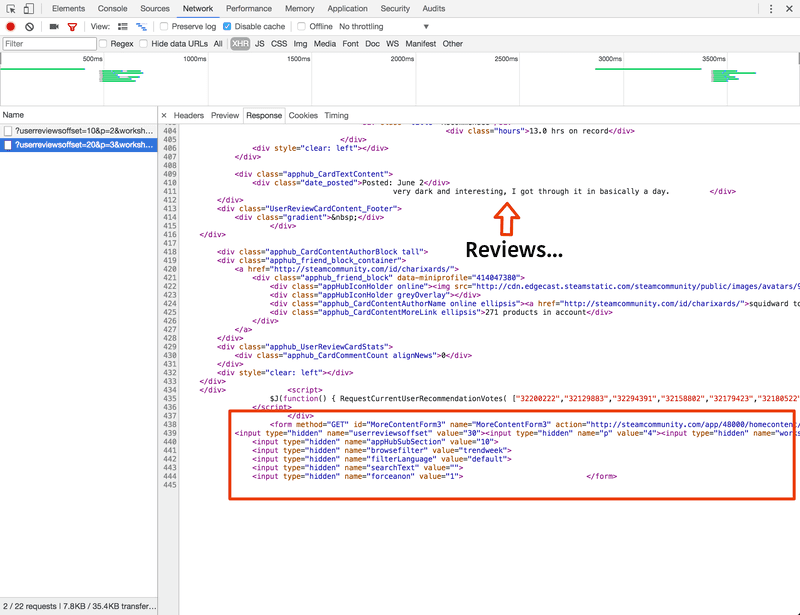
The reviews are returned as pre-rendered HTML ready to be injected into the page by JavaScript. At the bottom of each HTML response is a form named GetMoreContentForm whose purpose is clearly to get the next page of reviews. You can therefore repeatedly submit the form and scrape the response until reviews run out:
1def parse(self, response):
2 product\_id \= get\_product\_id(response)
3
4 \# Load all reviews on current page.
5 reviews \= response.css('div .apphub\_Card')
6 for i, review in enumerate(reviews):
7 yield load\_review(review, product\_id)
8
9 \# Navigate to next page.
10 form \= response.xpath('//form\[contains(@id, "MoreContentForm")\]')
11 if form:
12 yield self.process\_pagination\_form(form, product\_id)Here load_review() returns a loaded item populated as before, and process_pagination_form parses the form and returns a FormRequest.
And that's basically it! All that's left is to run the crawl. Since the job is so large, you should probably split up the URLs between a few text files and run each on a separate box with a command like the following:
1scrapy crawl reviews -o reviews\_slice\_1.jl -a url\_file=url\_slice\_1.txt -s JOBDIR=output/reviews\_1The completed crawler, which you can find in the accompanying repo, produces entries like this:
1{
2 'date': '2017-06-04',
3 'early\_access': False,
4 'found\_funny': 5,
5 'found\_helpful': 0,
6 'found\_unhelpful': 1,
7 'hours': 9.8,
8 'page': 3,
9 'page\_order': 7,
10 'product\_id': '414700',
11 'products': 179,
12 'recommended': True,
13 'text': '3 spooky 5 me',
14 'user\_id': '76561198116659822',
15 'username': 'Fowler'
16 }Conclusion
I hope you enjoyed this relatively detailed guide to getting started with Scrapy. Even if you are not directly interested in the Steam review dataset, we've covered more than just how to make selectors and developed practical solutions to a number of common scenarios such as redirect and infinite scroll scraping.
Leave a comment on this reddit thread.
1. This paper discusses sentiment analysis of Steam reviews, but the dataset is not available for download.
2. Steam has generally been very friendly to scrapers. They have no robots.txt restrictions, and there are multiple projects based on analyzing Steam data.