The Wemos D1 Mini is a development board built around the ESP8266 chip: it costs roughly $4, runs at 80 MHz, and has approximately 22 KB of free heap memory at runtime, which is about the size of a single compressed thumbnail image.
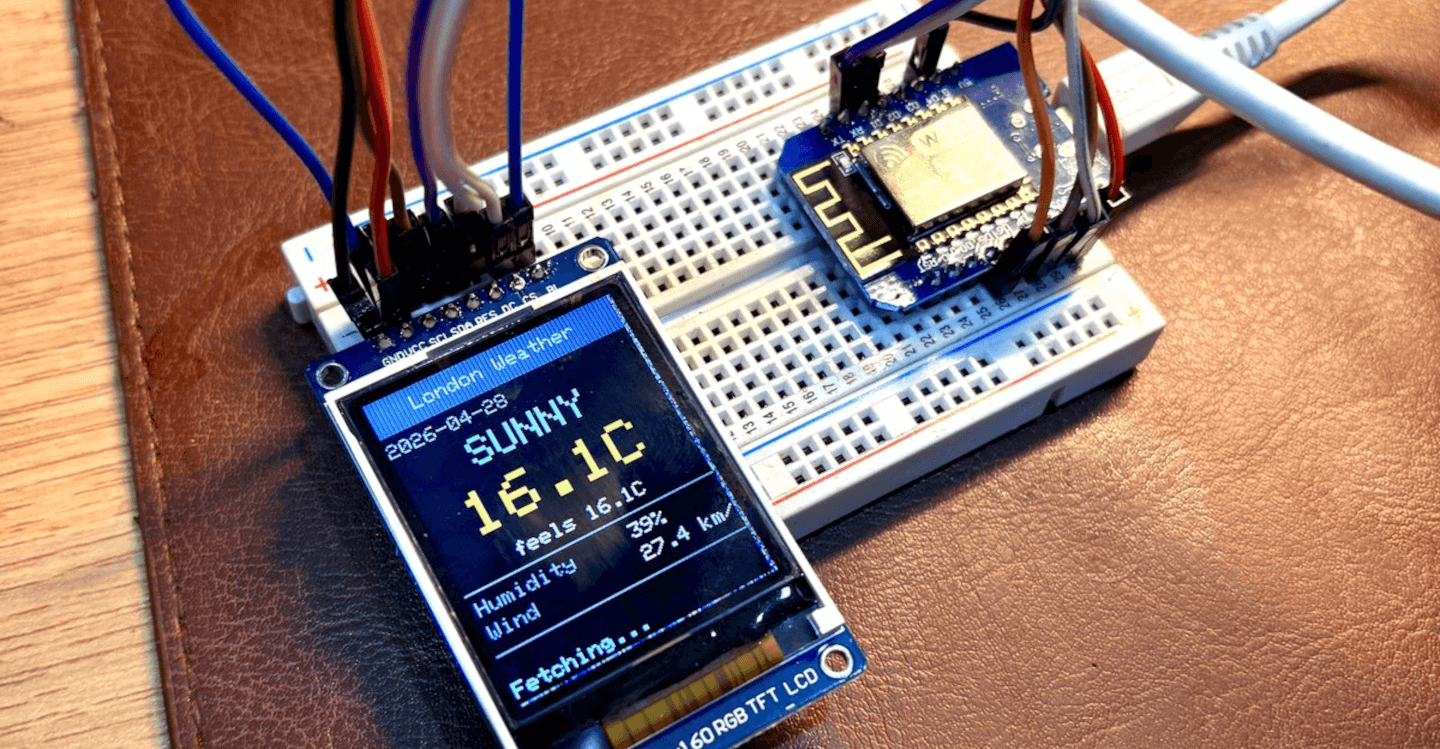
It was designed for reading sensors and controlling actuators. But I built a live weather monitor with one, scraping real-time conditions from Time and Date and rendering them on a 128×160 TFT display, refreshing every ten minutes without any manual intervention.
The reason it works comes down to one decision: all the genuinely hard parts of web scraping are handled by Zyte API, and the microcontroller only has to make one authenticated HTTPS POST.
The wall every microcontroller hits
A microcontroller with a TCP/IP stack can, in principle, make HTTP requests. The ESP8266 has BearSSL for TLS, a WiFiClientSecure class, and HTTPClient. What it cannot do is pass the anti-bot gauntlet that guards any website worth scraping.
Time and Date returns a 403 Forbidden to any request that arrives from a data-center IP address or lacks convincing browser headers. The ESP8266 fails both tests simultaneously:
- There is no browser fingerprint to replicate.
- Its source IP will be classified as a data center address the moment it tries to reach the site directly.
The traditional solutions to this - rotating residential proxy pools, TLS fingerprint, dynamic header injection - require infrastructure the chip cannot run. As the post on why scrapers keep getting banned covers in detail, these challenges consume significant engineering effort, even in full-scale Python operations with cloud infrastructure behind them.
For the ESP8266, there is no viable path through the anti-bot layer using only what the chip can run natively.
What Zyte API does instead
Zyte API abstracts the entire solution into a single HTTPS POST. The microcontroller sends one JSON payload to https://api.zyte.com/v1/extract
, and Zyte's infrastructure handles everything else.
1{
2  "url": "https://www.timeanddate.com/weather/uk/london",
3  "httpResponseBody": true,
4  "customHttpRequestHeaders": [
5    { "name": "Accept-Encoding", "value": "identity" }
6  ]
7}The httpResponseBody field tells Zyte API to return the raw HTML, base64-encoded, inside a JSON envelope. The Accept-Encoding: identity header is forwarded to the target to prevent gzip compression, since the ESP8266 has no way to decompress gzip in 22 KB of RAM.
The abstraction is complete. The firmware knows nothing about anti-bot systems - it knows how to make one POST request, and the data comes back. The same approach that lets an old Raspberry Pi pull live gold prices from a JavaScript-protected Indian jewellery site works here at a far more constrained scale, on hardware that costs a fraction of the price.
The memory problem: 62 KB through a 22 KB pipe
Zyte API solves the access problem but, for this tiny device, it created a new challenge.
The response is large: a base64-encoded copy of a full HTML page, wrapped in a JSON envelope, arrives at roughly 62 KB. That is nearly three times the free heap on the device. The obvious approach crashes immediately.
1String body = http.getString(); // tries to allocate ~62 KB → crashEvery approach that buffers the full response before parsing is dead on arrival. The firmware needed a different model: read the stream once, in order, keeping almost nothing.
Stream, decode, drop: The three-stage pipeline
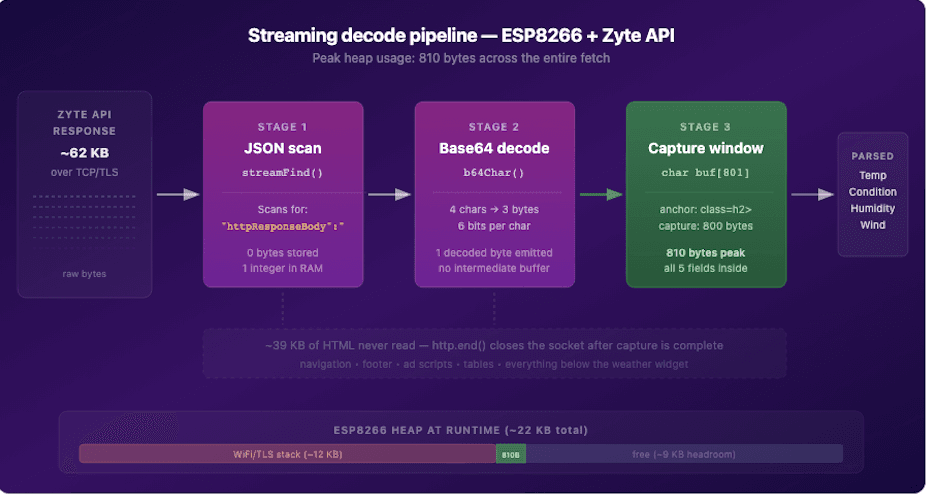
The solution treats the TCP connection as a pipe and processes it in a single forward pass, never holding more than 801 bytes in RAM at once.
Stage 1: Skip the JSON wrapper
The firmware scans the raw SSL stream one byte at a time, searching for the literal string "httpResponseBody":". It uses a KMP-style, single-integer matcher: one variable that advances when the current byte matches the next expected character and resets when it does not. No memory is allocated, and each byte is discarded as it is read.
1static bool streamFind(WiFiClient* s, const char* marker, unsigned long deadline) {
2  int mlen = strlen(marker), match = 0;
3  while (millis() < deadline) {
4    if (!s->available()) { delay(1); continue; }
5    char c = (char)s->read();
6    match = (c == marker[match]) ? match + 1 : (c == marker[0] ? 1 : 0);
7    if (match == mlen) return true;
8  }
9  return false;
10}Stage 2: Decode base64 one character at a time
Base64 encodes every three bytes of binary data as four ASCII characters, packing six bits per character. The decoder accumulates six bits per call in a single integer accumulator and emits one decoded byte each time it has collected eight bits, returning it directly to the caller with no intermediate buffer and no heap allocation.
1struct B64State { int val = 0, bits = -8; };
2
3static int b64Char(char c, B64State& st) {
4  const char* p = strchr(B64T, c);
5  if (!p) return -1;                         // padding or whitespace
6  st.val = (st.val << 6) + (int)(p - B64T);
7  st.bits += 6;
8  if (st.bits >= 0) {
9    int byte = (st.val >> st.bits) & 0xFF;
10    st.bits -= 8;
11    return byte;                             // one decoded HTML byte
12  }
13  return -1;                                 // still accumulating
14}The ESP8266 Arduino core ships a base64::encode function but no decoder. This 13-line struct replaces the missing half of the library, with the added property that it operates character by character directly off the TCP stream.
Stage 3: Anchor search and capture
While decoding, every decoded byte is simultaneously matched against the anchor string class=h2>, which is the CSS class on Time and Date current-conditions widget. The same single-integer KMP pattern handles the search. Once the anchor matches, the firmware opens an 801-byte stack buffer and fills it with the next 800 decoded bytes, a window that contains all five weather fields: temperature, condition, feels-like, wind speed, and humidity.
1anchorMatch = (c == ANCHOR[anchorMatch]) ? anchorMatch + 1
2 : (c == ANCHOR[0]) ? 1 : 0;When the buffer is full, http.end() closes the TCP connection. The remaining roughly 39 KB of HTML (footer, navigation, ad scripts, everything below the weather widget) is never read from the socket at all. The OS discards the buffered TCP data. Peak extra heap across the entire fetch: 810 bytes.
Searching for the anchor string rather than jumping to a hard-coded byte offset is what makes the firmware robust across requests. Page size varies slightly between fetches due to A/B test banners and minor HTML changes; a fixed offset would drift silently and produce garbage output, while the anchor search finds the widget regardless.
Parsing without a library
With 800 bytes of null-terminated HTML in a stack buffer, parsing becomes a string-search problem. The firmware uses String::indexOf and substring to extract each field by finding the literal text immediately before and after each value, with no HTML parser, no regex engine, and no ArduinoJson in the loop.
1String html(buf);
2String tempF_s = between(html, "class=h2>", " ");
3String condStr = between(html, "</div><p>", "</p>");
4String feelsF_s = between(html, "Feels Like: ", " ");
5String windS = between(html, "Wind: ", " mph");
6String humidS = between(html, "Humidity: </th><td>", "%");Time and Date serves data in imperial units. Two one-liners handle the conversion.
1static float toC(float f)   { return (f - 32.0f) * 5.0f / 9.0f; }
2static float toKmh(float m) { return m * 1.60934f; }The serial-monitor variant prints this to the console every three seconds:
1-----------------------------
2  London Weather | 2026-04-29
3-----------------------------
4  Condition : Sunny
5  Temp      : 17.8 C (feels 17.8 C)
6  Humidity  : 37 %
7 Wind : 20.9 km/hThe display variant
The TFT variant adds a 1.8-inch ST7735 display driven over hardware Serial Peripheral Interface (SPI). A WeatherDisplay library handles all rendering:
- A gradient header bar.
- Temperature numerals colour-coded by range (blue below freezing, stepping through cyan, white, orange, and red as temperature climbs).
- Condition icons drawn from geometric primitives with no image files.
- A humidity and wind row at the bottom.
The firmware syncs from Network Time Protocol (NTP) on startup, the ESP8266 has no on-board real-time clock, and prints the current UTC date in the header.
Wiring is minimal: CS on D8 (GPIO15), DC on D2 (GPIO4), and RST on D1 (GPIO5), with hardware SPI clock on D5 and MOSI on D7.
The backlight runs from 3.3V and stays on permanently. If colours look wrong after the first flash, swapping INITR_BLACKTAB for INITR_REDTAB or INITR_GREENTAB in setup() fixes it - the tab colour varies by display seller.
Build it yourself
The full project is on GitHub at github.com/zytelabs/webscraping-on-esp8266, built with PlatformIO. After cloning, setup is three commands.
1# Install the ESP8266 toolchain (~200 MB, once per machine)
2pio platform install espressif8266
3
4# Install project libraries (Adafruit GFX, ST7735)
5pio pkg install
6
7# Flash the minimal scraper — no display hardware needed
8pio run -e d1_mini_example --target uploadThere are three build environments in platformio.ini. The d1_mini_example environment is the recommended starting point: it scrapes books.toscrape.com, a public scraping practice site, in about 160 lines of commented C++.
Once that is running, d1_mini_serial adds the weather fetch, and d1_mini_tft adds the display. All three environments share the same networking and stream-decode core, so the architecture is identical across all three.
The only configuration required before flashing is three constants at the top of main.cpp.
1#define WIFI_SSID    "your-network"
2#define WIFI_PASS    "your-password"
3#define ZYTE_API_KEY "your-32-char-key"Zyte API key is available on a free trial with no credit card required. The README has the complete setup walk-through for macOS, Linux, and Windows, covering serial port identification, the CH340 USB driver situation on older macOS versions, and common build errors.
What the constraint revealed
The engineering challenge in this project was not really the microcontroller. The ESP8266 is more than capable of making HTTPS requests, running a base64 decoder, and driving an SPI display. The challenge was everything surrounding a modern web page: the residential IP requirements, the browser fingerprint checks, the anti-bot negotiation that blocks requests before the application layer even sees them.
Those problems do not shrink when the client is small. They scale up, not down, and they are the same problems whether you are writing Python on a cloud server or C++ on a chip the size of a postage stamp.
Zyte API moves all of that out of the client entirely. Once it does, the client can be almost arbitrarily simple.
The streaming decode architecture in this project is an adaptation specific to the ESP8266's memory constraints, but the broader pattern (send one API call, receive clean HTML, do something physical with the data applies to any constrained environment. The same shift that is driving the industry away from managing raw proxy infrastructure toward outcome-based APIs) also happens to make a project like this one possible at all.
If you want to build a stock ticker, a package-tracking display, a sports-score board, or a public-transport departure monitor on hardware that costs less than a coffee, the pattern is there in the repository and ready to adapt. The README has everything you need to get started.