An Introduction to Web Scraping with Python lxml library
Whether you're trying to analyze market trends or gather data for research, web scraping can be a useful skill to have. This technique allows you to extract specific pieces of data from websites automatically and process them for further analysis or use.
In this blog post, we'll introduce the concept of web scraping and the lxml library for parsing and extracting data from XML and HTML documents using Python.
Additionally, we'll touch upon Parsel, an extension of lxml that is a key component of the Scrapy web scraping framework, offering even more advanced capabilities for handling complex web tasks.
What is Web Scraping?
Web scraping extracts structured data from websites by simulating user interactions. It involves navigating pages, selecting elements, and capturing desired information for various purposes like data mining, data harvesting, competitor analysis, market research, social media monitoring, and more.
While web scraping can be done manually by copying and pasting information from a website, this approach is often time-consuming and error-prone.
Automating the process using programming languages like Python allows for faster, more accurate, and more efficient data collection with a web scraper.
What is lxml?
Python offers a wide range of libraries and tools for web scraping, such as Scrapy, Beautiful Soup, and Selenium. Each library has its own strengths and weaknesses, depending on the specific use case and requirements. lxml stands out due to its simplicity, efficiency, and flexibility when it comes to processing XML and HTML. lxml is designed for high-performance parsing and easy integration with other libraries. It combines the best of two worlds: the simplicity of Python's standard module xml.etree.ElementTree and the speed and flexibility of the C libraries libxml2 and libxslt.
HTML and XML files
HTML (HyperText Markup Language) is the standard markup language for creating web pages and web applications. It is also a hierarchical markup language, but its primary purpose is to structure and display content on the web.
HTML data consists of elements that browsers use to render the content on web pages. These elements, also referred to as html tags, have opening and closing parts (e.g., and ) that enclose the content they represent. Each html tag has a specific purpose, such as defining headings, paragraphs, lists, links, or images, and they work together to create the structure and appearance of a web page.
Here's a simple HTML document example:
Plain text
Copy to clipboard
Open code in new window
EnlighterJS 3 Syntax Highlighter
<html>
<head>
<title>Bookstore</title>
</head>
<body>
<h1>Bookstore</h1>
<ul>
<li>
<h2>A Light in the Attic</h2>
<p>Author: Shel Silverstein</p>
<p>Price: 51.77</p>
</li>
<li>
<h2>Tipping the Velvet</h2>
<p>Author: Sarah Waters</p>
<p>Price: 53.74</p>
</li>
</ul>
</body>
</html>
BookstoreBookstore
-
A Light in the Attic
Author: Shel Silverstein
Price: 51.77
-
Tipping the Velvet
Author: Sarah Waters
Price: 53.74
Bookstore
-
A Light in the Attic
Author: Shel Silverstein
Price: 51.77
-
Tipping the Velvet
Author: Sarah Waters
Price: 53.74
XML (eXtensible Markup Language) is a markup language designed to store and transport data in a structured, readable format. It uses a hierarchical structure, with elements defined by opening and closing tags. Each element can have attributes, which provide additional information about the element, and can contain other elements or text.
Here's a simple XML document example:
Plain text
Copy to clipboard
Open code in new window
EnlighterJS 3 Syntax Highlighter
<books>
<book id="1">
<title>A Light in the Attic</title>
<author>Shel Silverstein</author>
<price>51.77</price>
</book>
<book id="2">
<title>Tipping the Velvet</title>
<author>Sarah Waters</author>
<price>53.74</price>
</book>
</books>
A Light in the Attic Shel Silverstein 51.77 Tipping the Velvet Sarah Waters 53.74 A Light in the Attic Shel Silverstein 51.77 Tipping the Velvet Sarah Waters 53.74Both XML and HTML documents are structured in a tree-like format, often referred to as the Document Object Model (DOM). This hierarchical organization allows for a clear and logical representation of data, where elements (nodes) are nested within parent nodes, creating branches and sub-branches.
The topmost element, called the root, contains all other elements in the document. Each element can have child elements, attributes, and text content.
The tree structure enables efficient navigation, manipulation, and extraction of data, making it particularly suitable for web scraping and other data processing tasks.
XPath vs. CSS Selectors
XPath and CSS selectors are two popular methods for selecting elements within an HTML or XML document. While both methods can be used with lxml, they have their own advantages and drawbacks.
XPath is a powerful language for selecting nodes in an XML or HTML document based on their hierarchical structure, attributes, or content. XPath can be considered more powerful for parsing HTML tags and HTML markup compared to CSS selectors, especially when dealing with complex formats. However, it may have a steeper learning curve for those not familiar with its syntax.
CSS selectors, on the other hand, are a simpler and more familiar method for selecting elements, especially for those with experience in web development. They are based on CSS rules used to style HTML elements, which makes them more intuitive for web developers. While they may not be as powerful as XPath, they are often sufficient for most web scraping tasks.
Ultimately, the choice between XPath and CSS selectors depends on your personal preference, familiarity with each method, and the complexity of your web scraping project.
Using lxml for web scraping
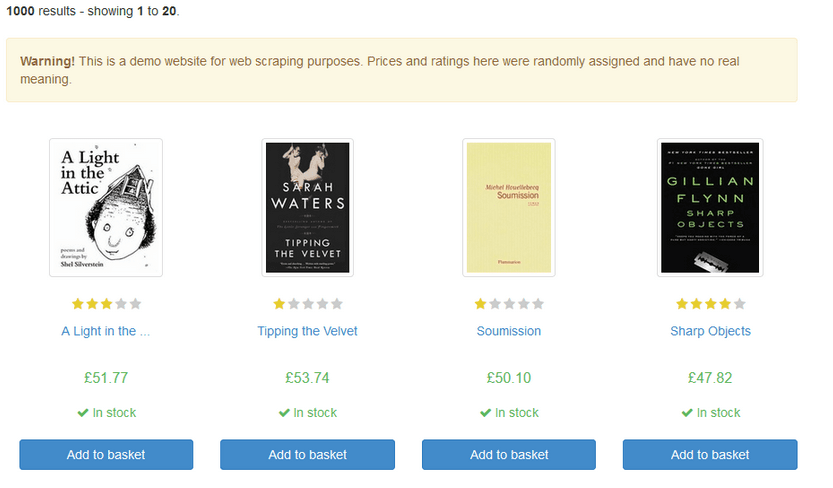
Let's look at an example of how to web scrape with Python lxml. Suppose we want to extract data about the title and price of books in Books to Scrape web page, a sandbox website created by Zyte for you to test your web scraping projects.
First, we need to install the Python lxml module by running the following command:
Plain text
Copy to clipboard
Open code in new window
EnlighterJS 3 Syntax Highlighter
pip install lxml
pip install lxml
pip install lxml
To perform web scraping using Python and lxml, create a python file for your web scraping script. Save the file with a ".py" extension, like "web_scraping_example.py". You can write and execute the script using a text editor and a terminal, or an integrated development environment (IDE).
Next, we can use the requests module to retrieve the HTML content of HTML page from the website:
Plain text
Copy to clipboard
Open code in new window
EnlighterJS 3 Syntax Highlighter
import requests
url = "https://books.toscrape.com"
response = requests.get(url)
content = response.content
import requests url = "https://books.toscrape.com" response = requests.get(url) content = response.content
import requests
url = "https://books.toscrape.com"
response = requests.get(url)
content = response.content
After retrieving the HTML content, use the html submodule from lxml to parse it:
Plain text
Copy to clipboard
Open code in new window
EnlighterJS 3 Syntax Highlighter
from lxml import html
parsed_content = html.fromstring(content)
from lxml import html parsed_content = html.fromstring(content)
from lxml import html
parsed_content = html.fromstring(content)
Then, employ lxml's xpath method to extract the desired data from the web page:
Plain text
Copy to clipboard
Open code in new window
EnlighterJS 3 Syntax Highlighter
# Parsing the HTML to gather all books
books_raw = parsed_content.xpath('//article[@class="product_pod"]')
# Parsing the HTML to gather all books books_raw = parsed_content.xpath('//article[@class="product_pod"]')
# Parsing the HTML to gather all books
books_raw = parsed_content.xpath('//article[@class="product_pod"]')
books_raw retrieves a list of Element article, which we can parse individually. Although we could extract the data directly by querying the titles and prices, this approach ensures greater consistency in more advanced data extraction cases.
Before proceeding, create a NamedTuple to store book information for improved readability with the following code:
Plain text
Copy to clipboard
Open code in new window
EnlighterJS 3 Syntax Highlighter
from typing import NamedTuple
class Book(NamedTuple):
title: str
price: str
from typing import NamedTuple class Book(NamedTuple): title: str price: str
from typing import NamedTuple
class Book(NamedTuple):
title: str
price: str
Using NamedTuple is not necessary, but it can be a good approach for organizing and managing the extracted data. NamedTuples are lightweight, easy to read, and can make the code more maintainable. By using NamedTuple in this example, we provide a clear structure for the book data, which can be especially helpful when dealing with more complex data extraction tasks.
With the NamedTuple Book defined, iterate through books_raw and create a list of Book instances:
Plain text
Copy to clipboard
Open code in new window
EnlighterJS 3 Syntax Highlighter
books = []
for book_raw in books_raw:
title = book_raw.xpath('.//a/img/@alt')
price = book_raw.xpath('.//p[@class="price_color"]/text()')
book = Book(title=title, price=price)
books.append(book)
books = [] for book_raw in books_raw: title = book_raw.xpath('.//a/img/@alt') price = book_raw.xpath('.//p[@class="price_color"]/text()') book = Book(title=title, price=price) books.append(book)
books = []
for book_raw in books_raw:
title = book_raw.xpath('.//a/img/@alt')
price = book_raw.xpath('.//p[@class="price_color"]/text()')
book = Book(title=title, price=price)
books.append(book)
The books list will display the following output:
Plain text
Copy to clipboard
Open code in new window
EnlighterJS 3 Syntax Highlighter
[Book(title=['A Light in the Attic'], price=['£51.77']),
Book(title=['Tipping the Velvet'], price=['£53.74']),
Book(title=['Soumission'], price=['£50.10']),
Book(title=['Sharp Objects'], price=['£47.82']),
Book(title=['Sapiens: A Brief History of Humankind'], price=['£54.23']),
Book(title=['The Requiem Red'], price=['£22.65']),
...
]
[Book(title=['A Light in the Attic'], price=['£51.77']), Book(title=['Tipping the Velvet'], price=['£53.74']), Book(title=['Soumission'], price=['£50.10']), Book(title=['Sharp Objects'], price=['£47.82']), Book(title=['Sapiens: A Brief History of Humankind'], price=['£54.23']), Book(title=['The Requiem Red'], price=['£22.65']), ... ]
[Book(title=['A Light in the Attic'], price=['£51.77']),
Book(title=['Tipping the Velvet'], price=['£53.74']),
Book(title=['Soumission'], price=['£50.10']),
Book(title=['Sharp Objects'], price=['£47.82']),
Book(title=['Sapiens: A Brief History of Humankind'], price=['£54.23']),
Book(title=['The Requiem Red'], price=['£22.65']),
...
]
You can execute your web scraping script from the same python console or terminal where you installed the lxml library. This way, you can run the script and observe the output directly in the console or store the scraped data in a file or a database, depending on your project requirements.
Extended lxml with Parsel/Scrapy
While lxml is a popular and powerful library for data extraction in Python, Parsel, a part of the Scrapy framework, can be an excellent addition to your toolkit.
Parsel allows you to parse HTML and XML documents, extracting information, and traversing the parsed structure. It is built on top of the lxml library and provides additional functionality, like handling character encoding and convenient methods for working with CSS and XPath selectors.
The following code is an example using parsel with CSS method:
Plain text
Copy to clipboard
Open code in new window
EnlighterJS 3 Syntax Highlighter
from parsel import Selector
sel = Selector(text=u"""
Hello, Parsel!
""")sel.css('h1::text').get() # Output: 'Hello, Parsel!'
from parsel import Selector sel = Selector(text=u"""
Hello, Parsel!
""") sel.css('h1::text').get() # Output: 'Hello, Parsel!'from parsel import Selector
sel = Selector(text=u"""
Hello, Parsel!
""")
sel.css('h1::text').get() # Output: 'Hello, Parsel!'
It is also possible to use parsel's selectors with regex expressions after the css and xpath extraction:
Plain text
Copy to clipboard
Open code in new window
EnlighterJS 3 Syntax Highlighter
sel.css('h1::text').re('\w+') # Output: ['Hello', 'Parsel!']
sel.css('h1::text').re('\w+') # Output: ['Hello', 'Parsel!']
sel.css('h1::text').re('\w+') # Output: ['Hello', 'Parsel!']
Conclusion
Web scraping is a powerful technique that enables users to collect valuable data from websites for various purposes. By understanding the fundamentals of HTML and XML documents and leveraging the Python lxml library, users can efficiently parse and extract data from web pages for simple data extraction tasks.
However, it's important to note that Python’s lxml may not be suitable for handling more complex projects. In those cases, Parsel, a key component of Scrapy, offers a superior solution. Scrapy comes with numerous benefits, including built-in support for handling cookies, redirects, and concurrency, as well as advanced data processing and storage capabilities. By utilizing Parsel for parsing both HTML and XML documents, Scrapy delivers a powerful and efficient way to traverse the parsed structure and extract the necessary information. This comprehensive library, combined with the robust and feature-rich capabilities of Scrapy, enables users to confidently tackle even the most complex web scraping projects.
By understanding the principles and techniques discussed in this blog post, you'll be prepared to tackle web scraping projects using either lxml or a comprehensive solution like Scrapy, harnessing data to achieve your objectives.
Learn from the leading web scraping developers
A discord community of over 3000 web scraping developers and data enthusiasts dedicated to sharing new technologies and advancing in web scraping.