An hour later, the machine is ready. Three months later, when that VM is gone and you need a replacement, the process repeats, and the result is a little different from the original because you are working from memory, not a spec.
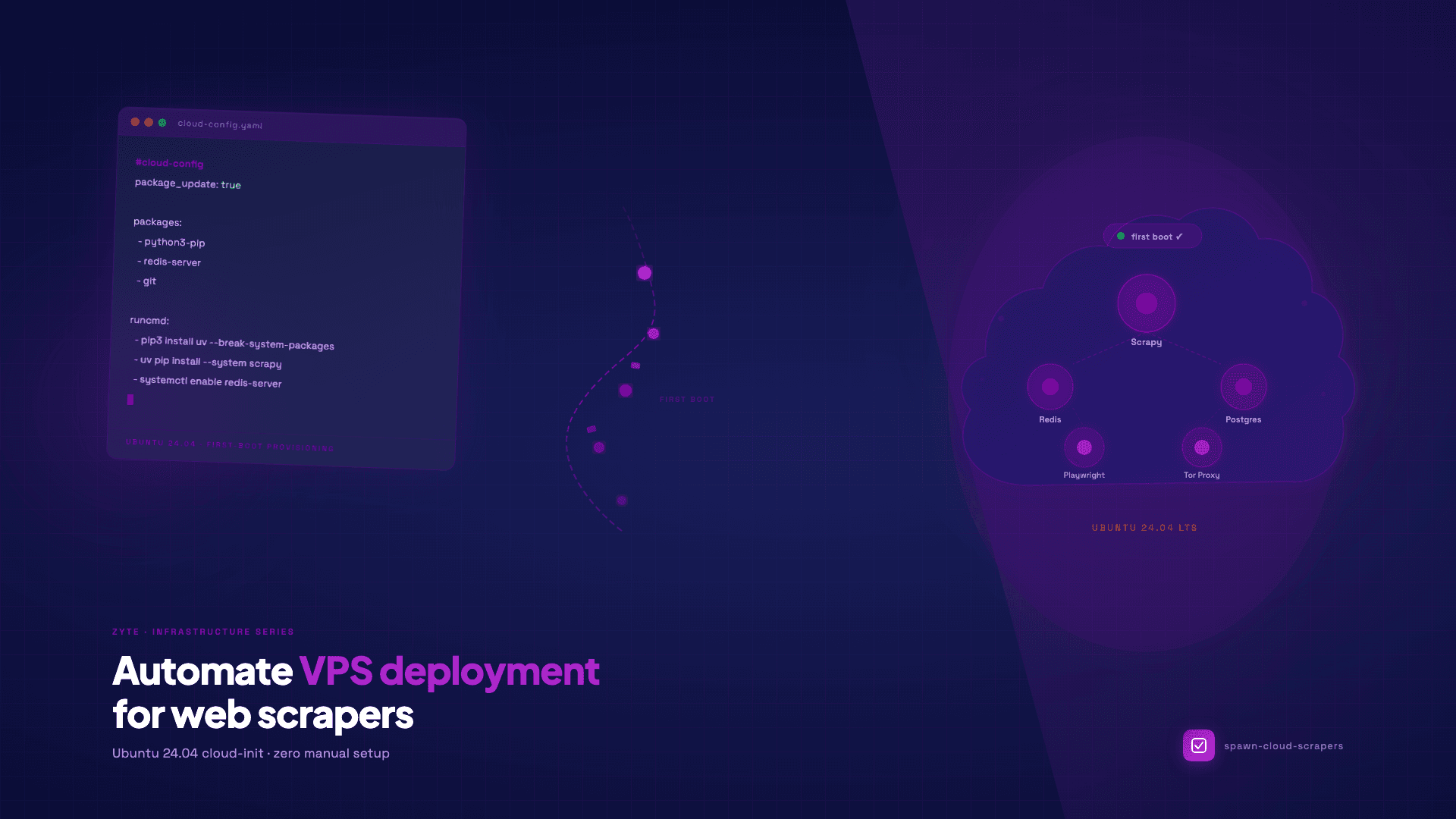
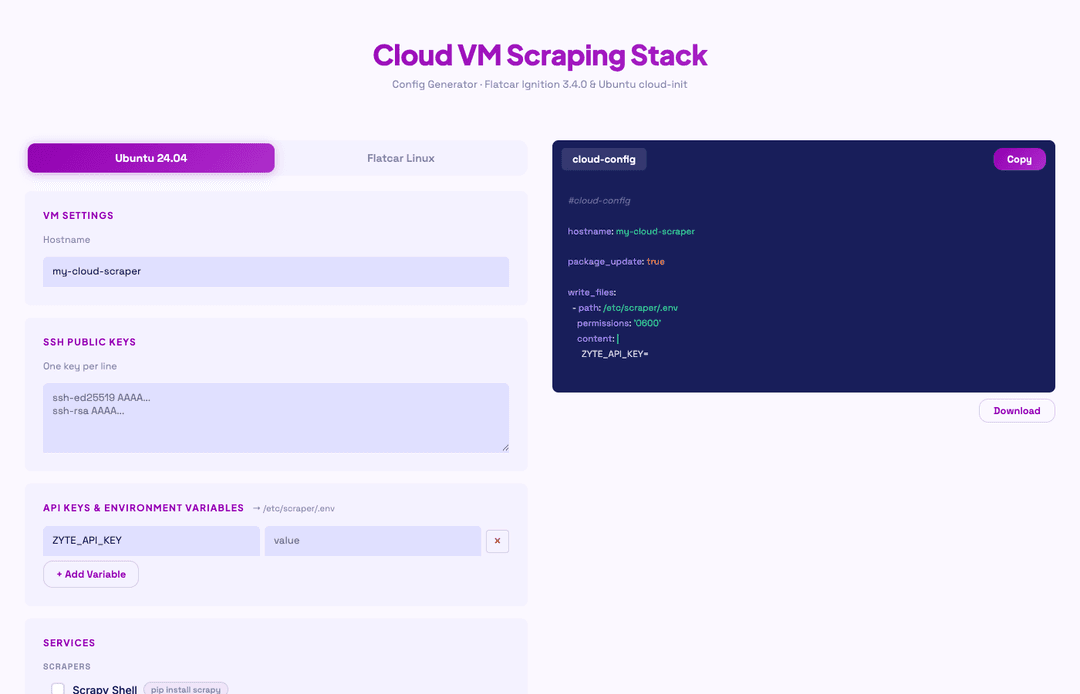
Cloud-init solves this by moving provisioning out of your SSH session and into a configuration file that the VM reads during its very first boot. You write the config once, paste it into your VPS provider's user-data field when you create the instance, and everything you need is running before you log in for the first time. I had a similar problem, so I built spawn-cloud-scrapers to generate that config file for you. Add your ZYTE_API_KEY and any other environment variables, optionally paste a GitHub URL for an existing Scrapy project to auto-clone on first boot, select your tools, and copy the ready-to-use #cloud-config YAML from the output panel.
Why VPS over your local machine
Scrapers that run on a laptop have a fundamental persistence problem: crawl jobs are interrupted every time the machine sleeps, the network switches, or you need to restart for an unrelated reason. The environment on a laptop, shaped by years of installs, upgrades, and one-off fixes, is also difficult to reproduce on a fresh machine, which matters when you need to debug a problem in a clean environment or hand the project to someone else.
A dedicated VPS gives you a process that keeps running after you close your laptop, an environment defined entirely by what you install during provisioning, and a reliable place to run scheduled crawls without involving your development machine.
For the requests themselves, Zyte API handles IP rotation, unblocking, and browser rendering in a single call, so your spider code stays focused on extraction logic rather than infrastructure concerns. What spawn-cloud-scrapers gives you is a clean, reproducible home for that code to run from. The discipline of provisioning via cloud-init reinforces this: when you cannot "just SSH in and fix it quickly," the config file stays accurate, and the next machine you spin up is genuinely identical to the last one.
What is cloud-init?
Cloud-init is the industry-standard first-boot initialization system for Linux VMs. Every major cloud provider supports it, which means a #cloud-config YAML file you write today will work on AWS, Google Cloud, Hetzner, DigitalOcean, Linode, Vultr, Azure, OVHcloud, Scaleway, and Oracle Cloud without modification. The file is passed to the VM at creation time via a user-data field, and cloud-init processes it once, during the first boot, before any user can log in.
A cloud-config file can install packages via apt, write files to the filesystem, create users, add SSH keys, run arbitrary commands in sequence, and enable or start services. Everything spawn-cloud-scrapers needs to do to build a scraping stack fits within these primitives.
What spawn-cloud-scrapers generates
Select any combination of the following services and the tool builds a deduplicated, correctly ordered cloud-config around them:
| Service | How it installs | Notes |
|---|---|---|
| Scrapy | uv pip install scrapy | Python spider framework |
| Playwright Python | pip install playwright + playwright install chromium --with-deps | Browser automation |
| Puppeteer | npm install -g puppeteer | Node.js headless Chrome |
| Redis | apt: redis-server, systemd enable | Queue / cache (port 6379) |
| PostgreSQL | apt: postgresql, systemd enable | Relational DB (port 5432) |
| Tor Proxy | apt: tor, systemd enable | Anonymous routing (port 9050) |
| mitmproxy | uv pip install mitmproxy | Traffic inspection (port 8080) |
Splash is available in Flatcar/Docker mode only and does not appear in Ubuntu mode, because it has no native Ubuntu package and running it as a container requires a separate Docker setup that cloud-init is not suited to manage. For everything else, native installs are stable, start on boot via systemd, and require no container runtime.
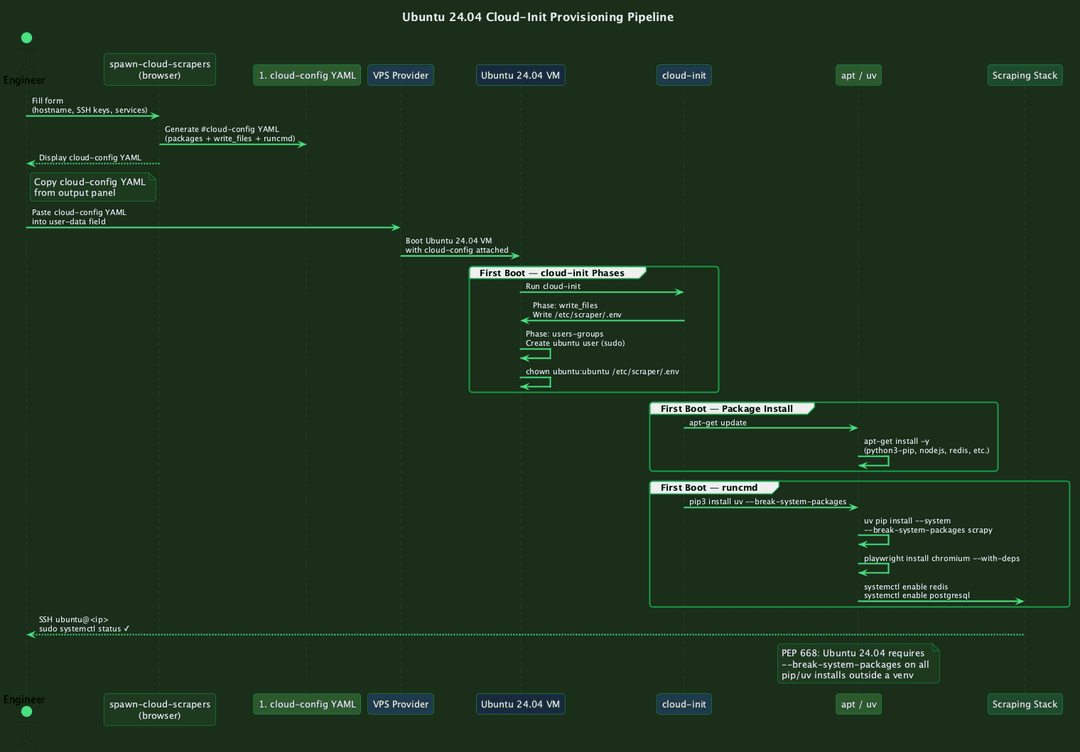
CNT-1201-diagram_ubuntu_pipeline.png
The PEP 668 issue on Ubuntu 24.04
Ubuntu 24.04 enforces PEP 668, which marks the system Python environment as "externally managed" and prevents pip install from modifying it without an explicit override. Run a bare pip3 install scrapy on a fresh Ubuntu 24.04 VM and you get:
1error: externally-managed-environment
2× This environment is externally managedThe correct pattern is to bootstrap uv first, then use uv with the --system and --break-system-packages flags for all subsequent installs:
1pip3 install uv --break-system-packages
2uv pip install --system --break-system-packages scrapyspawn-cloud-scrapers generates exactly this sequence in the runcmd section. Every Python package install in the output follows this pattern, so the provisioning script works on a vanilla Ubuntu 24.04 image without needing any pre-configuration. This is one of those details that is obvious in hindsight but costs you time the first time you encounter it on a fresh server, as described in the setup troubleshooting section of Scraping Swiss Army Knife: my personal fix for web setup fatigue.
A look at the generated cloud-config
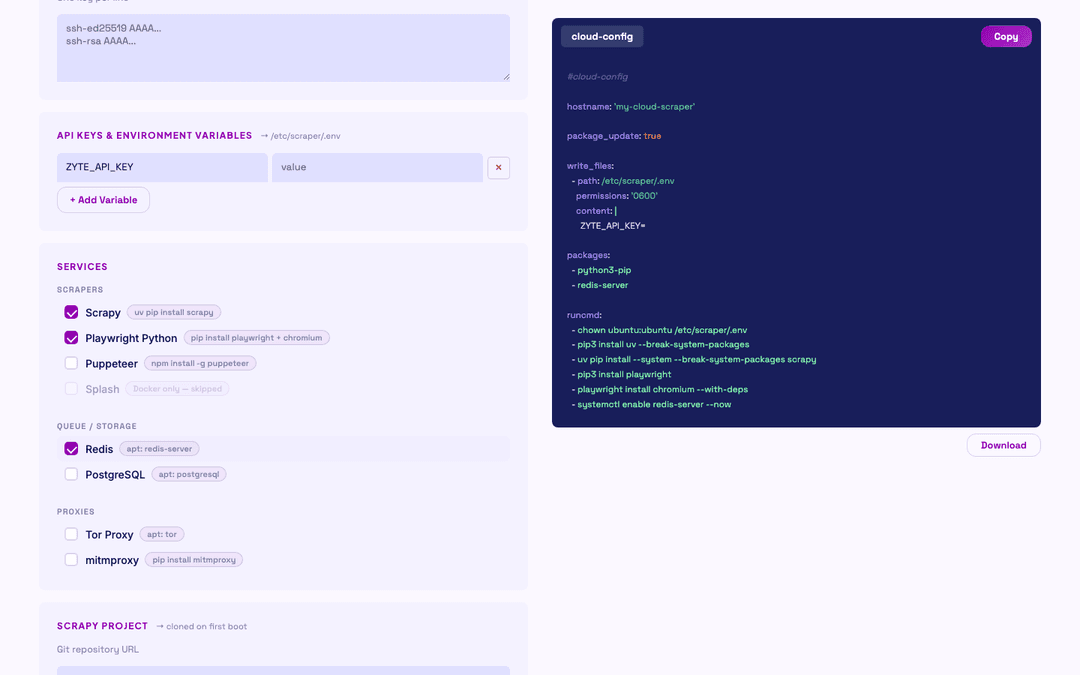
Here is a representative cloud-config for a Scrapy and Redis stack, showing the structure that spawn-cloud-scrapers produces:
1#cloud-config
2package_update: true
3
4users:
5  - name: ubuntu
6    groups: sudo
7    shell: /bin/bash
8    sudo: ALL=(ALL) NOPASSWD:ALL
9    ssh_authorized_keys:
10      - 'ssh-ed25519 AAAA... you@host'
11
12write_files:
13  - path: /etc/scraper/.env
14    content: |
15      ZYTE_API_KEY=your_key_here
16    permissions: '0644'
17
18packages:
19  - python3-pip
20  - redis-server
21  - git
22
23runcmd:
24  - chown ubuntu:ubuntu /etc/scraper/.env
25  - pip3 install uv --break-system-packages
26  - uv pip install --system --break-system-packages scrapy
27  - systemctl enable redis-server
28 - systemctl start redis-serverA few details in this structure are worth understanding. The chown command for /etc/scraper/.env is always the first item in runcmd. Cloud-init's write_files phase runs before the user-creation phase, which means the ubuntu user does not exist yet when the file is written, so using owner: ubuntu:ubuntu in write_files would silently fail. The runcmd phase runs after users are created, so the chown there is guaranteed to find the user.
The packages list is automatically deduplicated across all selected services. If you select both Scrapy and mitmproxy, both of which need python3-pip, it appears in the list only once. The runcmd entries run in selection order, with service-level dependencies respected.
Scrapy project auto-clone
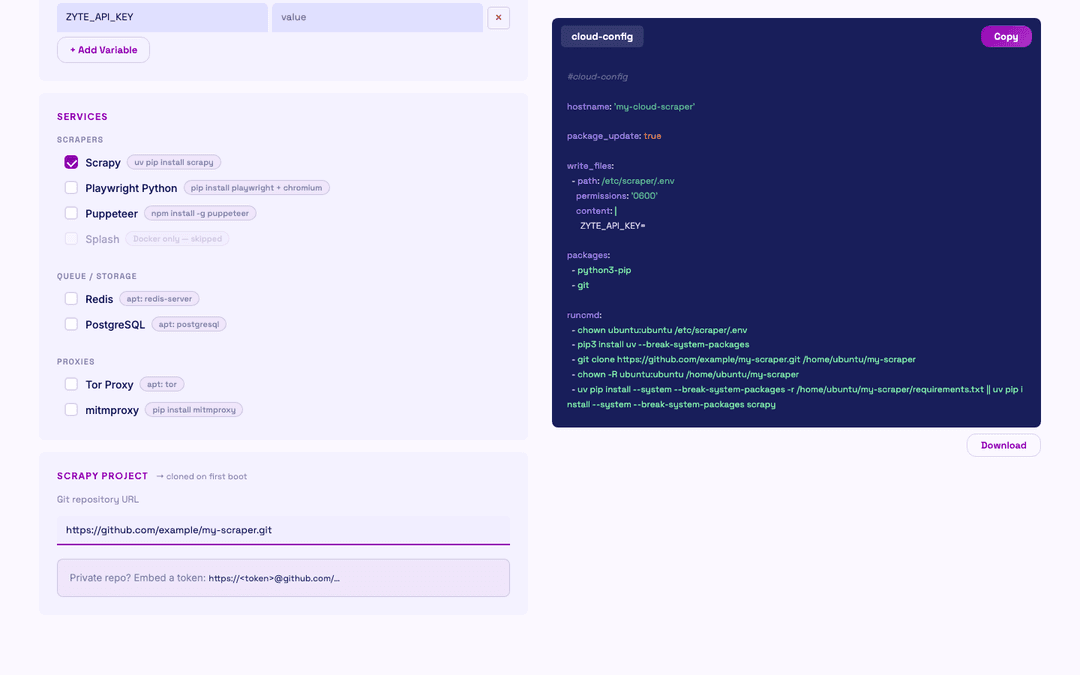
If you have an existing Scrapy project in a git repository, tick the Scrapy service and paste the HTTPS URL of your repo into the git URL field that appears. The generated config adds git to the packages list and a clone sequence to runcmd:
1git clone https://github.com/your-org/your-scraper.git /home/ubuntu/your-scraper
2chown -R ubuntu:ubuntu /home/ubuntu/your-scraper
3cd /home/ubuntu/your-scraper && \
4  uv pip install --system --break-system-packages -r requirements.txt || \
5 uv pip install --system --break-system-packages scrapyThe || scrapy fallback handles projects that use pyproject.toml rather than requirements.txt: if the requirements install fails because the file is absent, a bare Scrapy install ensures the tool is available regardless. Use HTTPS URLs rather than SSH git URLs; SSH would require a deploy key on the VM, which spawn-cloud-scrapers does not provision.
CNT-1201-screenshot_scrapy_git.png
How to use it
The tool is hosted at spawn-cloud-scrapers and requires no account or installation. If you want to run it locally or adapt it for your team:
1git clone https://github.com/zytelabs/spawn-cloud-scraper
2open index.htmlThe workflow:
- Enter a hostname (single-quoted in the output, safe for any provider's user-data field).
- Paste your SSH public key(s).
- Add environment variables: your ZYTE_API_KEY, database credentials, or any other secrets that will land in /etc/scraper/.env on the VM.
- Tick the services you need.
- Optionally paste a Scrapy project git URL.
- Make sure Ubuntu mode is selected (it is the default).
- Copy the generated #cloud-config YAML from the output panel.
CNT-1201-screenshot_ubuntu_output.png
CLI automation across providers
The generated YAML can be passed directly to any provider's CLI. Here are working examples for three common choices:
1doctl auth init
2
3doctl compute droplet create my-scraper \
4  --region nyc3 \
5  --size s-2vcpu-4gb \
6  --image ubuntu-24-04-x64 \
7  --ssh-keys "$(doctl compute ssh-key list --no-header --format FingerPrint)" \
8  --user-data-file ./cloud-config.yaml \
9 --wait1hcloud server create \
2 --name my-scraper \
3 --type cx22 \
4 --image ubuntu-24.04 \
5 --ssh-key your-key-name \
6 --user-data-file cloud-config.yaml1aws ec2 run-instances \
2 --image-id ami-0c55b159cbfafe1f0 \
3 --instance-type t3.small \
4 --key-name your-key-pair \
5 --user-data file://cloud-config.yaml \
6 --count 1After the instance boots, watch cloud-init finish:
1ssh ubuntu@<ip> "cloud-init status --wait && echo done"Or tail the log directly to see each step as it runs:
1ssh ubuntu@<ip> "tail -f /var/log/cloud-init-output.log"Verifying your services
Once cloud-init reports success, verify each service you selected:
1# Redis
2redis-cli -h <ip> -p 6379 ping
3# Expected: PONG
4
5# PostgreSQL
6psql -h <ip> -U postgres -c "SELECT version();"
7
8# Scrapy (interactive shell)
9ssh ubuntu@<ip>
10scrapy shell https://example.com
11
12# Tor exit node
13curl --socks5 <ip>:9050 https://check.torproject.org/api/ip
14
15# mitmproxy web UI
16open http://<ip>:8081Redis and PostgreSQL are enabled via systemd and will restart automatically on reboot. Scrapy and mitmproxy are installed globally via uv --system and are available in the PATH for the ubuntu user.
VPS provider support
Cloud-init is supported by virtually every cloud provider that runs Linux, which makes the Ubuntu mode in spawn-cloud-scrapers the most portable option:
| Provider | cloud-init support | Ubuntu 24.04 image |
|---|---|---|
| DigitalOcean | Yes | ubuntu-24-04-x64 |
| Hetzner Cloud | Yes | ubuntu-24.04 |
| Vultr | Yes | Available |
| AWS EC2 | Yes | AMI in all regions |
| Google Cloud | Yes | ubuntu-2404-lts |
| Azure | Yes | Canonical:ubuntu-24_04-lts |
| Linode/Akamai | Yes | Available |
| OVHcloud | Yes | Available |
| Scaleway | Yes | Available |
| Oracle Cloud | Yes | Available |
If you need a provider that does not support Flatcar Linux, this mode works everywhere. The config is plain YAML with no cloud-provider-specific extensions.
What this approach does not do
Cloud-init is a first-boot provisioner. It runs once, and changes to the cloud-config file do not automatically propagate to running machines. If you update the config and want the change on an existing VM, the options are to redeploy the VM with the new config or to SSH in and apply the change manually. For infrastructure that changes frequently, container-based approaches like the Flatcar mode handle redeployment more gracefully, since the entire stack is described in the compose file and a systemctl restart scraper brings up the new configuration.
For most scraping workloads, however, the VM is provisioned once, runs for weeks or months, and is replaced rather than updated when its job is done. Cloud-init is well suited to that lifecycle, and the combination of a clean Ubuntu 24.04 base, a stable service set, and a reproducible config file eliminates most of the friction that makes infrastructure management tedious for scraping teams.
The architectural patterns for longer-running production pipelines, where the scraping logic itself needs to evolve independently of the infrastructure, are worth reading about separately: Hybrid scraping: the architecture for the modern web covers how to structure a production scraping stack that separates browser sessions from lightweight HTTP fetching, a pattern that fits cleanly on top of a cloud-init-provisioned VM.
Deploy now
Visit spawn-cloud-scrapers, select Ubuntu mode (the default), choose your services, and copy the generated #cloud-config YAML. The GitHub repository contains the full source if you want to extend it with additional services or adapt the output format for your team's toolchain.
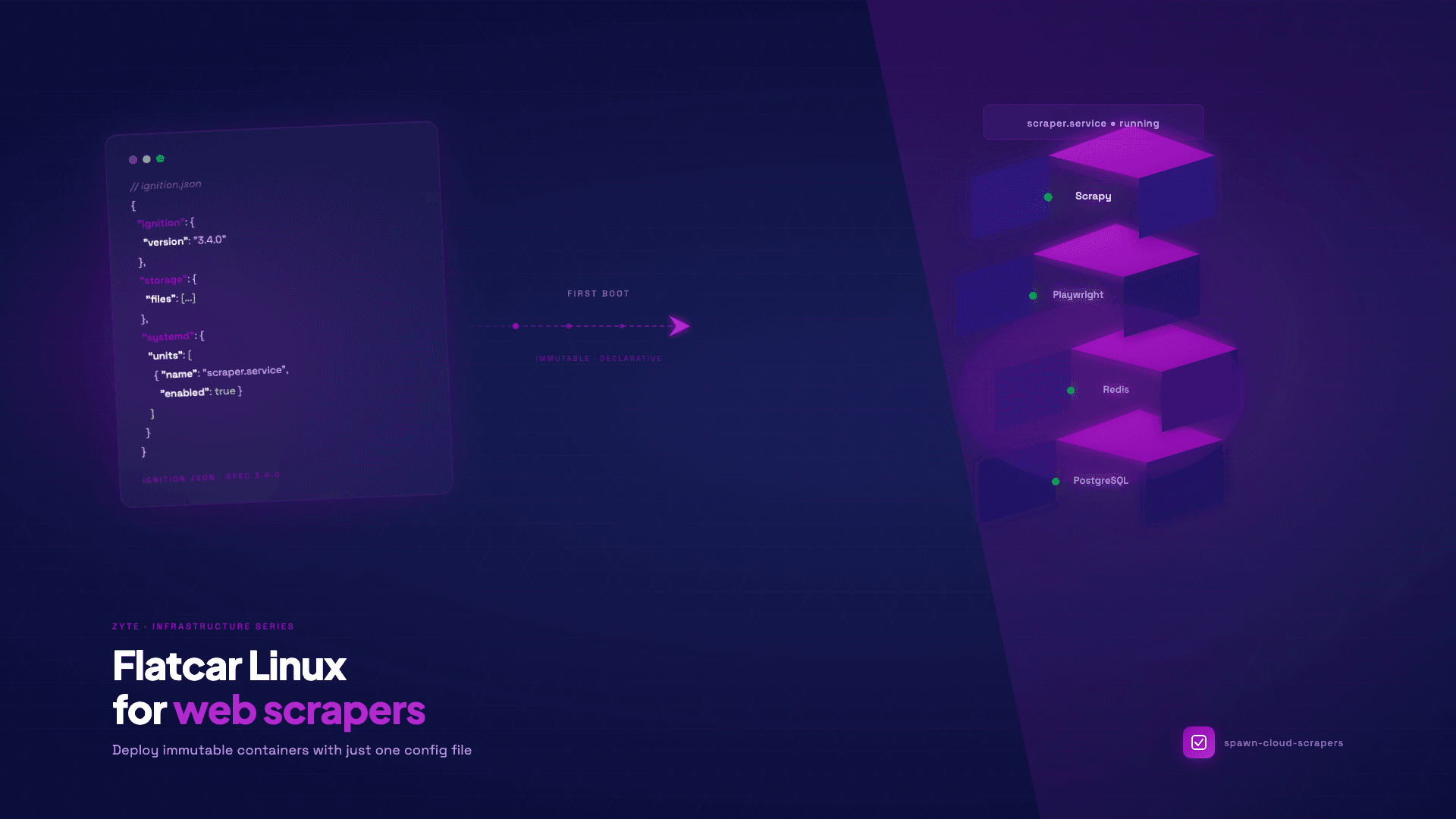
For teams running container-native infrastructure or providers with Flatcar Linux support, the Flatcar mode in the same tool generates an Ignition JSON file that provisions an identical service selection on an immutable, Docker-only OS with no package manager and no configuration drift.
If you would rather skip the infrastructure layer entirely, Scrapy Cloud is worth checking out. It provides fully managed hosting for Scrapy spiders, with a generous free tier, built-in scheduling, job monitoring, and no servers to manage.