Trusted by data-fueled organizations
Web crawlers are becoming increasingly popular in the era of big data, especially now with the advent of Large Language Models (LLMs) such as ChatGPT and LLaMA. The sheer amount of data that is publicly available from the web has a wide variety of applications including market research, sentiment analysis, and predictive modeling.
However, storing and curating this data can be a significant challenge, given its unstructured and dynamic nature. It’s even harder if you take into consideration that most crawlers are executed repeatedly weekly/hourly/daily, creating multiple sets of items every iteration. We can find some articles that delve into the overall process of creating a data pipeline such as this one from Macrometa
In this article, we will explore the steps to achieve a solid data engineering architecture to completely process and curate your acquisition pipeline, and pair that discussion with a real use case from Zyte’s internal projects.
Data Ingestion
Let’s say that you already have your crawlers working, ready to deliver neatly packaged JSON items to be used on your project. This data must flow from the Python Scrapy Spider to your database of choice.
It might land in AWS S3 or GCP Cloud Storage using FeedExports if you can handle large files;
It could be streamed to a Kafka or Redis topic through a custom pipeline to help your SQL database digest your data directly;
It could even stay in your local server and be overwritten every run, saving you concerns about memory and storage (and potentially losing everything you’ve ever crawled!).
The choices you make here will steer the design of your pipeline, making it easier to adopt certain practices: a streaming pipeline will have an item available for post-processing as soon as it hits the queue, but a batch-based process might only make results available after a spider safely concludes its run or compiles a significant amount of data before committing it to your storage space.
For instance, say that you are a Data Engineer working on a live dashboard for a soccer game. You’re monitoring data coming from multiple social networks at once, streaming recently crawled text-based posts to your sentiment analysis tool, and then storing it in a database that can be read from your favorite dashboarding tool (Metabase/Redash/Superset) for stakeholder perusal. Your business case needs data coming in as soon as it is available! A streaming pipeline would be a perfect fit for you, as it would land your data directly into a queue that would be consumed by a live deployed model, and promptly reinserted in your database.
Database Architecture
Before starting your project, you should have a very well-defined table architecture that’s suited to the purposes of the project. Since we’re talking about crawling, this kind of data is usually:
Unstructured: Web-scraped data is often unstructured, not following a specific format or schema.
Thus, your architecture must be flexible in its ingestion.Dynamic: Data can change frequently over time, in content (price information) and layout (text formatting).
Ergo, your architecture must be flexible in its validation.Incomplete: Items will often have missing fields due to the dynamic nature of unstructured data and site layouts.
Consequently, your architecture must allow missing data, and alert you of anomalies.Noisy: It may contain errors, duplicates, or irrelevant information that needs to be filtered out before analysis.
Therefore, your architecture needs some validation and quality assurance (QA) policies.Large: Depending on your periodicity, redundancy policies, and amount of sources, your data might take up a lot of space.
Hence, your architecture needs to be easily scalable in space and table structure.
From those points, we can say that it is easier to use a database that is unconstrained regarding column structure to accommodate the transient nature of web-crawled data. Does that mean non-relational approaches are inherently more suited for web crawling? Not necessarily.
SQL databases are often preferred for structured data, but they can also be used for unstructured data if a proper flexible schema is defined. Creating a multi-table structure that yields a complete item from multiple joins is much more understandable and achievable in SQL-likes. While it is easier to query, relate, and organize data through a relational approach, maintaining this structure might be challenging.
NoSQL databases are unconstrained and highly scalable, making them well-suited for large, dynamic datasets. However, they can be more challenging to query and may require more effort to ensure data consistency and accuracy. It’s the default choice for unstructured data due to its ease of use and setup.
Contrast and compare the optimization efforts to search items in MongoDB and Redshift:
To improve query times in MongoDB you would need to focus on the caching and sharding parameters of your database, distributing your search horizontally to maximize performance.
To do the same in Redshift, you would need to focus on indexing, pre-computing through materialization, and tuning the query structure itself.
Table Disposition
There are many articles and books out there with strategies for setting up your data warehouses on the web. I’m partial to the medallion architecture myself, separating tables through tiers related to their relative quality: raw data has the lowest tier, leveling up with successive post-processing and quality assurance.
In a single-database example of this architecture, we would have raw tables being fed straight from the crawlers (bronze), staging tables with manual/automated QA (silver), and production-ready tables ready for direct consumption from applications (gold). You can further separate raw tables from raw data: HTML data stored for cached crawling would be different from the table that stores the items themselves.
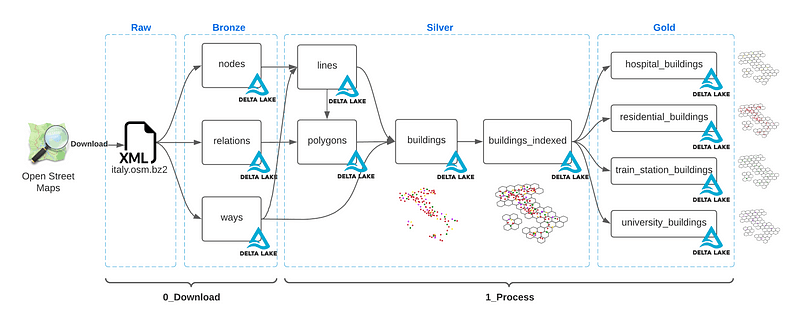
Of course, having everything in a single database is not the usual fare for any given project: mixing and matching the location of your data is the norm, but you should always think about the relative tier of any given table on your pipeline. A pipeline that lands data in PostgreSQL (bronze), processes it through Snowflake/DBT (silver), and makes it available in an Elasticsearch cluster (gold) still adheres to the medallion structure.
We can also discuss the structure of your tables regarding their contents.
An easy way to use SQL and still keep your schema flexibility is to use a catch-all JSON data field as your main data source. You lose pretty much everything that makes SQL powerful that way, as processing JSON data inside any SQL database takes a long time, but it can be a temporary solution until you have a fixed schema.
You should also think about separating sources and item types through your table schemas: should you separate data per source and add a type field to differentiate items, or would it be easier to maintain tables for item types and select sources instead? Exploding item and source separation is also an option to optimize your queries with large database maintenance overhead. Note that this applies to both SQL and NoSQL databases.
Another degree of separation that’s highly valuable for continuous crawling jobs is the timestamp. You can create different tables for historical and current data to make your storage easier to query and coalesce missing data from crawl to crawl.
Another topic that deserves a discussion with your Data Engineering team is the schema versioning approach: if you want to start transferring data from your blob to your column, it’ll be hard to change table structures from start to finish without careful planning. This can be mitigated with the usage of tools like dbt or dataform.
Example from Zyte’s Data-on-Demand Project
Our use case came from a request to crawl specific data sources for multiple item types and to deliver said data after manual QA and back-filling data from previous jobs whenever needed.
The sources are large and dynamic, but we won’t get into the challenges of scraping those pages in this article (since that’s not a problem anymore with Zyte API, check it out!).
We prioritized architecture decisions that would minimize the need for infrastructure or database-specialized programmers, and that would allow fast schema changes from client requests. Having a lower footprint in our internal services makes us less dependent on DevOps and makes us more independent. Since this architecture is self-contained we can take care of it internally, empowering our squad engineer's freedom to maintain and implement new pipelines.
This has led us to the following pipeline:
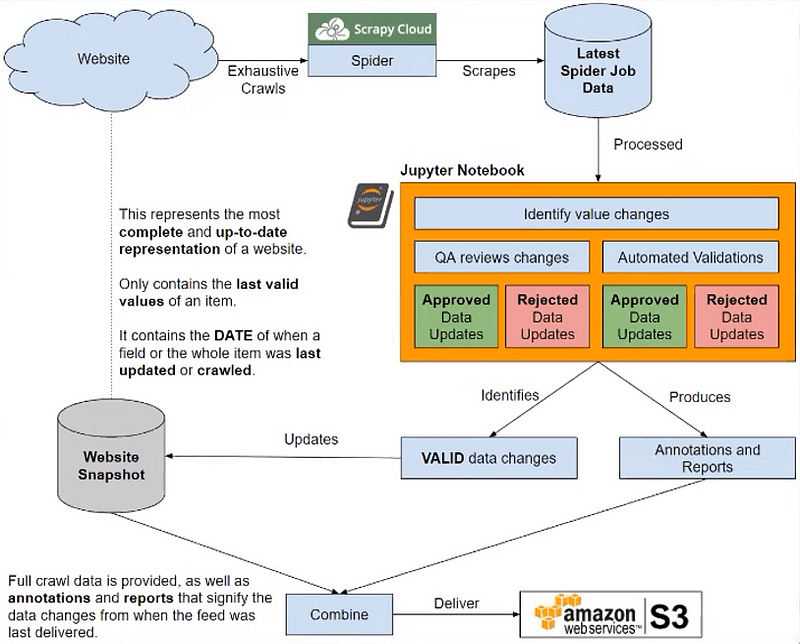
A diagram representation of our pipeline.
Scraping jobs are managed and executed through Scrapy Cloud, Zyte’s cloud-hosting platform for running spiders.
Each job is compared to our source-cached data and inspected by our QA team through automated Jupyter Notebooks to find inconsistencies.
Approved field changes are combined with the cached data, delivered to the client S3 bucket, and then taken to MongoDB Atlas to serve as our latest cached data storage.
Each source is saved in a separate table, with the type of the item being marked as a field.
Each item has a fingerprint, a hash from multiple fields that serves as an ID for deduplication. Since we’re saving over items with the same ID, we avoid duplication in most cases: exceptions are when a website changes something essential for item identification, modifying fields such as SKUs or ISBNs.
Each item is a document, meaning that we don’t have to adhere to a solid schema for each collection.
Analyzing this pipeline from the points we’ve talked about in the sections above this example:
We minimized deployment and infrastructure costs through the selection of a fully-managed database, keeping only our QA system in-house.
We added a validation step to ensure that our data is up to the quality standards we’ve agreed upon.
We can rewind caches through job history, giving us a safety net to fiddle around with schemas and deletions.
We quickly ramped up using MongoDB as it is less constrained than a pure relational approach.
Storing and curating unstructured data from web crawlers can be a daunting task that requires careful planning and a solid data engineering architecture. Your choices ultimately depend on the specific needs and characteristics of the project, and regardless of your ingestion or database used, it’s important to be mindful of the unique qualities of web-scraped data.