PINGDOM_CHECK

#ExtractSummit2026 The world's largest web scraping conference returns. Austin Oct 7–8 · Dublin Nov 10–11.

Register now
Data Services
Pricing
Login
Try Zyte APIContact Sales
  • Unblocking and Extraction

    Zyte API

    The ultimate API for web scraping. Avoid website bans and access a headless browser or AI Parsing

    Ban Handling

    Headless Browser

    AI Extraction

    SERP

    Enterprise

    DocumentationSupport

    Hosting and Deployment

    Scrapy Cloud

    Run, monitor, and control your Scrapy spiders however you want to.

    Coding Agent Add-Ons

    Agentic Web Data

    Plugins that give coding agents the context to build production Scrapy projects. Starts with Claude Code.

  • Data Services
  • Pricing
  • Browse

    • BlogArticles, podcasts, videos
    • Case studiesCustomer outcomes
    • White papersIn-depth reports
    • EventsConferences, webinars, recordings

    Subscribe

    • NewsletterSwiftly delivered
    • Discord communityExtract Data community
  • Product and E-commerce

    From e-commerce and online marketplaces

    Data for AI

    Collect and structure web data to feed AI

    Job Posting

    From job boards and recruitment websites

    Real Estate

    From Listings portals and specialist websites

    News and Article

    From online publishers and news websites

    Search

    Search engine results page data (SERP)

    Social Media

    From social media platforms online

  • Meet Zyte

    Our story, people and values

    Contact us

    Get in touch

    Support

    Knowledge base and raise support tickets

    Terms and Policies

    Accept our terms and policies

    Open Source

    Our open source projects and contributions

    Web Data Compliance

    Guidelines and resources for compliant web data collection

    Join the team building the future of web data
    We're Hiring
    Trust Center
    Security, compliance & certifications
Login
Try Zyte APIContact Sales

Zyte Developers

Coding tools & hacks straight to your inbox

Become part of the community and receive a bi-weekly dosage of all things code.

Join us
    • Zyte Data
    • News & Articles
    • Search
    • Social Media
    • Product
    • Data for AI
    • Job Posting
    • Real Estate
    • Zyte API - Ban Handling
    • Zyte API - Headless Browser
    • Zyte API - AI Extraction
    • Web Scraping Copilot
    • Zyte API Enterprise
    • Scrapy Cloud
    • Solution Overview
    • Blog
    • Webinars
    • Case Studies
    • White Papers
    • Documentation
    • Web Scraping Maturity Self-Assesment
    • Web Data compliance
    • Meet Zyte
    • Jobs
    • Terms and Policies
    • Trust Center
    • Support
    • Contact us
    • Pricing
    • Do not sell
    • Cookie settings
    • Sign up
    • Talk to us
    • Cost estimator
All articles
AI60, 60 articles
Data quality13, 13 articles
Developer interest57, 57 articles
Integration2, 2 articles
Open-source40, 40 articles
Proxies29, 29 articles
Scraping practice17, 17 articles
Scraping strategy26, 26 articles
Web data60, 60 articles
Web scraping APIs33, 33 articles
Zyte API59, 59 articles
Scrapy48, 48 articles
Scrapy Cloud10, 10 articles
Web Scraping Copilot12, 12 articles
AI & Machine Learning1, 1 articles
Automotive2, 2 articles
E-commerce & retail26, 26 articles
Entertainment & Streaming2, 2 articles
Financial Services8, 8 articles
Government2, 2 articles
Market Research & Intelligence3, 3 articles
Media & publishing8, 8 articles
Real Estate2, 2 articles
Recruitment & HR3, 3 articles
Transportation & Logistics2, 2 articles
Travel & hospitality2, 2 articles
Extract Summit25, 25 articles
PyCon1, 1 articles

Appearance

Discord Community
BlogUse caseWeb scraping on an iPhone? Yes, really!
ArticleUse case

Web scraping on an iPhone? Yes, really!

When you can scrape the web by API, a world of possibility opens up. Yes, you can extract live web data using iOS Shortcuts.

Ayan Pahwa · Developer Advocate

10 min read · June 4, 2026

Web scraping on an iPhone? Yes, really!

Imagine waking up to a notification on your iPhone with a fresh quote for the day. No app to open, no feed to scroll through. Just a quiet ping, a line of wisdom, and you're off.

Now imagine that notification was powered by a live web scrape that ran automatically while you slept.

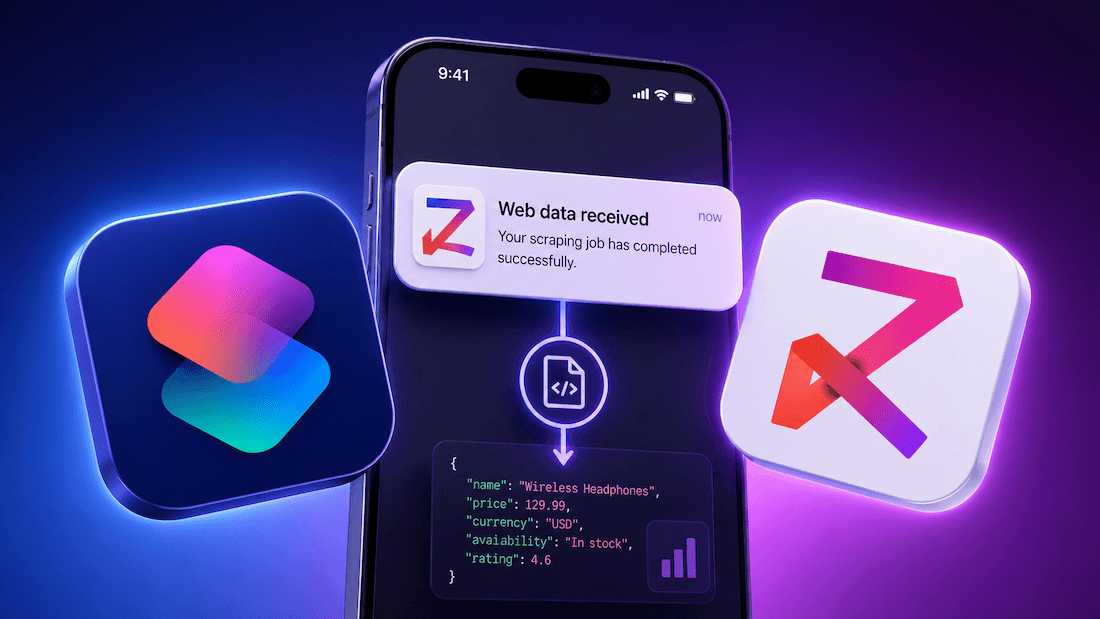
Here's the thing: that is exactly what I’ve built, using only Apple Shortcuts and Zyte API. No third-party apps, no Python environment, no server - just an iPhone and a single API call.

Web scraping is just an API call

Most people think of web scraping as a Python script hammering URLs from a server. And for a long time, that was the mental model: install a library, write a parser, fight CAPTCHAs, rotate proxies, and hope for the best.

Zyte API flips that model. Instead of building scraping infrastructure, you make a single POST request and get back clean data. Zyte handles the unblocking, the browser rendering, and the anti-ban mechanics so you do not have to.

That means web scraping is no longer tied to a specific tool, language, or machine. Any device that can make an HTTP request can scrape the web - a bash script, a Jupyter notebook, a serverless function, a Node.js app, or, as we are about to show you, an iPhone shortcut.

What we're building

We are going to build a shortcut that does the following every morning:

  1. Picks a random page from quotes.toscrape.com, a sandbox site with 100 quotes across 10 pages.
  2. Sends that URL to Zyte API, which returns the page HTML.
  3. Extracts a random quote using a regex match.
  4. Fires an iPhone notification with the quote as the body.

The whole thing runs silently via Apple automations. No interaction required.

Building the shortcut, step by step

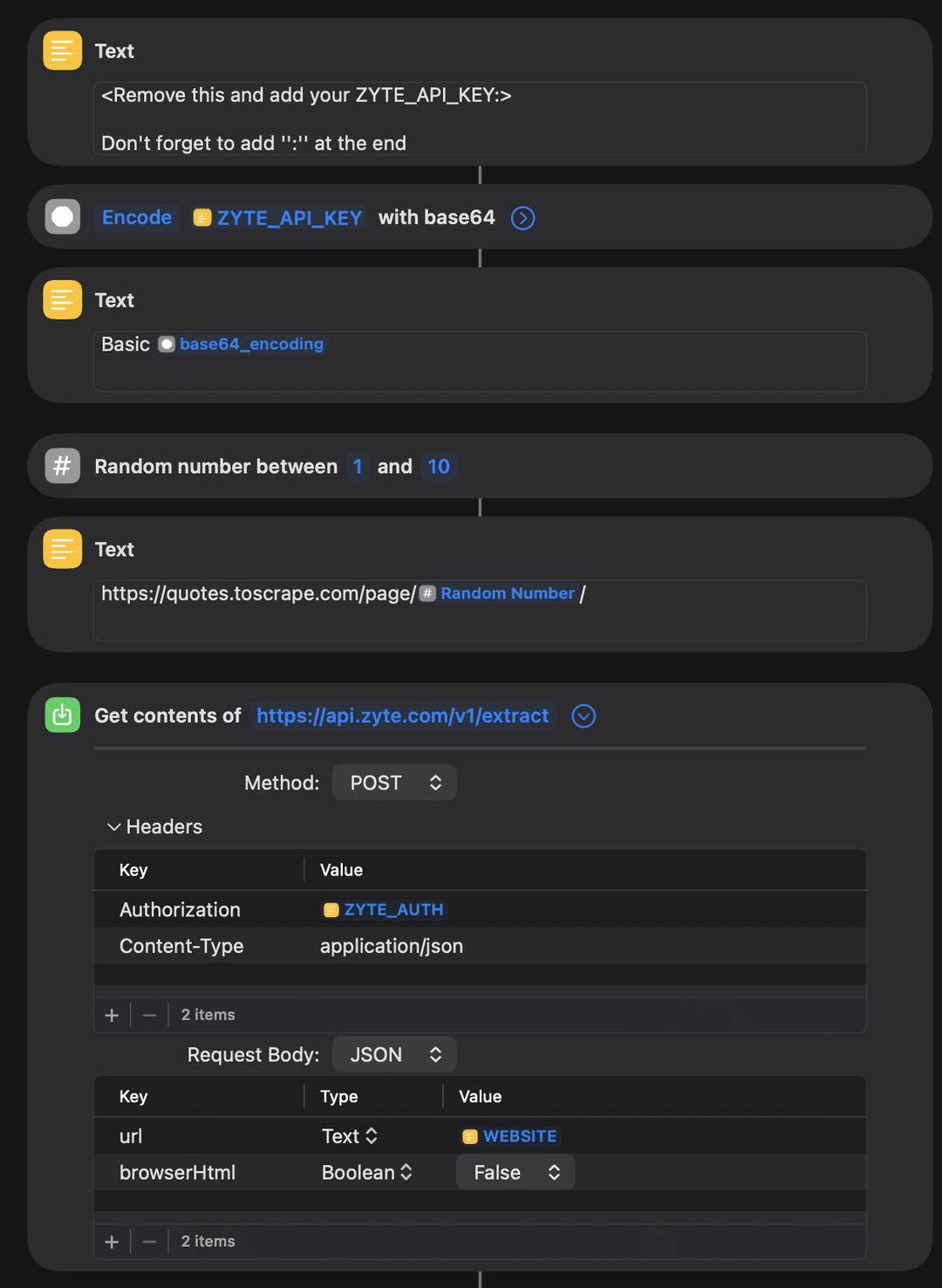
The shortcut has 10 blocks. Here is what each one does:

Block 1: Text (your API key) Add your Zyte API key here with a : appended at the end. That colon is required for HTTP Basic authentication and is easy to miss.

Block 2: Encode with Base64 The Shortcuts app requires the API key to be Base64-encoded before it can be used in an authorization header. This block does that encoding and saves the result as base64_encoding.

Block 3: Text (auth string) Builds the final authorization value: Basic <base64_encoding>. This becomes your ZYTE_AUTH variable.

Block 4: Random number Generates a random whole number between one and ten. This selects which page of quotes to scrape.

Block 5: Text (target URL) Assembles the full URL: https://quotes.toscrape.com/page/\<Random Number>/.

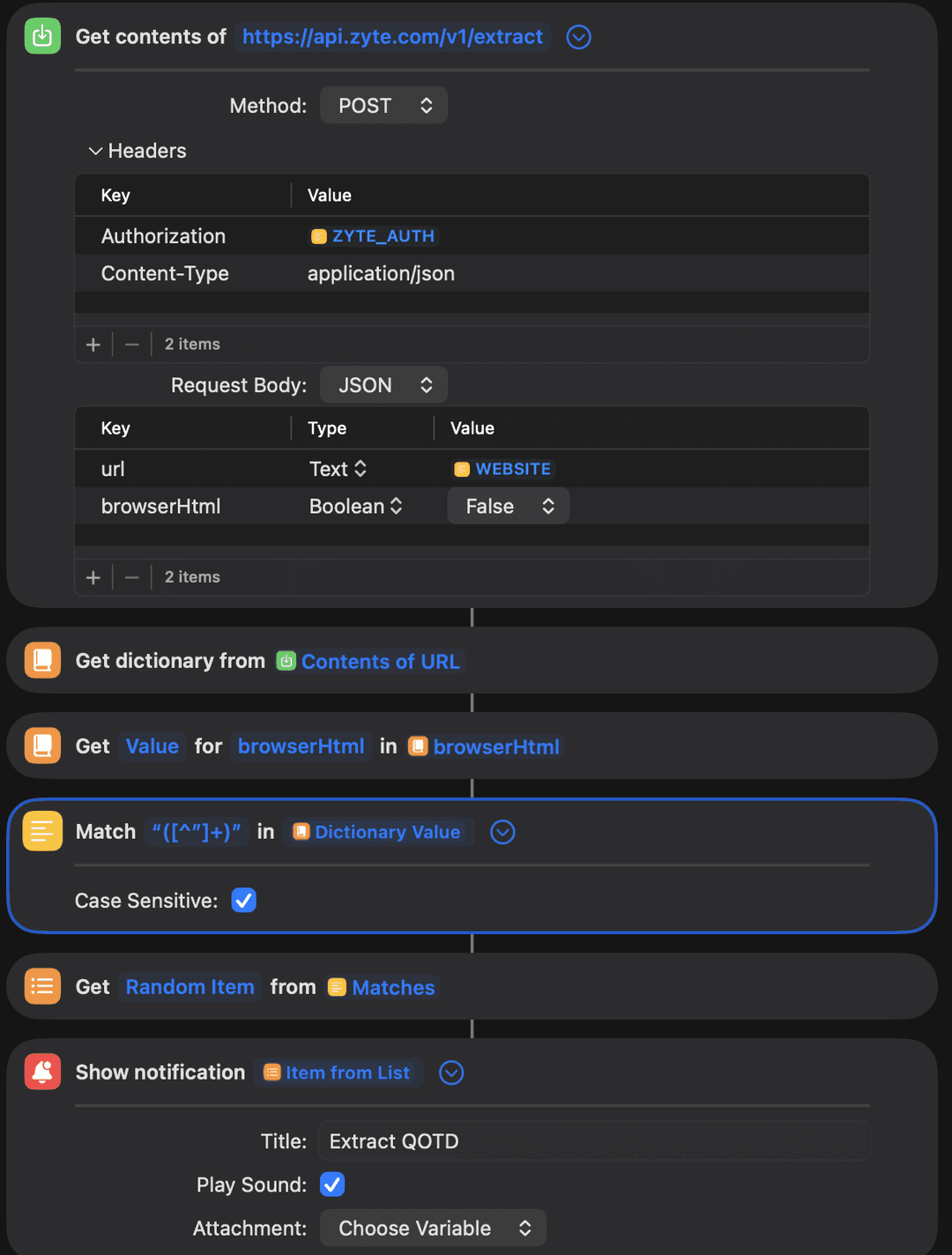
Block 6: Get contents of URL (the Zyte API call) This is the core of the shortcut. It makes a POST request to https://api.zyte.com/v1/extract with the following setup:

  • Method: POST
  • Headers: Authorization: ZYTE_AUTH, Content-Type: application/json
  • Request body (JSON):
1{
2  "url": "https://quotes.toscrape.com/page/3/",
3  "browserHtml": false
4}
Copy

Since quotes.toscrape.com is a static site (it does not render using JavaScript), browserHtml: false is fine. Zyte API fetches the raw HTML and returns it in the response.

Block 7: Get dictionary from response Parses the API response into a dictionary.

Block 8: Get value for browserHtml Pulls the raw HTML string out of the dictionary.

Block 9: Match text with regex Runs the pattern "([^"]+)+" against the HTML to extract all quoted text strings. This captures the quote content wrapped in standard HTML quote markup.

Block 10: Get random item, then show notification Picks one match at random and fires an iPhone notification with the title "Extract QOTD" and the quote as the body.
Give it a shot. Download the shortcut on your iPhone, iPad or Mac from here and get your Zyte API key from here.

Automate it: Wake up to a quote every morning
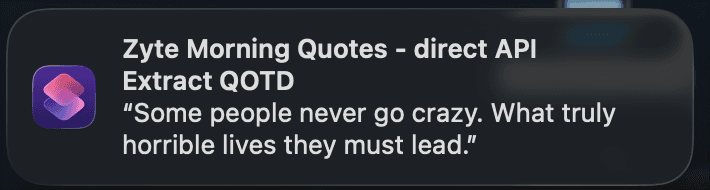
Running the shortcut manually is satisfying the first time. But the real magic is making it run itself.

  • Open the Shortcuts app and tap the Automation tab at the bottom.
  • Tap the + button and choose Personal Automation.
  • From the list of triggers, pick Time of Day and set it to whatever time you want your morning quote to arrive.
  • Tap Next, then search for and add a Run Shortcut action, and select your Zyte morning quotes shortcut.
  • Tap Done.

That is it. Every morning at your chosen time, the shortcut fires, scrapes a fresh quote, and sends it to your notification center. No interaction required, no phone to unlock, just a quiet ping.

What else could you build?

Once you realize that any API call is a potential data source, the shortcut format gets a lot more interesting. A few ideas to get you thinking:

  • Price drop alert: Scrape a product page daily and notify yourself when the price falls below a threshold
  • News headline digest: Pull the top headlines from a news site each morning and get a five-item notification summary
  • Sports score recap: Check last night's scores from a stats site and surface the result of your team's game
  • Flight price tracker: Monitor a route and alert yourself when fares dip to your target price

Each of these follows the same pattern: one Zyte API call, one URL, structured data back, and a notification on your wrist or lock screen.

Try it yourself

Download the shortcut directly to your iPhone, iPad, or Mac: Download the Zyte Morning Quotes shortcut

Once it is installed, open the first Text block, swap in your Zyte API key (with : at the end), and run it. You should see a notification within a few seconds.

If you tweak the shortcut or build something entirely different using Zyte API, we would love to see it. Share it in the Zyte community and subscribe to the newsletter while you're there for more projects like this one.


Try Zyte API

Build your first scraper in minutes

Free trial, no credit card. From a single request to production in an afternoon.

Get started
Use case

Ayan Pahwa

Developer Advocate

More from this author

In this article

  • Web scraping is just an API call
  • What we're building
  • Building the shortcut, step by step
  • Automate it: Wake up to a quote every morning
  • What else could you build?
  • Try it yourself

Follow

Get the latest

Zyte and the data web in your inbox — or wherever you already are.

Subscribe

Or follow elsewhere

Continue reading

Scraping Swiss Army Knife: My personal fix for web setup fatigue using Docker, Scrapy and Zyte
Use case

Scraping Swiss Army Knife: My personal fix for web setup fatigue using Docker, Scrapy and Zyte

Tired of repeating web scraping setup? Learn how a multi-arch Docker container with Scrapy, Zyte, Requests, and Pandas speeds up exploration and debugging.

Ayan Pahwa·10 min·February 5, 2026
How I trade gold using e-ink, live data and an old Raspberry Pi
Use case

How I trade gold using e-ink, live data and an old Raspberry Pi

Track real-world gold and silver retail prices automatically using Zyte API, Python, and a Raspberry Pi with an e-ink display. Learn how to scrape rendered HTML, parse prices, and build an always-on trading dashboard.

Ayan Pahwa·10 min·February 2, 2026
How price extraction is fuelling insights for modern retailers
Use case

How price extraction is fuelling insights for modern retailers

Retail pricing has long combined data, experience, and instinct – but today’s market volatility demands a faster, smarter approach.

Theresia Tanzil·7 mins·July 23, 2025

The Community · Newsletter

The best of Zyte and the data web, in your inbox.

One curated edition — new articles, product updates, and the stories shaping the data web. No noise.

G2.com

Capterra.com

Proxyway.com

EWDCI logoMost loved workplace certificateZyte rewardISO 27001 iconG2 rewardG2 rewardG2 reward

© Zyte Group Limited 2026