Handling JavaScript in Scrapy with Splash
A common roadblock when developing spiders is dealing with sites that use a heavy amount of JavaScript. Many modern websites run entirely on JavaScript and require scripts to be run in order for the page to render properly. In many cases, pages also present modals and other dialogues that need to be interacted with to show the full page. In this post, we’re going to show you how you can use Splash to handle JavaScript in your Scrapy projects.
What is Splash?
Splash is our in-house solution for JavaScript rendering, implemented in Python using Twisted and QT. Splash is a lightweight web browser that is capable of processing multiple pages in parallel, executing custom JavaScript in the page context, and much more. Best of all, it’s open-source!
Setting up Splash
The easiest way to set up Splash is through Docker:
Plain text
Copy to clipboard
Open code in new window
EnlighterJS 3 Syntax Highlighter
$ docker pull scrapinghub/splash
$ docker run -p 5023:5023 -p 8050:8050 -p 8051:8051 scrapinghub/splash
$ docker pull scrapinghub/splash $ docker run -p 5023:5023 -p 8050:8050 -p 8051:8051 scrapinghub/splash
1$ docker pull scrapinghub/splash
2$ docker run -p 5023:5023 -p 8050:8050 -p 8051:8051 scrapinghub/splashSplash will now be running on localhost:8050. If you’re using a Docker Machine on OS X or Windows, it will be running on the IP address of Docker’s virtual machine.
If you would like to install Splash without using Docker, please refer to the documentation.
Using Splash with Scrapy
Now that Splash is running, you can test it in your browser:
Plain text
Copy to clipboard
Open code in new window
EnlighterJS 3 Syntax Highlighter
1http://localhost:8050/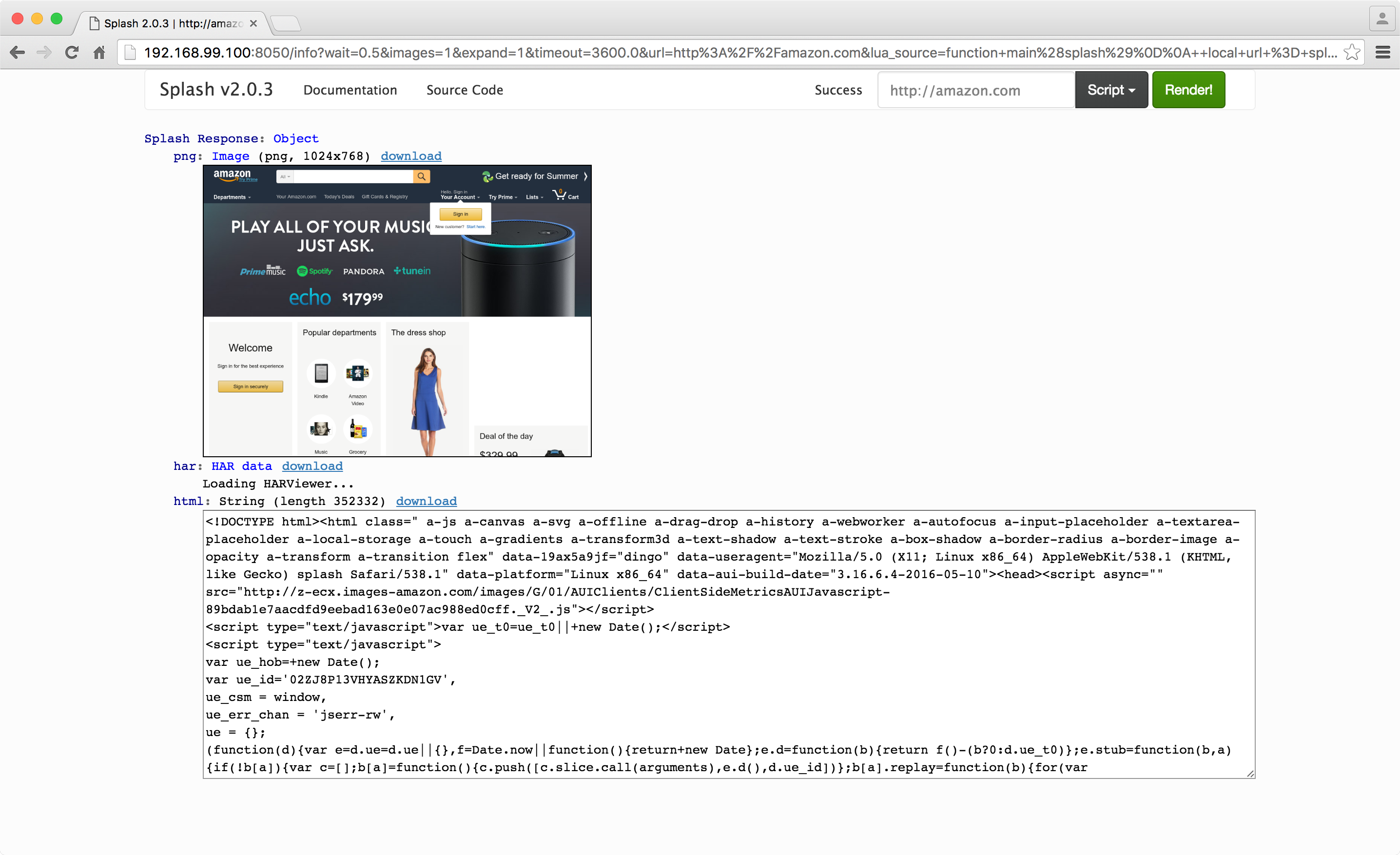
On the right enter a URL (e.g. http://amazon.com) and click 'Render me!'. Splash will display a screenshot of the page as well as charts and a list of requests with their timings. At the bottom, you should see a text box containing the rendered HTML.
Manually
You can use Request to send links to Splash:
Plain text
Copy to clipboard
Open code in new window
EnlighterJS 3 Syntax Highlighter
req_url = "http://localhost:8050/render.json"
body = json.dumps({
"url": url,
"har": 1,
"html": 0,
})
headers = Headers({'Content-Type': 'application/json'})
yield scrapy.Request(req_url, self.parse_link, method='POST', body=body, headers=headers)
req_url = "http://localhost:8050/render.json" body = json.dumps({ "url": url, "har": 1, "html": 0, }) headers = Headers({'Content-Type': 'application/json'}) yield scrapy.Request(req_url, self.parse_link, method='POST', body=body, headers=headers)
1req\_url = "http://localhost:8050/render.json"
2body = json.dumps({
3    "url": url,
4    "har": 1,
5    "html": 0,
6})
7headers = Headers({'Content-Type': 'application/json'})
8yield scrapy.Request(req\_url, self.parse\_link, method='POST', body=body, headers=headers)If you’re using CrawlSpider, the easiest way is to override the process_links function in your spider to replace links with their Splash equivalents:
Plain text
Copy to clipboard
Open code in new window
EnlighterJS 3 Syntax Highlighter
def process_links(self, links):
for link in links:
link.url = "http://localhost:8050/render.html?" + urlencode({ 'url' : link.url })
return links
def process_links(self, links): for link in links: link.url = "http://localhost:8050/render.html?" + urlencode({ 'url' : link.url }) return links
1def process\_links(self, links):
2    for link in links:
3        link.url = "http://localhost:8050/render.html?" + urlencode({ 'url' : link.url })
4 return linksScrapy-Splash (recommended)
The preferred way to integrate Splash with Scrapy is using scrapy-splash. See here for why it's recommended you use the middleware instead of using it manually. You can install scrapy-splash using pip:
Plain text
Copy to clipboard
Open code in new window
EnlighterJS 3 Syntax Highlighter
pip install scrapy-splash
pip install scrapy-splash
1pip install scrapy-splashTo use scrapy-splash in your project, you first need to enable the middleware:
Plain text
Copy to clipboard
Open code in new window
EnlighterJS 3 Syntax Highlighter
DOWNLOADER_MIDDLEWARES = {
'scrapy_splash.SplashCookiesMiddleware': 723,
'scrapy_splash.SplashMiddleware': 725,
'scrapy.downloadermiddlewares.httpcompression.HttpCompressionMiddleware': 810,
}
DOWNLOADER_MIDDLEWARES = { 'scrapy_splash.SplashCookiesMiddleware': 723, 'scrapy_splash.SplashMiddleware': 725, 'scrapy.downloadermiddlewares.httpcompression.HttpCompressionMiddleware': 810, }
1DOWNLOADER\_MIDDLEWARES = {
2    'scrapy\_splash.SplashCookiesMiddleware': 723,
3    'scrapy\_splash.SplashMiddleware': 725,
4    'scrapy.downloadermiddlewares.httpcompression.HttpCompressionMiddleware': 810,
5}The middleware needs to take precedence over HttpProxyMiddleware, which by default is at position 750, so we set the middleware positions to numbers below 750.
You then need to set the SPLASH_URL setting in your project's settings.py:
Plain text
Copy to clipboard
Open code in new window
EnlighterJS 3 Syntax Highlighter
SPLASH_URL = 'http://localhost:8050/'
SPLASH_URL = 'http://localhost:8050/'
1SPLASH\_URL = 'http://localhost:8050/'Don’t forget, if you’re using a Docker Machine on OS X or Windows, you will need to set this to the IP address of Docker’s virtual machine, e.g.:
Plain text
Copy to clipboard
Open code in new window
EnlighterJS 3 Syntax Highlighter
SPLASH_URL = 'http://192.168.59.103:8050/'
SPLASH_URL = 'http://192.168.59.103:8050/'
1SPLASH\_URL = 'http://192.168.59.103:8050/'Enable SplashDeduplicateArgsMiddleware to support cache_args feature: it allows to save disk space by not storing duplicate Splash arguments multiple times in a disk request queue. If Splash 2.1+ is used the middleware also allows saving network traffic by not sending these duplicate arguments to Splash server multiple times.
Plain text
Copy to clipboard
Open code in new window
EnlighterJS 3 Syntax Highlighter
SPIDER_MIDDLEWARES = {
'scrapy_splash.SplashDeduplicateArgsMiddleware': 100,
}
SPIDER_MIDDLEWARES = { 'scrapy_splash.SplashDeduplicateArgsMiddleware': 100, }
1SPIDER\_MIDDLEWARES = {
2    'scrapy\_splash.SplashDeduplicateArgsMiddleware': 100,
3}Scrapy currently doesn’t provide a way to override request fingerprints calculation globally, so you will also have to set a custom DUPEFILTER_CLASS and a custom cache storage backend:
Plain text
Copy to clipboard
Open code in new window
EnlighterJS 3 Syntax Highlighter
DUPEFILTER_CLASS = 'scrapy_splash.SplashAwareDupeFilter'
HTTPCACHE_STORAGE = 'scrapy_splash.SplashAwareFSCacheStorage'
DUPEFILTER_CLASS = 'scrapy_splash.SplashAwareDupeFilter' HTTPCACHE_STORAGE = 'scrapy_splash.SplashAwareFSCacheStorage'
1DUPEFILTER\_CLASS = 'scrapy\_splash.SplashAwareDupeFilter'
2HTTPCACHE\_STORAGE = 'scrapy\_splash.SplashAwareFSCacheStorage'If you already use another cache storage backend, you will need to subclass it and replace all calls to scrapy.util.request.request_fingerprint with scrapy_splash.splash_request_fingerprint.
Now that the Splash middleware is enabled, you can use SplashRequest in place of scrapy.Request to render pages with Splash.
For example, if we wanted to retrieve the rendered HTML for a page, we could do something like this:
Plain text
Copy to clipboard
Open code in new window
EnlighterJS 3 Syntax Highlighter
import scrapy
from scrapy_splash import SplashRequest
class MySpider(scrapy.Spider):
start_urls = ["http://example.com", "http://example.com/foo"\]
def start_requests(self):
for url in self.start_urls:
yield SplashRequest(url, self.parse,
endpoint='render.html',
args={'wait': 0.5},
)
def parse(self, response):
# response.body is a result of render.html call; it
# contains HTML processed by a browser.
# …
import scrapy from scrapy_splash import SplashRequest class MySpider(scrapy.Spider): start_urls = ["http://example.com", "http://example.com/foo"\] def start_requests(self): for url in self.start_urls: yield SplashRequest(url, self.parse, endpoint='render.html', args={'wait': 0.5}, ) def parse(self, response): # response.body is a result of render.html call; it # contains HTML processed by a browser. # …
1import scrapy
2from scrapy\_splash import SplashRequest
3
4class MySpider(scrapy.Spider):
5    start\_urls = \["http://example.com", "http://example.com/foo"\]
6
7    def start\_requests(self):
8        for url in self.start\_urls:
9            yield SplashRequest(url, self.parse,
10                endpoint='render.html',
11                args={'wait': 0.5},
12           )
13
14    def parse(self, response):
15        # response.body is a result of render.html call; it
16        # contains HTML processed by a browser.
17 # …The ‘args’ dict contains arguments to send to Splash. You can find a full list of available arguments in the HTTP API documentation. By default, the endpoint is set to ‘render.json’, but here we have overridden it and set it to ‘render.html’ to provide an HTML response.
Running custom JavaScript
Sometimes you may need to press a button or close a modal to view the page properly. Splash lets you run your own JavaScript code within the context of the web page you’re requesting. There are several ways you can accomplish this:
Using the js_source parameter
You can use the js_source parameter to send the JavaScript you want to execute. The JavaScript code is executed after the page finished loading but before the page is rendered. This allows using the JavaScript code to modify the page being rendered. For example, you can do it with Scrapy-Splash:
Plain text
Copy to clipboard
Open code in new window
EnlighterJS 3 Syntax Highlighter
# Render page and modify its title dynamically
yield SplashRequest(
endpoint='render.html',
args={'js_source': 'document.title="My Title";'},
)
# Render page and modify its title dynamically yield SplashRequest( 'http://example.com', endpoint='render.html', args={'js_source': 'document.title="My Title";'}, )
1\# Render page and modify its title dynamically
2yield SplashRequest(
3    'http://example.com',
4    endpoint='render.html',
5    args={'js\_source': 'document.title="My Title";'},
6)Splash scripts
Splash supports Lua scripts through its execute endpoint. This is the preferred way to execute JavaScript as you can preload libraries, choose when to execute the JavaScript, and retrieve the output.
Here’s an example script:
Plain text
Copy to clipboard
Open code in new window
EnlighterJS 3 Syntax Highlighter
function main(splash)
assert(splash:go(splash.args.url))
splash:wait(0.5)
local title = splash:evaljs("document.title")
return {title=title}
end
function main(splash) assert(splash:go(splash.args.url)) splash:wait(0.5) local title = splash:evaljs("document.title") return {title=title} end
1function main(splash)
2    assert(splash:go(splash.args.url))
3    splash:wait(0.5)
4    local title = splash:evaljs("document.title")
5    return {title=title}
6endYou need to send that script to the execute endpoint, in the lua_source argument.
This will return a JSON object containing the title:
Plain text
Copy to clipboard
Open code in new window
EnlighterJS 3 Syntax Highlighter
{
"title": "Some title"
}
{ "title": "Some title" }
1{
2     "title": "Some title"
3}Every script requires a main function to act as the entry point. You can return a Lua table that will be rendered as JSON, which is what we have done here. We use the splash:go function to tell Splash to visit the URL. The splash:evaljs function lets you execute JavaScript within the page context, however, if you don't need the result you should use splash:runjs instead.
You can test your Splash scripts in your browser by visiting your Splash instance’s index page (e.g. http://localhost:8050/). It’s also possible to use Splash with IPython notebook as an interactive web-based development environment, see here for more details.
It’s often the case that you need to click a button before the page is displayed. We can do that using splash:mouse_click function:
Plain text
Copy to clipboard
Open code in new window
EnlighterJS 3 Syntax Highlighter
function main(splash)
assert(splash:go(splash.args.url))
local get_dimensions = splash:jsfunc([[
function () {
var rect = document.getElementById('button').getClientRects()[0];
return {"x": rect.left, "y": rect.top}
}
]])
splash:set_viewport_full()
splash:wait(0.1)
local dimensions = get_dimensions()
splash:mouse_click(dimensions.x, dimensions.y)
-- Wait split second to allow event to propagate.
splash:wait(0.1)
return splash:html()
end
function main(splash) assert(splash:go(splash.args.url)) local get_dimensions = splash:jsfunc([[ function () { var rect = document.getElementById('button').getClientRects()[0]; return {"x": rect.left, "y": rect.top} } ]]) splash:set_viewport_full() splash:wait(0.1) local dimensions = get_dimensions() splash:mouse_click(dimensions.x, dimensions.y) -- Wait split second to allow event to propagate. splash:wait(0.1) return splash:html() end
1function main(splash)
2    assert(splash:go(splash.args.url))
3    local get\_dimensions = splash:jsfunc(\[\[
4        function () {
5            var rect = document.getElementById('button').getClientRects()\[0\];
6            return {"x": rect.left, "y": rect.top}
7        }
8    \]\])
9    splash:set\_viewport\_full()
10    splash:wait(0.1)
11    local dimensions = get\_dimensions()
12    splash:mouse\_click(dimensions.x, dimensions.y)
13    -- Wait split second to allow event to propagate.
14    splash:wait(0.1)
15    return splash:html()
16endHere we use splash:jsfunc to define a function that will return the element coordinates, then make sure the element is visible with splash:set_viewport_full, and click on the element. Splash then returns the rendered HTML.
You can find more info on running JavaScript with Splash in the docs, and for a more in-depth tutorial, check out the Splash Scripts Tutorial.
We hope this tutorial gave you a nice introduction to Splash, and please let us know if you have any questions or comments!