PINGDOM_CHECK

#ExtractSummit2026 The world's largest web scraping conference returns. Austin Oct 7–8 · Dublin Nov 10–11.

Register now
Data Services
Pricing
Login
Try Zyte APIContact Sales
  • Unblocking and Extraction

    Zyte API

    The ultimate API for web scraping. Avoid website bans and access a headless browser or AI Parsing

    Ban Handling

    Headless Browser

    AI Extraction

    SERP

    Enterprise

    DocumentationSupport

    Hosting and Deployment

    Scrapy Cloud

    Run, monitor, and control your Scrapy spiders however you want to.

    Coding Agent Add-Ons

    Agentic Web Data

    Plugins that give coding agents the context to build production Scrapy projects. Starts with Claude Code.

  • Data Services
  • Pricing
  • Browse

    • BlogArticles, podcasts, videos
    • Case studiesCustomer outcomes
    • White papersIn-depth reports
    • EventsConferences, webinars, recordings

    Subscribe

    • NewsletterSwiftly delivered
    • Discord communityExtract Data community
  • Product and E-commerce

    From e-commerce and online marketplaces

    Data for AI

    Collect and structure web data to feed AI

    Job Posting

    From job boards and recruitment websites

    Real Estate

    From Listings portals and specialist websites

    News and Article

    From online publishers and news websites

    Search

    Search engine results page data (SERP)

    Social Media

    From social media platforms online

  • Meet Zyte

    Our story, people and values

    Contact us

    Get in touch

    Support

    Knowledge base and raise support tickets

    Terms and Policies

    Accept our terms and policies

    Open Source

    Our open source projects and contributions

    Web Data Compliance

    Guidelines and resources for compliant web data collection

    Join the team building the future of web data
    We're Hiring
    Trust Center
    Security, compliance & certifications
Login
Try Zyte APIContact Sales

Zyte Developers

Coding tools & hacks straight to your inbox

Become part of the community and receive a bi-weekly dosage of all things code.

Join us
    • Zyte Data
    • News & Articles
    • Search
    • Social Media
    • Product
    • Data for AI
    • Job Posting
    • Real Estate
    • Zyte API - Ban Handling
    • Zyte API - Headless Browser
    • Zyte API - AI Extraction
    • Web Scraping Copilot
    • Zyte API Enterprise
    • Scrapy Cloud
    • Solution Overview
    • Blog
    • Webinars
    • Case Studies
    • White Papers
    • Documentation
    • Web Scraping Maturity Self-Assesment
    • Web Data compliance
    • Meet Zyte
    • Jobs
    • Terms and Policies
    • Trust Center
    • Support
    • Contact us
    • Pricing
    • Do not sell
    • Cookie settings
    • Sign up
    • Talk to us
    • Cost estimator
All articles
AI60, 60 articles
Data quality13, 13 articles
Developer interest57, 57 articles
Integration2, 2 articles
Open-source40, 40 articles
Proxies29, 29 articles
Scraping practice17, 17 articles
Scraping strategy26, 26 articles
Web data60, 60 articles
Web scraping APIs33, 33 articles
Zyte API59, 59 articles
Scrapy48, 48 articles
Scrapy Cloud10, 10 articles
Web Scraping Copilot12, 12 articles
AI & Machine Learning1, 1 articles
Automotive2, 2 articles
E-commerce & retail26, 26 articles
Entertainment & Streaming2, 2 articles
Financial Services8, 8 articles
Government2, 2 articles
Market Research & Intelligence3, 3 articles
Media & publishing8, 8 articles
Real Estate2, 2 articles
Recruitment & HR3, 3 articles
Transportation & Logistics2, 2 articles
Travel & hospitality2, 2 articles
Extract Summit25, 25 articles
PyCon1, 1 articles

Appearance

Discord Community
BlogUse casePrice Intelligence With Python: Scrapy, SQL, And Pandas
ArticleUse case

Price Intelligence With Python: Scrapy, SQL, And Pandas

Smart Price intelligence for retailers is becoming increasingly important. In this article we will extract products data then try to get insights out of it.

A

Attila Toth

7 min read · October 8, 2019

Price Intelligence With Python: Scrapy, SQL, And Pandas

Price intelligence with Python: Scrapy, SQL, and Pandas

In this article, I will guide you through a web scraping and data visualization project. We will extract e-commerce data from real e-commerce websites then try to get some insights out of it. The goal of this article is to show you how to get product pricing data from the web and what are some ways to analyze pricing data. We will also look at how price intelligence makes a real difference for e-commerce companies for smarter price intelligence decisions.

This is the simple process we are going to follow for this article:

  1. Identify data sources and fields
  2. Extract and store data
  3. Analyze data

Identify data sources and fields

Websites

In a real-life project, you’d probably know which websites you want to get data from. For this article, I’m choosing some popular European e-commerce stores.

Fields to scrape

When scraping product information we have an endless amount of data types we could get from an e-commerce site: product name, product-specific attributes, price, stock, reviews, category, etc. For now, we will focus on four fields that have the potential to give us the most interesting insights:

  • product name
  • price
  • stock
  • category

See how we at Zyte structure product data.

Ethical web scraping

Before we start writing code to extract data from any website, it’s important to make sure we are scraping ethically. First, we should check the robots.txt file and see if it allows us to visit the pages we want to get data from.

Example robots.txt:

Plain text

Copy to clipboard

Open code in new window

EnlighterJS 3 Syntax Highlighter

User-agent: *

Disallow: /

User-Agent: *

Disallow: /*.json

Disallow: /api

Disallow: /post

Disallow: /submit

Allow: /

User-agent: * Disallow: / User-Agent: * Disallow: /*.json Disallow: /api Disallow: /post Disallow: /submit Allow: /

1User-agent: \*
2Disallow: /
3
4User-Agent: \*
5Disallow: /\*.json
6Disallow: /api
7Disallow: /post
8Disallow: /submit
9Allow: /
Copy

Some things you could do to be compliant:

  • Respect the rules
  • Adjust crawling speed if needed
  • Identify yourself with a UserAgent
  • Do not harm the website

Extract and store data

This is the part where we extract the data from the website. We’re going to use several modules of the Scrapy framework like Item, ItemLoader, and pipeline. We want to make sure that the output is clean so we can insert it into a database for later analysis.

Installing Scrapy

We are using Scrapy, the web scraping framework for this project that will help you better understand price intelligence. It is recommended to install Scrapy in a virtual environment so it doesn’t conflict with other system packages.

Create a new folder and install virtualenv:

Plain text

Copy to clipboard

Open code in new window

EnlighterJS 3 Syntax Highlighter

mkdir ecommerce

cd ecommerce

pip install virtualenv

virtualenv env

source env/bin/activate

mkdir ecommerce cd ecommerce pip install virtualenv virtualenv env source env/bin/activate

1mkdir ecommerce
2cd ecommerce
3pip install virtualenv
4virtualenv env
5source env/bin/activate
Copy

Install Scrapy:

Plain text

Copy to clipboard

Open code in new window

EnlighterJS 3 Syntax Highlighter

pip install scrapy

pip install scrapy

1pip install scrapy
Copy

If you’re having trouble with installing scrapy check out the installation guide.

Create a new Scrapy project

Now that we have Scrapy installed in our environment we can create a new Scrapy project:

Plain text

Copy to clipboard

Open code in new window

EnlighterJS 3 Syntax Highlighter

scrapy startproject ecommerce

scrapy startproject ecommerce

1scrapy startproject ecommerce
Copy

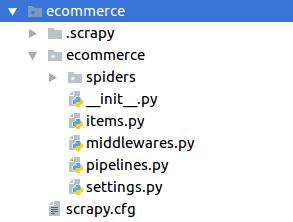
This will generate the file structure:

Items

Before we can write the spiders for each website, we have to create an item in the items file which contains the previously defined data fields. Remember, since this project is related to price intelligence then it is important how you define and represent your data fields. One item will represent one product and hold all its data.

Plain text

Copy to clipboard

Open code in new window

EnlighterJS 3 Syntax Highlighter

class ProductItem(Item):

product = Field()

price = Field()

category = Field()

stock = Field()

class ProductItem(Item): product = Field() price = Field() category = Field() stock = Field()

1class ProductItem(Item):
2   product = Field()
3   price = Field()
4   category = Field()
5   stock = Field()
Copy

Spider

Each of our spiders will look the same except the selectors of course.

To create a spider, first, we should look at the website and its source code, for example:
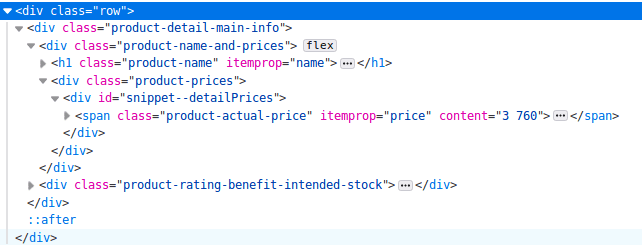
This is the HTML of one e-commerce website I’m scraping and this part contains the key ingredients that will follow for price intelligence analysis, which are the name and price information. One thing to look out for is the itemprop attribute. Many e-commerce sites use this schema. In the source code above we have itemprop=”name” which contains the product name and itemprop=”price” which contains the product price.

Selecting data fields based on itemprop attributes gives us a better chance that the scraper won’t break in the future when the website layout changes.

Plain text

Copy to clipboard

Open code in new window

EnlighterJS 3 Syntax Highlighter

class Ecommerce(Spider):

name = "ecommerce"

start_urls = ["example.com/products/1", "example.com/products/2", "example.com/products/3", ]

def parse(self, response):

item_loader = ItemLoader(item=ProductItem(), response=response)

item_loader.default_input_processor = MapCompose(remove_tags)

item_loader.add_css("product", "h1[itemprop='name']")

item_loader.add_css("price", "span[itemprop=price]")

item_loader.add_css("stock", "span[itemprop=’stock’]")

item_loader.add_css("category", "a[data-track='Breadcrumb']")

return item_loader.load_item()

class Ecommerce(Spider): name = "ecommerce" start_urls = ["example.com/products/1", "example.com/products/2", "example.com/products/3", ] def parse(self, response): item_loader = ItemLoader(item=ProductItem(), response=response) item_loader.default_input_processor = MapCompose(remove_tags) item_loader.add_css("product", "h1[itemprop='name']") item_loader.add_css("price", "span[itemprop=price]") item_loader.add_css("stock", "span[itemprop=’stock’]") item_loader.add_css("category", "a[data-track='Breadcrumb']") return item_loader.load_item()

1class Ecommerce(Spider):
2   name = "ecommerce"
3   start\_urls = \["example.com/products/1", "example.com/products/2", "example.com/products/3", \]
4
5   def parse(self, response):
6       item\_loader = ItemLoader(item=ProductItem(), response=response)
7       item\_loader.default\_input\_processor = MapCompose(remove\_tags)
8
9       item\_loader.add\_css("product", "h1\[itemprop='name'\]")
10       item\_loader.add\_css("price", "span\[itemprop=price\]")
11       item\_loader.add\_css("stock", "span\[itemprop=’stock’\]")
12       item\_loader.add\_css("category", "a\[data-track='Breadcrumb'\]")
13
14       return item\_loader.load\_item()
Copy

I’m using ItemLoader with a default input processor to remove HTML tags. As you can see, I’m selecting the category field from the breadcrumb.

Creating a data pipeline

If we want to run an analysis of our data we need to store it in some kind of database. For this price intelligence project, I’m using a MySQL database for storage. If you want to use MySQL as well you should install MySQL-python if it isn’t already installed:

Plain text

Copy to clipboard

Open code in new window

EnlighterJS 3 Syntax Highlighter

sudo pip install MySQL-python

sudo pip install MySQL-python

1sudo pip install MySQL-python
Copy

Then in Scrapy, we create a new class called DatabasePipeline in the pipelines.py file:

Plain text

Copy to clipboard

Open code in new window

EnlighterJS 3 Syntax Highlighter

class DatabasePipeline:

def process_item(self, item, spider):

return item

class DatabasePipeline: def process_item(self, item, spider): return item

1class DatabasePipeline:
2       def process\_item(self, item, spider):
3    	   return item
Copy

In this class we have several things to do:

  1. Add database connection parameters in the constructor
  2. Implement from_crawler method and get database connection info from settings.py
  3. Connect to the database when the spider starts
  4. Insert data records into the database (one item at a time)
  5. When all done close the database connection

Plain text

Copy to clipboard

Open code in new window

EnlighterJS 3 Syntax Highlighter

class DatabasePipeline:

# Add database connection parameters in the constructor

def __init__(self, db, user, passwd, host):

self.db = db

self.user = user

self.passwd = passwd

self.host = host

# Implement from_crawler method and get database connection info from settings.py

@classmethod

def from_crawler(cls, crawler):

db_settings = crawler.settings.getdict("DB_SETTINGS")

if not db_settings:

raise NotConfigured

db = db_settings['db']

user = db_settings['user']

passwd = db_settings['passwd']

host = db_settings['host']

return cls(db, user, passwd, host)

# Connect to the database when the spider starts

def open_spider(self, spider):

self.conn = MySQLdb.connect(db=self.db,

user=self.user, passwd=self.passwd,

host=self.host,

charset='utf8', use_unicode=True)

self.cursor = self.conn.cursor()

# Insert data records into the database (one item at a time)

def process_item(self, item, spider):

sql = "INSERT INTO table (field1, field2, field3) VALUES (%s, %s, %s)"

self.cursor.execute(sql,

(

item.get("field1"),

item.get("field2"),

item.get("field3"),

)

)

self.conn.commit()

return item

# When all done close the database connection

def close_spider(self, spider):

self.conn.close()

class DatabasePipeline: # Add database connection parameters in the constructor def __init__(self, db, user, passwd, host): self.db = db self.user = user self.passwd = passwd self.host = host # Implement from_crawler method and get database connection info from settings.py @classmethod def from_crawler(cls, crawler): db_settings = crawler.settings.getdict("DB_SETTINGS") if not db_settings: raise NotConfigured db = db_settings['db'] user = db_settings['user'] passwd = db_settings['passwd'] host = db_settings['host'] return cls(db, user, passwd, host) # Connect to the database when the spider starts def open_spider(self, spider): self.conn = MySQLdb.connect(db=self.db, user=self.user, passwd=self.passwd, host=self.host, charset='utf8', use_unicode=True) self.cursor = self.conn.cursor() # Insert data records into the database (one item at a time) def process_item(self, item, spider): sql = "INSERT INTO table (field1, field2, field3) VALUES (%s, %s, %s)" self.cursor.execute(sql, ( item.get("field1"), item.get("field2"), item.get("field3"), ) ) self.conn.commit() return item # When all done close the database connection def close_spider(self, spider): self.conn.close()

1class DatabasePipeline:
2       # Add database connection parameters in the constructor
3       def \_\_init\_\_(self, db, user, passwd, host):
4    	      self.db = db
5    	      self.user = user
6    	      self.passwd = passwd
7    	      self.host = host
8       # Implement from\_crawler method and get database connection info from settings.py
9       @classmethod
10       def from\_crawler(cls, crawler):
11    	      db\_settings = crawler.settings.getdict("DB\_SETTINGS")
12    	      if not db\_settings:
13                  raise NotConfigured
14    	      db = db\_settings\['db'\]
15    	      user = db\_settings\['user'\]
16    	      passwd = db\_settings\['passwd'\]
17    	      host = db\_settings\['host'\]
18    	      return cls(db, user, passwd, host)
19       # Connect to the database when the spider starts
20       def open\_spider(self, spider):
21    	      self.conn = MySQLdb.connect(db=self.db,
22                            user=self.user, passwd=self.passwd,
23                            host=self.host,
24                            charset='utf8', use\_unicode=True)
25    	      self.cursor = self.conn.cursor()
26       # Insert data records into the database (one item at a time)
27       def process\_item(self, item, spider):
28    	      sql = "INSERT INTO table (field1, field2, field3) VALUES (%s, %s, %s)"
29    	      self.cursor.execute(sql,
30                             (
31                             item.get("field1"),
32                             item.get("field2"),
33                             item.get("field3"),
34                             )
35                             )
36    	      self.conn.commit()
37    	      return item
38	# When all done close the database connection
39        def close\_spider(self, spider):
40    	       self.conn.close()
Copy

For effective price intelligence, technically, you could also hardcode your database connection info in the pipeline but I suggest putting it into the settings file like this:

Plain text

Copy to clipboard

Open code in new window

EnlighterJS 3 Syntax Highlighter

DB_SETTINGS = {

'db': "my_db",

'user': 'root',

'passwd': 'my_pass',

'host': '0.0.0.0',

}

DB_SETTINGS = { 'db': "my_db", 'user': 'root', 'passwd': 'my_pass', 'host': '0.0.0.0', }

1DB\_SETTINGS = {
2 	'db': "my\_db",
3 	'user': 'root',
4 	'passwd': 'my\_pass',
5 	'host': '0.0.0.0',
6 }
Copy

Now we only have to activate this pipeline in the settings file:

Plain text

Copy to clipboard

Open code in new window

EnlighterJS 3 Syntax Highlighter

ITEM_PIPELINES = {

'ecommerce.pipelines.DatabasePipeline: 300,

}

ITEM_PIPELINES = { 'ecommerce.pipelines.DatabasePipeline: 300, }

1ITEM\_PIPELINES = {
2   'ecommerce.pipelines.DatabasePipeline: 300,
3}
Copy

Price intelligence

We have focused on how to extract e-commerce pricing data now let’s look at some basic ways you can analyze it and get actionable insights. This is essentially Price Intelligence.

In this section, I’m going to introduce some basic ways to analyze price data and how to get actionable insights from it. I’m using pandas and SQL queries on the backend to get the data from the database. To generate the charts on the front end, I’m using Google Charts.

Price history

When it comes to price intelligence, one important analysis is the price history of one product. It shows you how one product was priced in the past. This could be one way to help determine the pricing strategy of an e-commerce store. Obviously, for this, you need to scrape their data regularly for a longer time. But when you actually have access to the data you can see how their pricing has changed or not changed in the past. It’s also interesting to see what pricing strategy they use on important shopping days like Black Friday.
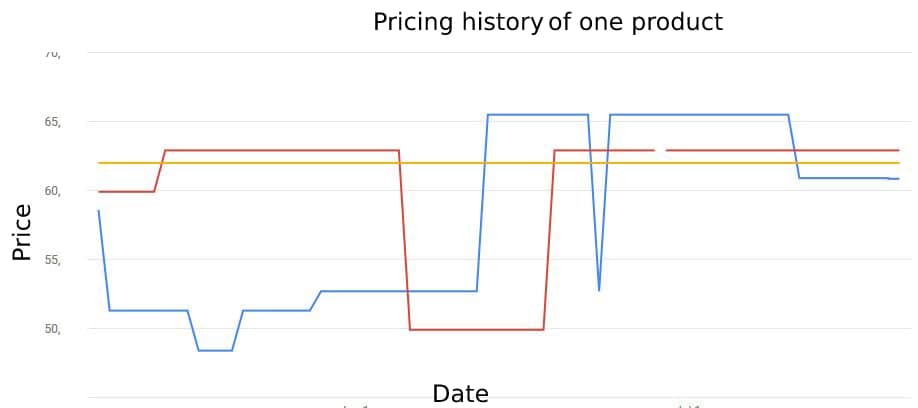
The following should give you a better understanding of what is meant by price intelligence.

If you look at the history chart above, you can have a good understanding of how you and your competitors set the prices for one product. Based on the past you could forecast how the competitors will change their prices in the future so you can adjust your strategy to prepare for it.

Stock

One of the key factors when shopping online is the availability of the chosen product. Maybe I’m willing to wait a week or two till the product I want to buy is in stock again but most of the time I want it in my hands as soon as possible and maybe even pay a little more as well just to get it faster.
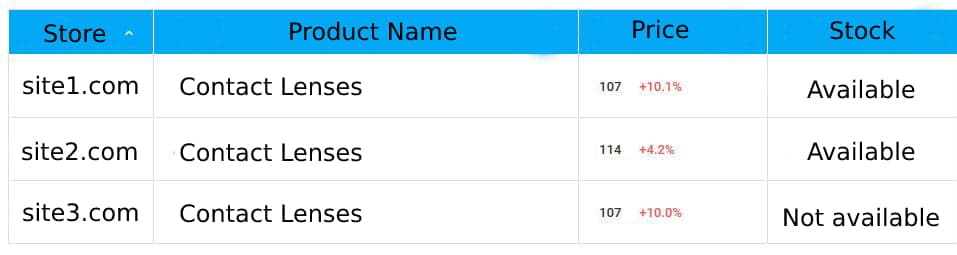
To use the dynamic of smart price intelligence to our advantage, we can scrape the stock information from the product page and get alerted if all of our competitors are out of the given product so we can increase the price.

Price comparison

On a day-to-day basis, maybe the best insight price intelligence can give us is the overall view on the market and how our products fit in. Without web scraping, we would have a hard time knowing how our main competitors are pricing the same products as we sell.
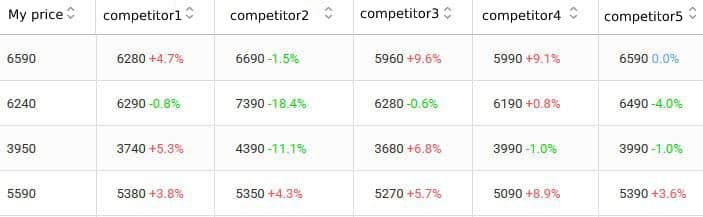
Price position

On a higher level, we can analyze how many of our products are priced lower, the same, or higher than each of the competitors. On the chart below, we have 34 products that have a higher price than competitor3 and 9 products with lower price than competitor5. As you can see, this is a key component for price intelligence.
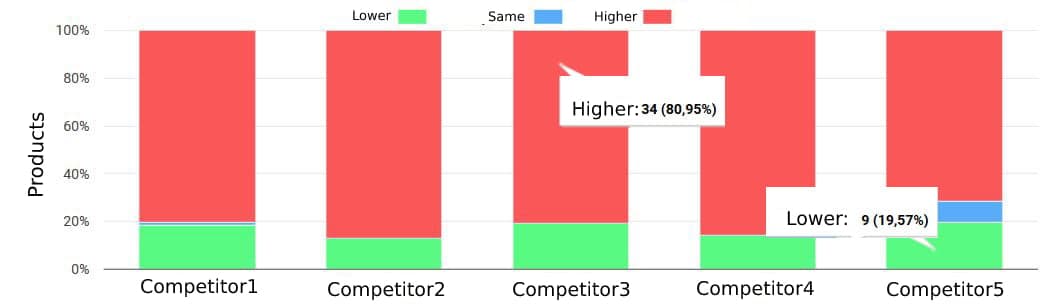
For example, we might want to position ourselves to have higher prices than one of our competitors or we want to be lower than another one. This kind of price intelligence analysis can help you adjust prices accordingly.

Category analysis

When we were writing the spider we extracted the category of the products as well. This way we can also group together products based on category.
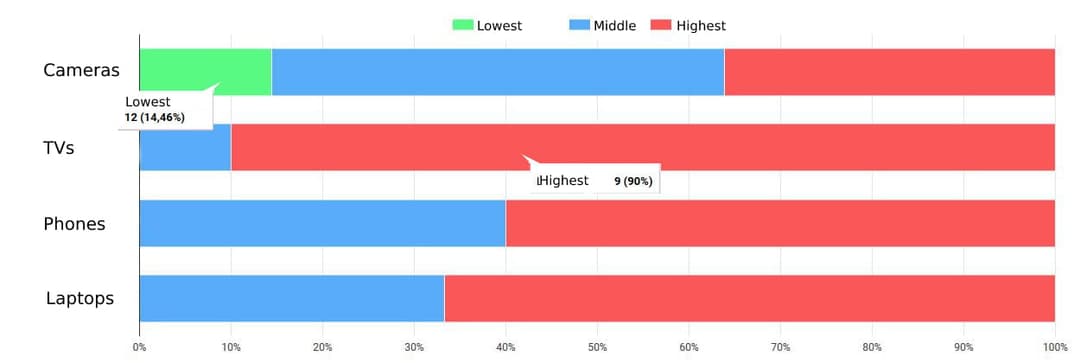
This chart shows what our price position is compared to the competitors in each product category. As you can see, here we have 12 products in the “Cameras” category where we have the lowest price. In the other categories, we are either in the middle or highest price position.

Wrapping up

So this is the process of effective price intelligence so you can scrape e-commerce websites and get actionable insights from the data using python and some visualization. First, you plan what data fields you exactly need and from what websites. Second, you create web spiders to extract and store the data. (If you don’t want to struggle with selectors/XPath, use an AI-based web scraping tool, like Zyte Automatic Extraction (formerly AutoExtract)). Finally, you visualize the data to understand it and find business opportunities, which comes to the definition of price intelligence.

If you have an eCommerce data-driven product and you need help with data extraction, contact us here

Try Zyte API

Build your first scraper in minutes

Free trial, no credit card. From a single request to production in an afternoon.

Get started
Use case
A

Attila Toth

More from this author

In this article

  • Identify data sources and fields
  • Websites
  • Fields to scrape
  • Ethical web scraping
  • Extract and store data
  • Installing Scrapy
  • Create a new Scrapy project
  • Items
  • Spider
  • Creating a data pipeline
  • Price intelligence
  • Price history
  • Stock
  • Price comparison
  • Price position
  • Category analysis
  • Wrapping up

Follow

Get the latest

Zyte and the data web in your inbox — or wherever you already are.

Subscribe

Or follow elsewhere

Continue reading

Scraping Swiss Army Knife: My personal fix for web setup fatigue using Docker, Scrapy and Zyte
Use case

Scraping Swiss Army Knife: My personal fix for web setup fatigue using Docker, Scrapy and Zyte

Tired of repeating web scraping setup? Learn how a multi-arch Docker container with Scrapy, Zyte, Requests, and Pandas speeds up exploration and debugging.

Ayan Pahwa·10 min·February 5, 2026
How I trade gold using e-ink, live data and an old Raspberry Pi
Use case

How I trade gold using e-ink, live data and an old Raspberry Pi

Track real-world gold and silver retail prices automatically using Zyte API, Python, and a Raspberry Pi with an e-ink display. Learn how to scrape rendered HTML, parse prices, and build an always-on trading dashboard.

Ayan Pahwa·10 min·February 2, 2026
How price extraction is fuelling insights for modern retailers
Use case

How price extraction is fuelling insights for modern retailers

Retail pricing has long combined data, experience, and instinct – but today’s market volatility demands a faster, smarter approach.

Theresia Tanzil·7 mins·July 23, 2025

The Community · Newsletter

The best of Zyte and the data web, in your inbox.

One curated edition — new articles, product updates, and the stories shaping the data web. No noise.

G2.com

Capterra.com

Proxyway.com

EWDCI logoMost loved workplace certificateZyte rewardISO 27001 iconG2 rewardG2 rewardG2 reward

© Zyte Group Limited 2026